infinix x yugatech

O+ Notepad 4G and IntelliPen Review

Listen to article

Display and Multimedia

As mentioned earlier, the Notepad 4G sports a 10.1-inch WUXGA (1920 x 1200) display or equal to 224ppi. It’s sharp, bright with good colors and viewing angles. It’s reflective though so you might want to keep that in mind if you’re going to use it outdoors. Other than that, the large display makes for a good device for watching videos and for sketching and doodling using the IntelliPen.
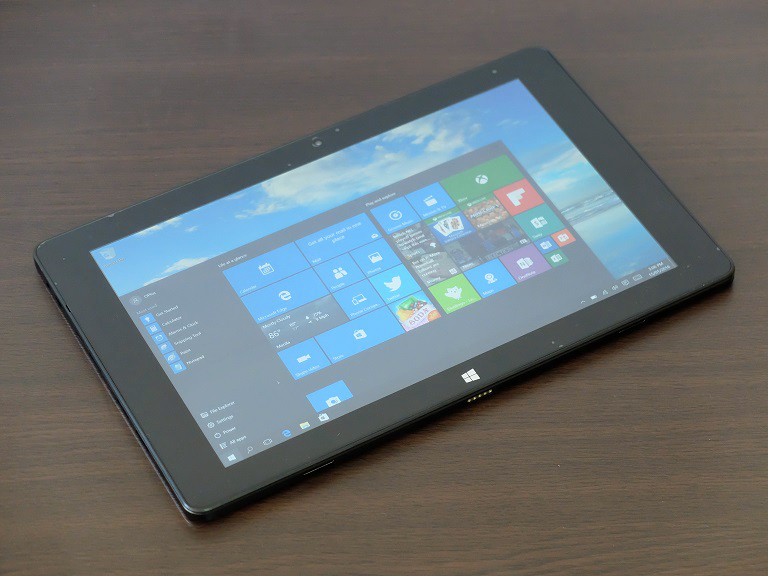
The speakers, on the other hand, is underwhelming. It’s audible if you’re listening in a small space but not as loud as we want it to be. When it comes to sound quality, it’s trebly and sibilant most of the time. The bass is very weak so if you’re planning to play tunes on it, we highly suggest using a good pair of headphones or a Bluetooth-enabled speaker.

OS, Apps, and Features

Running the O+ Notepad’s software department is Windows 10 64-bit. When docked to the keyboard it uses the standard desktop mode but automatically switches to its tablet interface when you remove it. A simple implementation yet very convenient.
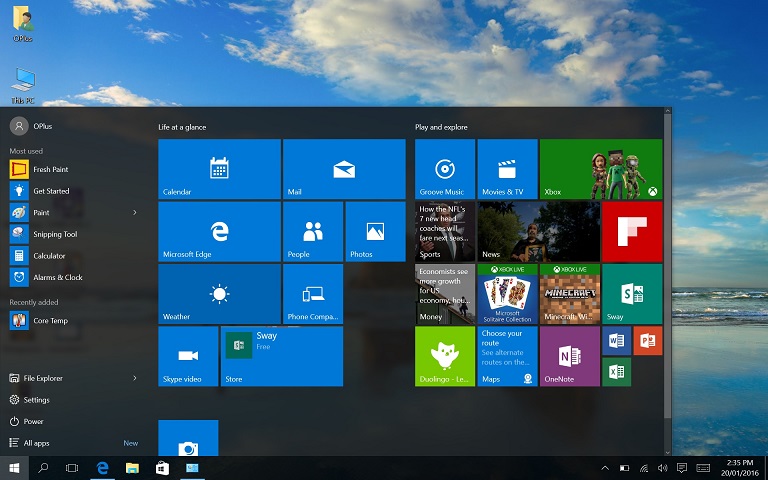
O+ didn’t include a lot of pre-installed apps and just included Word Mobile, PowerPoint Mobile, Excel Mobile and OneNote. Overall, the O+ Notepad’s 64GB of storage provides you with a pretty decent 44GB of usable storage.
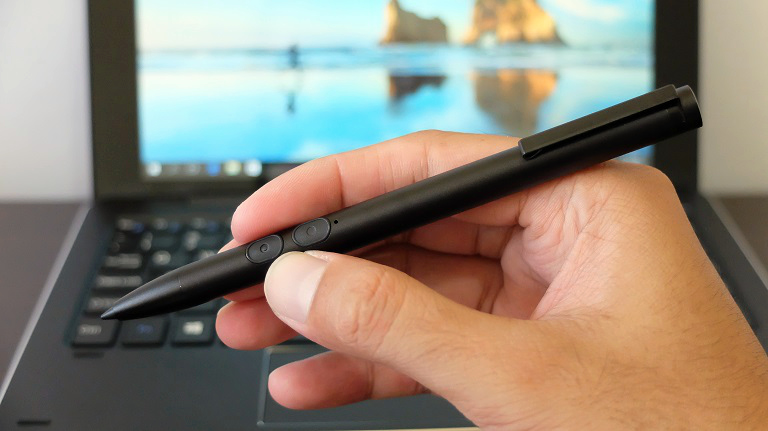
One of the main features of the O+ Notepad is the IntelliPen which is very handy if you want to use the tablet to jot down notes or make sketches. What is sad though is that O+ didn’t care to elaborate much on the technical capabilities of the pen, not even in the manual or their website.

Here are what we’ve noticed on the functions of the pen so far:
• The pen is powered by a quadruple-A (AAAA) battery.
• Automatically works on the O+ Notepad. No need to pair or sync.
• When using Fresh Paint, the lower button lets you hold and drag the canvas while the upper button works as an eraser.
• The tip is pressure sensitive. When using the Fresh Paint app we just lightly slide the tip if we want a lighter stroke. Apply just a little bit of pressure and you’ll get a thicker and more prominent stroke. See sample below.

Performance-wise, the IntelliPen works well as it is responsive and nice to hold. Although we would like it to be more sensitive as there are times some light strokes do not register.

Continued in next page: Performance and Connectivity, Battery Life, Conclusion


Frequently Asked Questions

Can the O+ Notepad 4G be used as both a laptop and a tablet?
The O+ Notepad 4G is a convertible notebook with a detachable keyboard, allowing use as a laptop or tablet.
What ports are available on the O+ Notepad 4G?
It has ports for SIM card, microSD card, USB 3.0, micro USB 2.0, micro HDMI, and headset jack.
How is the display quality of the O+ Notepad 4G?
The 10.1-inch WUXGA display is sharp with good colors and viewing angles.
React to this article:
Written by
Diangson Louie

This article was written by Louie Diangson, Managing Editor of YugaTech. You can follow him at @John_Louie.

View all posts by Diangson Louie →

34 Comments

BR
Bryan · 7 years ago

Ung saakin Hindi na nag function ung touch screen at ung keyboard nya ay kusang nag tatype ng mga keys kahit d ginagalaw so ang ginawa Ko ay inopen Ko sya at dinisconnect ung wire connection Sa keyboard at bumili nlang ako Ng external keyboard. Awesome ung screen resolution at nkapag install ako dto Ng photoshop at adobe premire ok po silang gumagana at Hindi nman masyadong log ang performance. Ang d nya mkayanan Na video editor ay ung Vegas pro haha super bgal tlaga dun at obviously nman Na 1.44ghz LNG ang speed. Pero un nga maraming problem ung hardware nya at need Ko po Sana ung driver nito kaso LNG wala akong mahanap.

Reply
MA
Mark · 8 years ago

I got mine reformatted and lost it’s touch capability. Anybody here who can send me working touch screen drivers for O+ Notepad 4G? TIA

Reply
AG
Agl105 · 9 years ago

may emojis poba to?

Reply
TO
Tommy Chung Yang · 10 years ago

I bought my o+ notepad after a month failure to boot. How come they do not provide product key for the Windows 10. So the os of this unit is prone to piracy. Please help me. I bought my unit at o+ SM sta rosa. They said they will provide for the product key but until now they are not giving me the product key.

Reply
CH
Christian Angelo Gayo · 10 years ago

I’m curious, with LTE capability and a sim slot… Does this mean cellular function as well?

Reply
MI
MikeM · 10 years ago

O+ SIM card powered by Smart Bro which comes with 10 days of unlimited Internet browsing and 400 SMS

Hmmm… so can you send text messages with this? Or just the internet part?

Reply
RY
Ryan · 10 years ago

AWESOME REVIEW! i’m really convinced now to buy this one!
tanong lang po, meron po ba kayong marerecomendang Online store na nagtitinda neto? wala po kasing O+ store sa City namin. thanks in advance!

Reply
CO
CoffeeDude · 10 years ago

Kudos to O+ for bringing in an x5 series in the local market.

Contrary to what DOO WOP said, this is way cheaper than the lower-spec’d Toshiba Satellite Click 10 (32G storage vs 64G; 2G RAM vs 4G) at 23,000 PhP (converted international SRP)

Though, I’m still dumbfounded as to why O+ opted to have LTE for the Notepad. They could have saved some money removing it. And they can lower the price too.

LTE on a laptop is “good to have”. It’s not practical, if you ask me.

I would like to buy this one, but I’m hoping they would release one without LTE and probably with only HD+ (1600×900) resolution to save on battery and cut the price to, perhaps, around 15K

Reply
DO
Doo Wop · 10 years ago

Mukhang ok to ah. Kaso ung price nga lang, sana bumaba pa. Naglalabasan na mga Cherry trail tablet/laptop na less than $200.

I hope you can also review O+ Duo.

Reply
DI
diego delos santos · 10 years ago

yesterday i was at megamall o plus. sabi ko sa sales person i need to see it in action. ung demo unit sira daw di nag ccharge. there was also a customer kkbili lang the other day hindi daw gumagana ang lte sim slot. he was asking for a new replacement unit. after nag taas ng boses ung customer pinalitan pero last na un pag me sira ang unit di na nila papalitan. nadala na ko sa mga ganitong scenario. its safe to bet on the proven brand kahit medyo mahal.

Reply
ZA
Zaph F. Castillo · 10 years ago

Your comment sir, it must be read thoroughly so people will know what to buy…. ako rin na eengganyo.. buti wala ako pera

CE
Ced · 10 years ago

Nice review… but I have question, aside of FreshPaint pressure sensitive sample, can you sample of the following either Autodesk Sketchbook or Photoshop if the pressure sensitive works. Thank you.

Reply
LO
Louie Diangson · 10 years ago

We’ll try. We’ll update the post once we have new samples.

NO
NotaSheep · 10 years ago

Autodesk Sketchbook (TRIAL) version = Works~
Autodesk Sketchbook (FULL) version = Buggy~
Photoshop = Works~ but very slow.

I have sent mine back though because of it’s erratic movements with the pen. If you want to buy this for artwork, you must test the pen.

Test it by continuously tapping on the screen with the pen, if you see the cursor mirrored to where you are tapping, then don’t buy it, when you try to draw quick strokes the pen will create a line on some programs such as SAI, Photoshop and SOMETIMES Autodesk Sketchbook.

KI
Kit · 10 years ago

Thanks for the nice review. However, I can’t explain pero parang nabitin ako sa review? Parang kulang?

Reply
LO
Louie Diangson · 10 years ago

Hi Kit, thanks. Just click on the next page.

RC
RCB · 10 years ago

Can i use an External Hard Drive or USB on this laptop?

Reply

Leave a Reply

Loading next article...