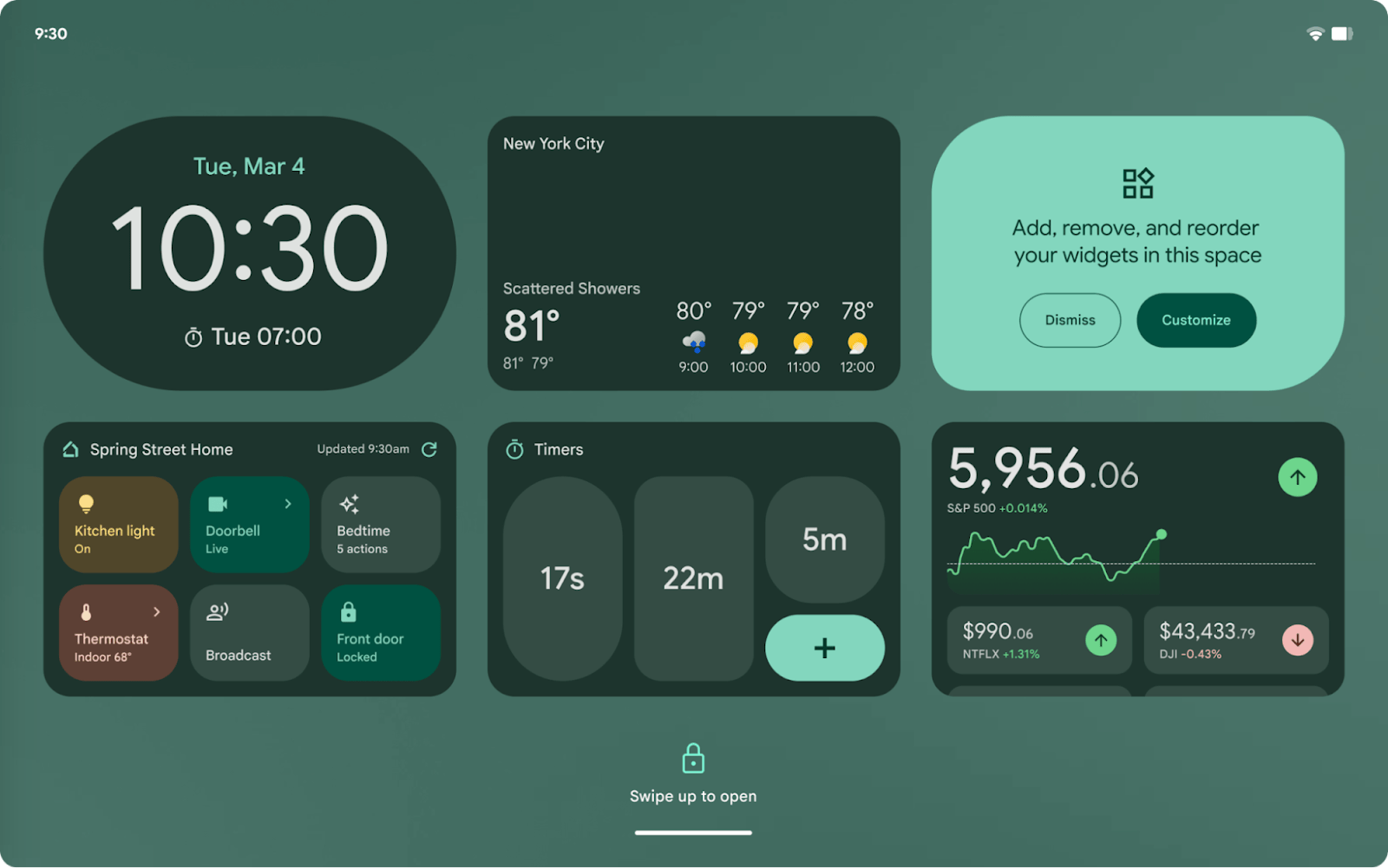

Google is making Android lock screens even more useful with lock screen widgets—starting with the Pixel Tablet and expanding to more devices after Android 16 (QPR1). This means users will soon be able to customize their lock screens with widgets for quick access to essential info like weather, stocks, timers, and even smart home controls. Lock screen widgets are set to roll out to AOSP (Android Open Source Project) in late Summer 2025, giving other manufacturers the chance to adopt the feature. Lock screen widgets follow the same rules as home screen widgets. That means:• Any existing widget can be used on the lock screen.• Dynamic color and resizing are supported for a seamless look.• OEMs can set default widgets, but users have full customization control.• No special requirements are needed—any home screen widget can be used, as long as it meets Android’s quality guidelines. For developers, apps can opt out of the lock screen experience using a specific API (not_keyguard in the XML file). Some brands may require a dock or charging to enable lock screen widgets, while others might allow them at all times. For now, Pixel Tablet users can try lock screen widgets before a wider rollout. Read more in our articles including "Lock Screen Widgets are Coming to Android Tablets and Phones" and "Google previews Android 12L for tablets, foldables, ChromeOS devices".
Google is making Android lock screens even more useful with lock screen widgets—starting with the…
Mar 9, 2025
Google has just announced a new version of Android 12 that is catered to larger…
Oct 28, 2021Just finished a taping for one segment of QTV 11’s “Ang Pinaka” and our topic…
Feb 6, 2009The biggest news for 2009 so far is the YellowSn0w unlocking application for the iPhone…
Jan 2, 2009Maybe this is what Google wanted all along — for every small-time phone manufacturer not…
Dec 5, 2008
After being spotted in Lazada, the Infinix HOT 70 is now available in the Philippines.…
Jun 24, 2026Google is making Android lock screens even more useful with lock screen widgets—starting with the Pixel Tablet and expanding to more devices after Android 16 (QPR1). This means users will soon be able to customize their lock screens with widgets for quick access to essential info like weather, stocks, timers, and even smart home controls.
Lock screen widgets are set to roll out to AOSP (Android Open Source Project) in late Summer 2025, giving other manufacturers the chance to adopt the feature. Lock screen widgets follow the same rules as home screen widgets. That means:• Any existing widget can be used on the lock screen.• Dynamic color and resizing are supported for a seamless look.• OEMs can set default widgets, but users have full customization control.• No special requirements are needed—any home screen widget can be used, as long as it meets Android’s quality guidelines.
Our coverage of android lock screen widgets includes: "Lock Screen Widgets are Coming to Android Tablets and Phones"; "Google previews Android 12L for tablets, foldables, ChromeOS devices"; ""How to Overclock": Pinoys Most Searched". Each article provides unique insights and information.