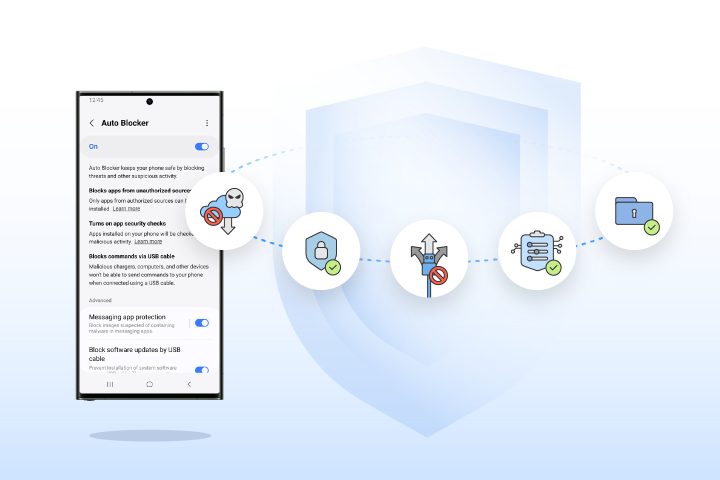


Auto Blocker enables new levels of device protection, bridging a commitment to security and privacy with Samsung Galaxy’s long-standing commitment to openness and user choice Samsung Electronics Co., Ltd. Seungwon Shin, EVP & Head of Security Team, Mobile eXperience Business at Samsung Electronics. Pushing the Industry Forward with New Security Standards Samsung sets the foundation for a safer, more secure mobile experience for Galaxy users, and Auto Blocker takes this one step further by combining industry-leading security standards with user choice to allow customers to control their device their way. As the latest feature to be added to Samsung’s suite of security and privacy innovations, Auto Blocker further optimizes the mobile experience for users across the Galaxy ecosystem. Although it's impossible to keep our privacy entirely secured on any smartphone, there are plenty of settings we can adjust to increase your security and privacy. Here's a quick guide and tips on how to protect your privacy on Android smartphones. According to the Federal Communications Commission, updating your phone's operating system when notified to do so helps patch security gaps and improve your device's overall performance. On Android devices, you can update your software any time by going to Settings > About Phone > System Update. Read more in our articles including "Protect Your Device Your Way with Samsung Auto Blocker" and "How to protect your privacy on Android smartphones".
Auto Blocker enables new levels of device protection, bridging a commitment to security and privacy…
Nov 5, 2023
Smartphones have become an inseparable part of our daily lives. This device likely carries records…
Feb 5, 2022If you’re one who likes rooting your devices to load your ROMs or custom operating…
Oct 27, 2014
Google has just announced a new version of Android 12 that is catered to larger…
Oct 28, 2021Maybe this is what Google wanted all along — for every small-time phone manufacturer not…
Dec 5, 2008
After being spotted in Lazada, the Infinix HOT 70 is now available in the Philippines.…
Jun 24, 2026Auto Blocker enables new levels of device protection, bridging a commitment to security and privacy with Samsung Galaxy’s long-standing commitment to openness and user choice Samsung Electronics Co., Ltd. Seungwon Shin, EVP & Head of Security Team, Mobile eXperience Business at Samsung Electronics.
Pushing the Industry Forward with New Security Standards Samsung sets the foundation for a safer, more secure mobile experience for Galaxy users, and Auto Blocker takes this one step further by combining industry-leading security standards with user choice to allow customers to control their device their way. As the latest feature to be added to Samsung’s suite of security and privacy innovations, Auto Blocker further optimizes the mobile experience for users across the Galaxy ecosystem. Although it's impossible to keep our privacy entirely secured on any smartphone, there are plenty of settings we can adjust to increase your security and privacy.
Our coverage of android security includes: "Protect Your Device Your Way with Samsung Auto Blocker"; "How to protect your privacy on Android smartphones"; "L is for Lockdown: Increased security makes Android Lollipop harder to root". Each article provides unique insights and information.