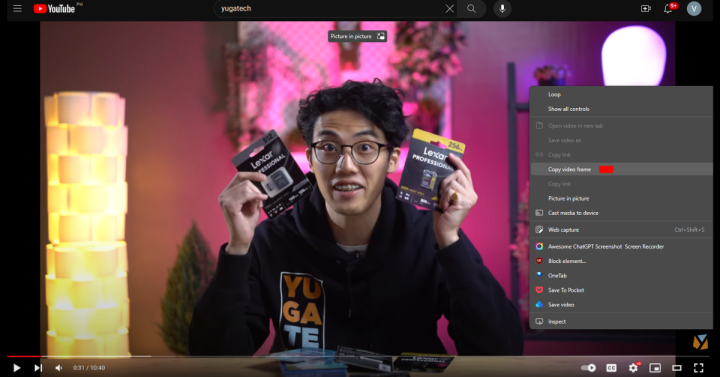

Chrome has quietly launched a new feature that allows users to copy a frame from a video instead of having to go through the trouble of pausing the video and taking a screenshot Users will simply need to right-click on the video and select "Copy Video Frame". However, it seems to mostly work on YouTube videos and according to The Verge, the feature gets the image in the video's streaming resolution and not the resolution shown on screen. [caption id="attachment_343551" align="alignnone" width="720"] Image Copied from YouTube using Copy Video Frame[/caption] Google says that the feature will help most especially students who want to take an important frame from a recorded lecture. It's also worth noting that it only copies the frame and doesn't save it, so in order to save the frame or further edit, you would need to paste it on the editor or document of choice before copying another frame. However, we did notice that the image frame does also get saved on your clipboard after copying if you have it switched on your PC. YouTube has updated its desktop site so it now remembers how users sort videos on a channel. Read more in our articles including "Chrome now makes it simpler to take screenshots of a YouTube video" and "YouTube now remembers your video sorting preference".

Chrome has quietly launched a new feature that allows users to copy a frame from…
Sep 4, 2023
YouTube has updated its desktop site so it now remembers how users sort videos on…
Mar 12, 2026
Zoom has introduced ZoomMate, a new AI-powered work platform designed to help teams turn conversations…
Jun 20, 2026
The Philippine Atmospheric, Geophysical and Astronomical Services Administration (PAGASA) has launched the PANaHON mobile app,…
Jun 16, 2026
EStrava has announced a set of new and updated hiking features aimed at helping users…
Jun 13, 2026
Netflix has unveiled a refreshed mobile experience and expanded gaming initiatives during its APAC Product…
Jun 11, 2026Chrome has quietly launched a new feature that allows users to copy a frame from a video instead of having to go through the trouble of pausing the video and taking a screenshot Users will simply need to right-click on the video and select "Copy Video Frame". However, it seems to mostly work on YouTube videos and according to The Verge, the feature gets the image in the video's streaming resolution and not the resolution shown on screen.
[caption id="attachment_343551" align="alignnone" width="720"] Image Copied from YouTube using Copy Video Frame[/caption] Google says that the feature will help most especially students who want to take an important frame from a recorded lecture. It's also worth noting that it only copies the frame and doesn't save it, so in order to save the frame or further edit, you would need to paste it on the editor or document of choice before copying another frame. However, we did notice that the image frame does also get saved on your clipboard after copying if you have it switched on your PC.
Our coverage of copy video frame youtube includes: "Chrome now makes it simpler to take screenshots of a YouTube video"; "YouTube now remembers your video sorting preference"; "Zoom launches ZoomMate AI Teammate". Each article provides unique insights and information.