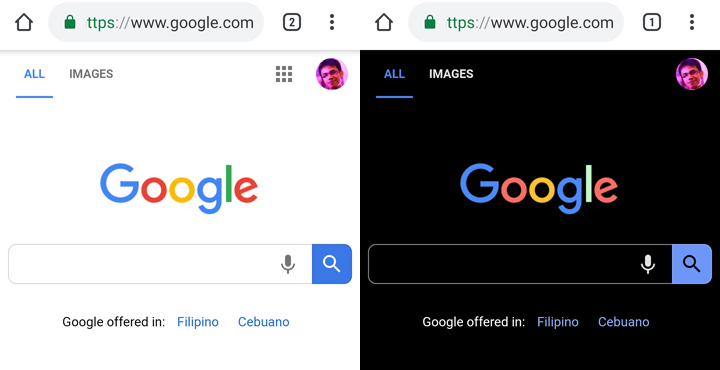

Google has silently implemented the Dark Mode feature for its Chrome browser in Android. The Dark Mode feature for Google Chrome Mobile is still at an experimental phase so expect that enabling it will take unusual steps to go to it. Press on the "default" option on the Android Web Contents dark mode and Android Chrome UI dark mode and choose "Enabled" Restart the Chrome app and you'll be greeted with a dark interface. Read more in our articles including "You can now enable Dark Mode for Google Chrome in Android" and "Google Chrome expands Autofill with Google Wallet integration".

Google has silently implemented the Dark Mode feature for its Chrome browser in Android. Read…
Apr 28, 2019
Google has announced new updates to Chrome Autofill. With this feature, it brings support for…
Jun 24, 2026
Apple did not build its new AI alone. At WWDC 2026, the company confirmed it…
Jun 9, 2026
Google has started rolling out a redesigned Google Wallet app for Android alongside new Google…
May 24, 2026
Google has announced Android Halo. Android Halo is a new feature that shows what your…
May 20, 2026
Google has introduced new AI-powered pointer features that let users interact with Google Gemini more…
May 14, 2026Google has silently implemented the Dark Mode feature for its Chrome browser in Android. The Dark Mode feature for Google Chrome Mobile is still at an experimental phase so expect that enabling it will take unusual steps to go to it.
Press on the "default" option on the Android Web Contents dark mode and Android Chrome UI dark mode and choose "Enabled" Restart the Chrome app and you'll be greeted with a dark interface.
Our coverage of how to Dark Mode Google Chrome Android includes: "You can now enable Dark Mode for Google Chrome in Android"; "Google Chrome expands Autofill with Google Wallet integration"; "Apple Built Its New AI Foundation Models With Google". Each article provides unique insights and information.