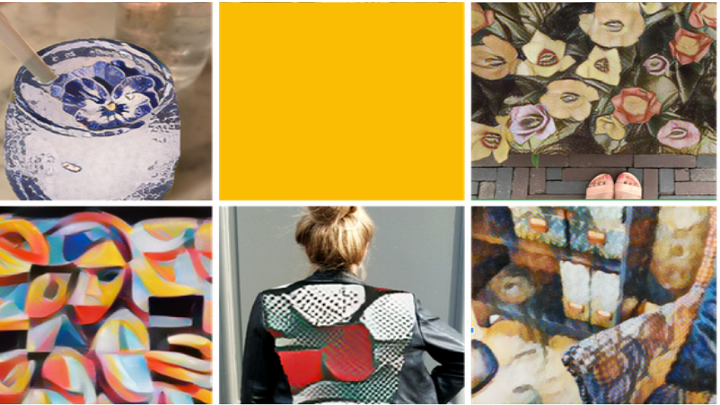

Google's Arts and Culture app, in partnership with United Kingdom's National Gallery and Japan's Museum of Art, adds a new feature that transforms your photos into the style of the world's famous artists. Powered by Google AI, the Art Transfer applies a unique algorithm that adapts the characteristics of the chosen artist's paintings and recreates the chosen images right in your mobile device. Among the featured artists on the Art Transfer are Frida Kahlo, Vincent Van Gogh, Edvard Munch, and Leonardo Da Vinci. Step 2: Open the camera menu located at the bottom bar of the app then select "Art Transfer." Step 3: Upload your photos. RCBC has announced free InstaPay transfers for its digital banking apps starting July 4, 2026. RCBC will soon free InstaPay transfers for RCBC Pulz and DiskarTech. The company has removed InstaPay transfer fees on its RCBC DiskarTech app. Meanwhile, RCBC Pulz users can enjoy 30 free InstaPay transfers per month when sending money to other local banks. Read more in our articles including "Google Arts and Culture app adds Art Transfer feature" and "RCBC to remove InstaPay transfer fees on Pulz, DiskarTech".
Google’s Arts and Culture app, in partnership with United Kingdom’s National Gallery and Japan’s Museum…
Apr 3, 2020
RCBC has announced free InstaPay transfers for its digital banking apps starting July 4, 2026.…
Jul 3, 2026
Bank of the Philippine Islands (BPI) will permanently remove transfer fees for InstaPay and PESONet…
Jun 29, 2026A new poster ad from Smart Bro promotes their broadband speed to be up to…
Oct 11, 2008It’s finally here, Smart Bro is now offering unlimited 3G access for a monthly flat…
Oct 22, 2008Healthy competition drives prices down and at the end of the day, consumers win. So…
Sep 6, 2008Google's Arts and Culture app, in partnership with United Kingdom's National Gallery and Japan's Museum of Art, adds a new feature that transforms your photos into the style of the world's famous artists. Powered by Google AI, the Art Transfer applies a unique algorithm that adapts the characteristics of the chosen artist's paintings and recreates the chosen images right in your mobile device.
Among the featured artists on the Art Transfer are Frida Kahlo, Vincent Van Gogh, Edvard Munch, and Leonardo Da Vinci. Step 2: Open the camera menu located at the bottom bar of the app then select "Art Transfer." Step 3: Upload your photos. RCBC has announced free InstaPay transfers for its digital banking apps starting July 4, 2026.
Our coverage of how to use Art Transfer includes: "Google Arts and Culture app adds Art Transfer feature"; "RCBC to remove InstaPay transfer fees on Pulz, DiskarTech"; "BPI to remove InstaPay, PESONet transfer fees starting July 1". Each article provides unique insights and information.