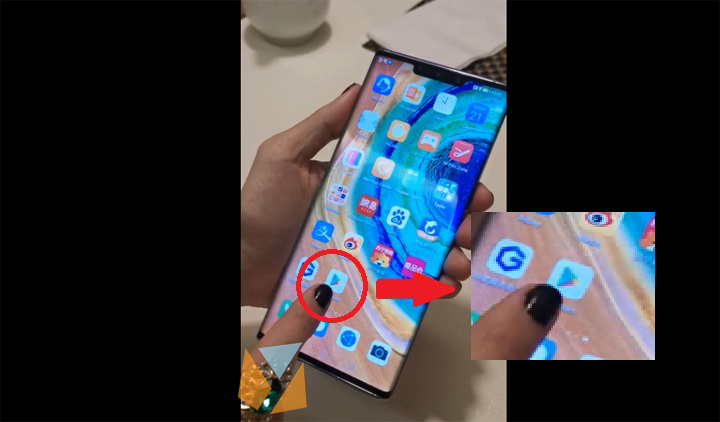

Huawei's launch of the Mate 30 series a few days ago became one of the most talked smartphones nowadays not just because of its powerful features, but also of an ongoing issue. The phones may be running with the latest Android 10 operating system; however, the Google Play Store and Google apps are not pre-installed there. Step 3: Install the Google Apps including the Play Store Upon pressing the Activate option, you will be directed to a set of files that needs to be downloaded in order to run the Google Play Store. Step 4: Open the Google Play Store and enjoy After the downloads complete, you can now open the app; however, there will be cases where you have to change your language depending on where you are currently. After doing these steps, you can now enjoy using the Google Play Store and download all the apps that you want. Read more in our articles including "Install Google Play Store, Google Apps on Huawei Mate 30, Mate 30 Pro" and "The day Google broke the Web".

Huawei’s launch of the Mate 30 series a few days ago became one of the…
Sep 21, 2019There was some sort of mass panic last night when Google was spewing a warning…
Feb 1, 2009
It’s that time again when we round up the latest smartphone launches here in the…
Jun 26, 2026
A new school year means new projects, research papers, presentations, and online learning tasks. Whether…
Jun 14, 2026
With the announcement of the Xiaomi 17T series today, those hoping to upgrade from last…
May 29, 2026
Inflation is now (May 2026) at 7.2%, electricity rates at Php14.33/kWhr, and gas prices through…
May 28, 2026Huawei's launch of the Mate 30 series a few days ago became one of the most talked smartphones nowadays not just because of its powerful features, but also of an ongoing issue. The phones may be running with the latest Android 10 operating system; however, the Google Play Store and Google apps are not pre-installed there.
Step 3: Install the Google Apps including the Play Store Upon pressing the Activate option, you will be directed to a set of files that needs to be downloaded in order to run the Google Play Store. Step 4: Open the Google Play Store and enjoy After the downloads complete, you can now open the app; however, there will be cases where you have to change your language depending on where you are currently. After doing these steps, you can now enjoy using the Google Play Store and download all the apps that you want.
Our coverage of Huawei Mate 30 google play includes: "Install Google Play Store, Google Apps on Huawei Mate 30, Mate 30 Pro"; "The day Google broke the Web"; "Smartphones Under P10,000 | Q2 2026". Each article provides unique insights and information.