
The iFlashDrive practically stores and transfers media between the iPhone/iPod/iPad to your PC very easily. Unplug and and connect it to your iPhone/iPad, launch the iFlashDrive app and start playing all the media files straight away. The iFlashDrive acts as some sort of File Manager since you have options to create new Folders, create new Text file, record voice, paste content from Clipboard and import Photos from Photo Library. If you have a DropBox account, the app can also link it to the iFlashDrive so you can sync files between the USB and your DropBox folder. Read more in our articles including "PhotoFast i-FlashDrive HD for iPod, iPhone and iPad " and "iOS 27 Beta Is Out, But You'll Need to Join a Waitlist to Try the New Siri AI".
Saw this little USB device in action last week and was impressed by how easy…
Nov 11, 2012
Apple dropped iOS 27 beta 1 right after the WWDC 2026 keynote, and yes, the…
Jun 9, 2026
Image Playground Gets Photorealistic Generation and New Editing Tools in iOS 27 Image Playground in…
Jun 9, 2026
Point your iPhone camera at something and ask Siri about it. That is the new…
Jun 9, 2026
Safari in iOS 27 is getting smarter in ways that actually matter for daily browsing.…
Jun 9, 2026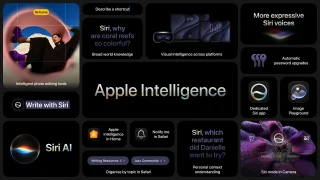
Apple Intelligence is not just about Siri and Safari. iOS 27 brings contextual AI features…
Jun 9, 2026The iFlashDrive practically stores and transfers media between the iPhone/iPod/iPad to your PC very easily. Unplug and and connect it to your iPhone/iPad, launch the iFlashDrive app and start playing all the media files straight away.
The iFlashDrive acts as some sort of File Manager since you have options to create new Folders, create new Text file, record voice, paste content from Clipboard and import Photos from Photo Library. If you have a DropBox account, the app can also link it to the iFlashDrive so you can sync files between the USB and your DropBox folder.
Our coverage of iflashdrive includes: "PhotoFast i-FlashDrive HD for iPod, iPhone and iPad "; "iOS 27 Beta Is Out, But You'll Need to Join a Waitlist to Try the New Siri AI"; "Image Playground, Photo Spacial Reframe and New Editing Tools in iOS 27". Each article provides unique insights and information.