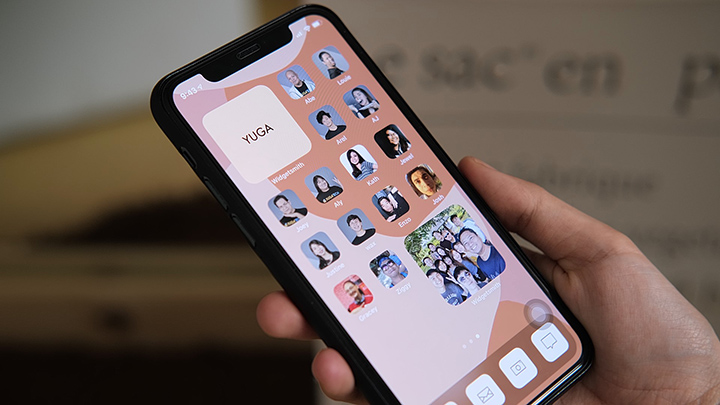

Since the global rollout of the iOS 14, iPhone users have been testing the new customization possibilities offered by the latest update from Apple. From the App Library to customizable widgets, iOS 14 comes with a variety of ways for users to modify their devices. STEP 1: Make sure your iPhone is updated to iOS 14. And that sums up the steps on changing your app icon on the iOS 14. We hope this guide helps in changing your icons on iOS 14. Apple has released iOS 12.5.8 to keep key services like iMessage, FaceTime, and device activation working on older Apple devices that can no longer upgrade to newer versions of iOS. The update extends an important security certificate that these services rely on. Apple confirmed the change in its release notes, saying the update ensures continued access to these services on supported older devices. Read more in our articles including "How to Change App Icons on iOS 14" and "Apple updates iOS 12 to keep iMessage and FaceTime working on older devices".

Since the global rollout of the iOS 14, iPhone users have been testing the new…
Sep 28, 2020
Apple has released iOS 12.5.8 to keep key services like iMessage, FaceTime, and device activation…
Jan 27, 2026Apple today officially announced the next version of their popular mobile operating system, the iOS…
Jun 7, 2011
It’s that time again when we round up the latest smartphone launches here in the…
Jun 26, 2026
A new school year means new projects, research papers, presentations, and online learning tasks. Whether…
Jun 14, 2026
With the announcement of the Xiaomi 17T series today, those hoping to upgrade from last…
May 29, 2026Since the global rollout of the iOS 14, iPhone users have been testing the new customization possibilities offered by the latest update from Apple. From the App Library to customizable widgets, iOS 14 comes with a variety of ways for users to modify their devices.
STEP 1: Make sure your iPhone is updated to iOS 14. And that sums up the steps on changing your app icon on the iOS 14. We hope this guide helps in changing your icons on iOS 14.
Our coverage of iOS 14 update includes: "How to Change App Icons on iOS 14"; "Apple updates iOS 12 to keep iMessage and FaceTime working on older devices"; "Apple announces iOS 5 at WWDC 2011". Each article provides unique insights and information.