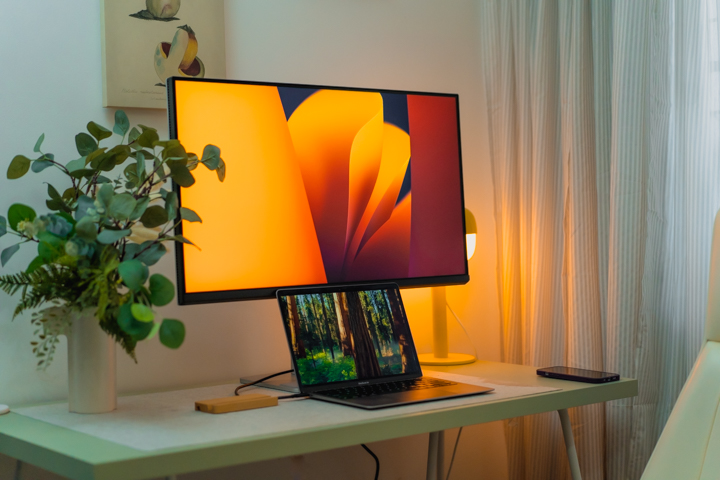

The sleek silver finish complements modern Mac computers perfectly, ensuring that the monitor doesn’t feel out of place in a premium workspace. A thoughtful addition is the rubber pad on the base, designed to protect our MacBooks from scratches while doubling-down as a convenient resting spot for Apple accessories. Setting up the monitor out of the box can look a little daunting at first, but the panel is actually lighter than it looks. The monitor also features a height-adjustable stand (115mm) that features tilt, swivel, and pivot adjustments, making it ergonomic and adaptable for different work setups. What sets this monitor apart is BenQ’s Mac Color Tuning technology, which provides high color consistency between our test MacBook Air and the MA320U. Some key features include: iKeyboard Control: Adjust brightness and volume directly from your MacBook keyboard. Brightness Sync: Synchronize brightness levels between the MacBook and the monitor using either the MacBook’s light sensor or the MA320U’s B.I.+ Gen2 sensor. FocuSync: Syncs Focus Mode between your Mac and the monitor, automatically adjusting color modes, blue light reduction, and audio settings. Always-on Power Charging: Keeps your MacBook charged even when the monitor is turned off. Read more in our articles including "BenQ MA320U Review - The Best 32” 4K UHD Monitor for MacBook Users?" and "Apple introduces 11.6" Macbook Air".
MacBook users searching for a premium external display often struggle to find the perfect match…
Mar 28, 2025Apple today unveiled their smallest notebook so far — an 11.6″ Macbook Air weighing in…
Oct 21, 2010
Beyond the Box has announced the availability and pricing of Apple’s latest M1-powered MacBook Pro,…
Dec 29, 2020
Apple has officially unveiled its newest lineup of laptops, the MacBook Air, 13-inch MacBook Pro,…
Nov 11, 2020
Apple has updated its MacBook Air and the 13-inch MacBook Pro which are already available…
Jul 10, 2019Apple’s newest MacBook has just arrived in the Philippines, along with refreshed MacBook Airs and…
Apr 12, 2015The sleek silver finish complements modern Mac computers perfectly, ensuring that the monitor doesn’t feel out of place in a premium workspace. A thoughtful addition is the rubber pad on the base, designed to protect our MacBooks from scratches while doubling-down as a convenient resting spot for Apple accessories. Setting up the monitor out of the box can look a little daunting at first, but the panel is actually lighter than it looks.
The monitor also features a height-adjustable stand (115mm) that features tilt, swivel, and pivot adjustments, making it ergonomic and adaptable for different work setups. What sets this monitor apart is BenQ’s Mac Color Tuning technology, which provides high color consistency between our test MacBook Air and the MA320U. Some key features include: iKeyboard Control: Adjust brightness and volume directly from your MacBook keyboard.
Our coverage of MacBook monitor includes: "BenQ MA320U Review - The Best 32” 4K UHD Monitor for MacBook Users?"; "Apple introduces 11.6" Macbook Air"; "M1-powered 13-inch MacBook Pro, MacBook Air, Mac Mini now available at Beyond the Box". Each article provides unique insights and information.