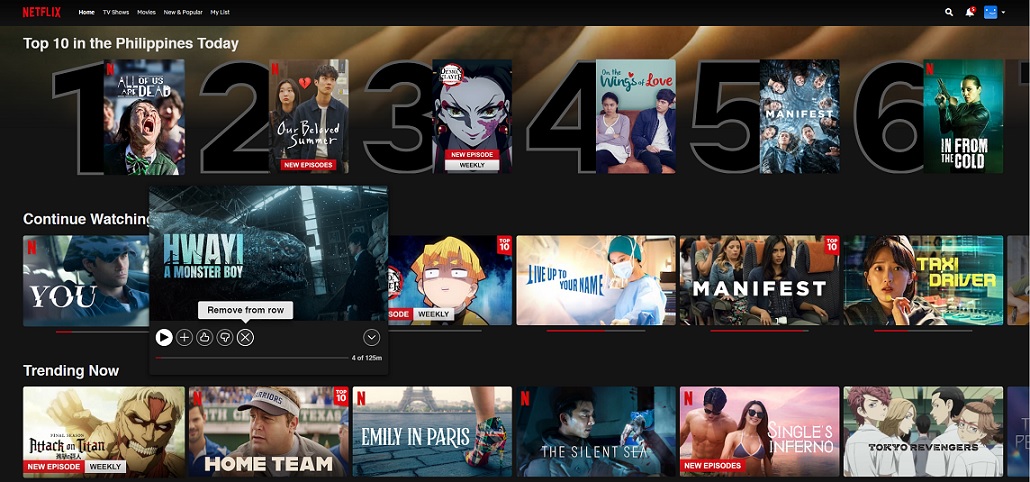

Netflix now gives its subscribers the option to delete titles from their "Continue Watching" list. In order to remove a show or movie, simply select the card in the row and scroll down to the new "Remove from Continue Watching" option to clear. So let's say you're stuck at home because of the ongoing pandemic and thinking of spending your time binge-watching shows on Netflix. If you’re a Smart subscriber who loves binge-watching Netflix, here’s some good news. Read more in our articles including "Netflix now lets you remove titles from the "Continue Watching" list" and "Nothing teases Phone (4b) in cryptic teaser video".

Netflix now gives its subscribers the option to delete titles from their “Continue Watching” list.…
Feb 2, 2022
Nothing has likely just confirmed the presence of a Phone (4b) in its upcoming lineup.…
Jun 22, 2026A couple of days ago, Netflix made the announcement that it will soon launch in…
Sep 11, 2015
So let’s say you’re stuck at home because of the ongoing pandemic and thinking of…
Mar 19, 2020Netflix has just revealed a new logo with a different look that will be used on all…
Jun 21, 2016
If you’re a Smart subscriber who loves binge-watching Netflix, here’s some good news. You can…
Mar 9, 2023Netflix now gives its subscribers the option to delete titles from their "Continue Watching" list. In order to remove a show or movie, simply select the card in the row and scroll down to the new "Remove from Continue Watching" option to clear.
So let's say you're stuck at home because of the ongoing pandemic and thinking of spending your time binge-watching shows on Netflix. If you’re a Smart subscriber who loves binge-watching Netflix, here’s some good news.
Our coverage of Netflix remove Continue Watching includes: "Netflix now lets you remove titles from the "Continue Watching" list"; "Nothing teases Phone (4b) in cryptic teaser video"; "Netflix to launch in SG, HK, South Korea and Taiwan". Each article provides unique insights and information.