
So here it is, the fastest PC gaming combo one can ever hope for -- Intel's 6-core processor the Core i7 Extreme 980X @ 3.33GHz paired with an ATI Radeon HD 5970 (as provided by Intel Philippines). Asus Philippines put up this dream team gaming rig with the new Intel Core i5 750, Asus nVidia Geforce GTX 285 and Asus Maximus III Formula. But all our lives, we know that the best practice for this, is to find the 'Safely Remove Hardware' or 'Eject' button in the task bar before removing our external media. However, the 'Safely Remove Hardware' option can show you a pop-up that says the drive is still in use, and to close all programs before removing it. At this point, it's a matter of "better safe than sorry", so if you aren't fond of hitting 'Safely Remove Hardware', then the least you can do is close all programs or windows that directly involve your external drive. It features a lineup of PC hardware and accessories inspired by the series. [gallery size="medium" ids="420235,420234,420236"] MSI Philippines has already listed the products on its official website. OpenAI is reportedly preparing to launch its first hardware product, and it may come in the form of AI-powered earbuds. Read more in our articles including "The Core i7 980X and Radeon HD 5970 Combo" and "Core i5, nVidia GTX285 on Asus Clear Case".
So here it is, the fastest PC gaming combo one can ever hope for —…
May 29, 2010Asus Philippines put up this dream team gaming rig with the new Intel Core i5…
Dec 2, 2009
We’ve all been here before. You’re transferring a file from your Windows computer to your…
Oct 8, 2018
MSI has announced a new collaboration with the anime Frieren: Beyond Journey’s End. It features…
Mar 13, 2026
OpenAI is reportedly preparing to launch its first hardware product, and it may come in…
Feb 8, 2026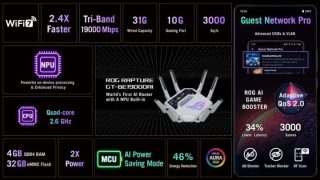
ASUS and Republic of Gamers (ROG) showcased their latest networking innovations at CES 2025, unveiling…
Jan 7, 2025So here it is, the fastest PC gaming combo one can ever hope for -- Intel's 6-core processor the Core i7 Extreme 980X @ 3.33GHz paired with an ATI Radeon HD 5970 (as provided by Intel Philippines). Asus Philippines put up this dream team gaming rig with the new Intel Core i5 750, Asus nVidia Geforce GTX 285 and Asus Maximus III Formula.
But all our lives, we know that the best practice for this, is to find the 'Safely Remove Hardware' or 'Eject' button in the task bar before removing our external media. However, the 'Safely Remove Hardware' option can show you a pop-up that says the drive is still in use, and to close all programs before removing it. At this point, it's a matter of "better safe than sorry", so if you aren't fond of hitting 'Safely Remove Hardware', then the least you can do is close all programs or windows that directly involve your external drive.
Our coverage of PC Hardware Philippines includes: "The Core i7 980X and Radeon HD 5970 Combo"; "Core i5, nVidia GTX285 on Asus Clear Case"; "What happens when you DON'T 'Safely Remove' your USB drive?". Each article provides unique insights and information.