
In addition to having one of the slowest LTE speed in the world, OpenSignal’s recent report also show that the Philippines is tied with Ecuador for having the second worst LTE coverage among other countries that were on the list. Not long ago, the Philippines have always been reported as among having the slowest internet in the Sount-East Asian region. While our national broadband average is still nowhere near that of Singapore or Hong Kong, broadband and mobile internet speeds have significantly improved in the last few years. Median fixed-broadband speeds now hover around the mid to high-100Mbps. Media cellular download speeds have more thna doubled in recent years, now comfortable sitting at 50-60Mbps bracket nationwide. Why stability matters more than Mbps The pivot from speed to stability is rooted in how Filipinos actually use the internet. Consumer advocacy groups have long pointed out that most complaints to ISPs and regulators are about consistency, not speed. This is why regulators and industry watchers are starting to push for metrics that emphasize quality of service (QoS) and quality of experience (QoE), not just peak speed. Read more in our articles including "PH Ranks Close to Last in LTE Coverage at 39%" and "Looking beyond SPEED; is PH internet any better?".
In addition to having one of the slowest LTE speed in the world, OpenSignal’s recent…
Sep 24, 2015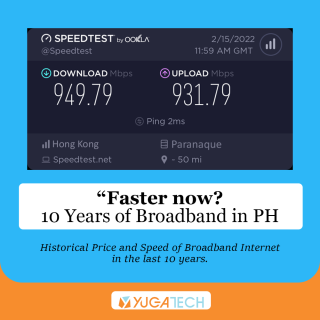
Not long ago, the Philippines have always been reported as among having the slowest internet…
May 28, 2026
Microsoft has quietly introduced a new internet speed test feature in Windows 11, giving users…
Mar 30, 2026
President Ferdinand Marcos Jr. has ordered the rollout of an investment package designed to transform…
Jun 22, 2026
Pasig Mega Market now has satellite-powered internet to support cashless payments under the Paleng-QR Ph…
Jun 21, 2026
Every day, millions of Filipinos go online to work, study, run businesses, connect with loved…
May 30, 2026In addition to having one of the slowest LTE speed in the world, OpenSignal’s recent report also show that the Philippines is tied with Ecuador for having the second worst LTE coverage among other countries that were on the list. Not long ago, the Philippines have always been reported as among having the slowest internet in the Sount-East Asian region.
While our national broadband average is still nowhere near that of Singapore or Hong Kong, broadband and mobile internet speeds have significantly improved in the last few years. Median fixed-broadband speeds now hover around the mid to high-100Mbps. Media cellular download speeds have more thna doubled in recent years, now comfortable sitting at 50-60Mbps bracket nationwide.
Our coverage of PH Internet Speed includes: "PH Ranks Close to Last in LTE Coverage at 39%"; "Looking beyond SPEED; is PH internet any better?"; "Windows 11 adds built-in internet speed test to taskbar". Each article provides unique insights and information.