

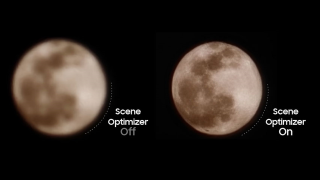
On March 15, Samsung shed light on how its “Super Resolution technology” combined with the “Scene Optimizer” work in order to produce high-quality images of the moon. What are Scene Optimizer and Super Resolution technology? When the Scene Optimizer feature is enabled, its AI engine recognizes whether you’re taking a photo of the moon or not. Of course, Samsung reiterates that users can disable Scene Optimizer if you don’t want AI interfering your photography preferences. Just head to Camera → Camera Settings → Scene Optimizer → Off. The brand says that they’re improving Scene Optimizer to “reduce any potential confusion” in taking photos of the actual moon and an image of the moon. Read more in our articles including "Samsung clears up ‘fake’ moon shots allegation" and "Samsung i900 Omnia Philippine Price".
Samsung drew flak last week for its Galaxy phones’ camera shooting capabilities allegedly ‘faking’ moon…
Mar 20, 2023The much awaited Omnia i900 from Samsung (see specs here) was released in the Philippines…
Aug 8, 2008The rumored new Samsung i8510 that tows in an 8-megapixel camera and a 16GB internal…
Jul 25, 2008LCD monitors from Samsung are getting better and better. I thought the dual 19″ 940BW…
Jul 6, 2008After Nokia and Sony Ericsson’s stellar performance at GSMA World Congress, it’s now Samsung’s turn…
Feb 13, 2008Yesterday, during a media briefing for Norton/Symantec, I was chatting with several tech journalists about…
Sep 25, 2008On March 15, Samsung shed light on how its “Super Resolution technology” combined with the “Scene Optimizer” work in order to produce high-quality images of the moon. What are Scene Optimizer and Super Resolution technology?
When the Scene Optimizer feature is enabled, its AI engine recognizes whether you’re taking a photo of the moon or not. Of course, Samsung reiterates that users can disable Scene Optimizer if you don’t want AI interfering your photography preferences. Just head to Camera → Camera Settings → Scene Optimizer → Off.
Our coverage of samsung scene optimizer includes: "Samsung clears up ‘fake’ moon shots allegation"; "Samsung i900 Omnia Philippine Price"; "Samsung Innov8 i8510 confirmed". Each article provides unique insights and information.