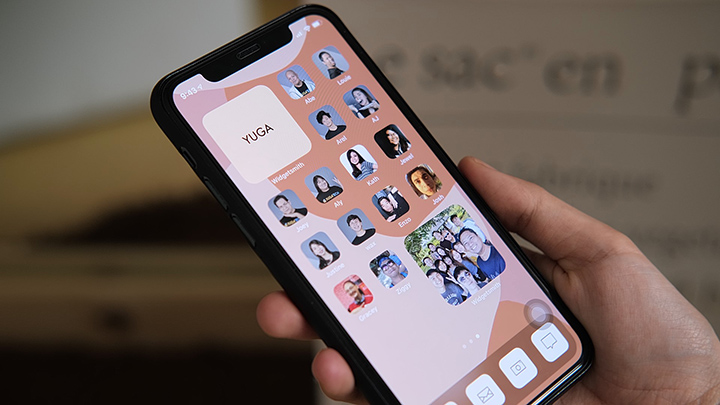

Since the global rollout of the iOS 14, iPhone users have been testing the new customization possibilities offered by the latest update from Apple. From the App Library to customizable widgets, iOS 14 comes with a variety of ways for users to modify their devices. However, changing the app icons is possibly the best customization option offered to iPhone users today. iPhone users can now unleash their creativity by changing their app icons to whatever they want by using a third-party app called Shortcuts. Here’s a step-by-step tutorial on how you can change your app icons on your iPhone. STEP 2: Download the Shortcuts App on the App Store. STEP 3: Launch the application and tap the plus sign on the top right of the screen. STEP 4: Tap on 'Add Action' option STEP 5: Search for the term 'Open App' in the search bar and tap on it under the Actions section. Read more in our articles including "How to Change App Icons on iOS 14" and "Apple App Store now permits game emulators globally".

Since the global rollout of the iOS 14, iPhone users have been testing the new…
Sep 28, 2020
Apple has loosened its grip on retro console emulators within the App Store. This move…
Apr 6, 2024
Apple has revealed that the iPhone 12 and 12 mini now come in the color…
Apr 21, 2021
Apple has a reputation for making premium and expensive products– from accessories down to smart…
Aug 9, 2020
Apple released the iPhone SE 2020 last week. It’s Apple’s most affordable iPhone in its…
Apr 24, 2020
Apple has just announced its Independent Repair Provider Program, allowing companies interested in offering out-of-warranty…
Aug 30, 2019Since the global rollout of the iOS 14, iPhone users have been testing the new customization possibilities offered by the latest update from Apple. From the App Library to customizable widgets, iOS 14 comes with a variety of ways for users to modify their devices.
However, changing the app icons is possibly the best customization option offered to iPhone users today. iPhone users can now unleash their creativity by changing their app icons to whatever they want by using a third-party app called Shortcuts. Here’s a step-by-step tutorial on how you can change your app icons on your iPhone.
Our coverage of Shortcuts App includes: "How to Change App Icons on iOS 14"; "Apple App Store now permits game emulators globally"; "Apple iPhone 12, 12 mini in Purple now official". Each article provides unique insights and information.