

Tonik - one of the first neobanks in the Philippines - can now send money through Instapay integration for free! [caption id="attachment_316958" align="alignnone" width="720"] Image | Tonik[/caption] With this recent update, users can now send and receive money from participating banks and other e-banks in real-time for up to PHP 50,000 with no additional transfer fees from Tonik. Steps to top up to your Tonik Account: Click the Top Up option in the Tonik dashboard Click Instapay Tap the Square button to copy the 14-digit Tonik account number Once copied, launch the mobile bank app or bank website where you’ll get the fund for top-up. Paste the 14-digit Tonik account number Enter your desired amount and other required information Perform the steps required by your bank’s app like the required authorization to finalize the whole transaction. Tonik was founded last 2018 and it launch its operations in the Philippines last 2020 through its own bank license with its support and other R&D functions which are based in Singapore and Chennai, India. The Bank of the Philippine Islands (BPI) has restored access to its mobile app and online banking platform following a service disruption on July 15. BPI first reported the outage at 1:13 PM, when customers couldn’t really access its digital banking services. Read more in our articles including "Tonik now offers FREE funds transfer via Instapay" and "BPI restores app and online banking services after outage".

Tonik – one of the first neobanks in the Philippines – can now send money…
Aug 5, 2022
The Bank of the Philippine Islands (BPI) has restored access to its mobile app and…
Jul 16, 2026
The Bangko Sentral ng Pilipinas (BSP) has introduced new rules aimed at making electronic payment…
Jun 19, 2026Our friends from Western Digital in the region is holding another contest and I’d like…
Jan 4, 2012
Meta launches Facebook Verified, a new free badge designed to show that a Facebook account…
Jul 25, 2026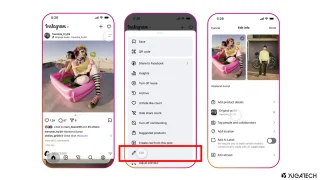
Instagram finally lets its users replace the background music for published posts and carousels without…
Jul 22, 2026Tonik - one of the first neobanks in the Philippines - can now send money through Instapay integration for free! [caption id="attachment_316958" align="alignnone" width="720"] Image | Tonik[/caption] With this recent update, users can now send and receive money from participating banks and other e-banks in real-time for up to PHP 50,000 with no additional transfer fees from Tonik.
Steps to top up to your Tonik Account: Click the Top Up option in the Tonik dashboard Click Instapay Tap the Square button to copy the 14-digit Tonik account number Once copied, launch the mobile bank app or bank website where you’ll get the fund for top-up. Paste the 14-digit Tonik account number Enter your desired amount and other required information Perform the steps required by your bank’s app like the required authorization to finalize the whole transaction. Tonik was founded last 2018 and it launch its operations in the Philippines last 2020 through its own bank license with its support and other R&D functions which are based in Singapore and Chennai, India.
Our coverage of Tonik digital bank app includes: "Tonik now offers FREE funds transfer via Instapay"; "BPI restores app and online banking services after outage"; "Banks, e-wallets face new BSP rules on digital payment fees". Each article provides unique insights and information.