

The feature is available in the mobile app under the "Your Library" section and uses the TuneMyMusic service to copy playlists from other services without removing them from the original platform. To transfer playlists, users scroll to the bottom of "Your Library" and tap “Import Your Music,” located under “Add podcasts & shows.” They then follow prompts to connect TuneMyMusic and select the service to transfer from. This contrasts with TuneMyMusic’s standalone version, which only allows free transfers of up to 500 tracks; transfers beyond that require a subscription. Spotify has not shared details about any deal with TuneMyMusic, though the timing comes after recent criticism of the company’s practices and competitor updates. Read more in our articles including "Spotify lets you move playlists from other apps" and "Meta introduces free Facebook Verified badge".

Spotify now allows users to transfer playlists from other music streaming services, making it easier…
Nov 21, 2025
Meta launches Facebook Verified, a new free badge designed to show that a Facebook account…
Jul 25, 2026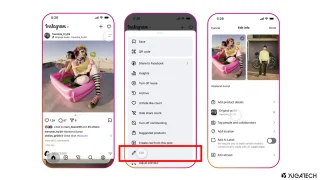
Instagram finally lets its users replace the background music for published posts and carousels without…
Jul 22, 2026
The Bank of the Philippine Islands (BPI) has restored access to its mobile app and…
Jul 16, 2026
Telegram just released a new update that introduces a Rich Text Editor, Communities, Ephemeral Bot…
Jul 15, 2026
Meta has removed a recently announced AI image feature that allowed users to generate images…
Jul 11, 2026The feature is available in the mobile app under the "Your Library" section and uses the TuneMyMusic service to copy playlists from other services without removing them from the original platform. To transfer playlists, users scroll to the bottom of "Your Library" and tap “Import Your Music,” located under “Add podcasts & shows.” They then follow prompts to connect TuneMyMusic and select the service to transfer from.
This contrasts with TuneMyMusic’s standalone version, which only allows free transfers of up to 500 tracks; transfers beyond that require a subscription. Spotify has not shared details about any deal with TuneMyMusic, though the timing comes after recent criticism of the company’s practices and competitor updates.
Our coverage of TuneMyMusic includes: "Spotify lets you move playlists from other apps"; "Meta introduces free Facebook Verified badge"; "Instagram finally brings Replace Audio feature for old posts". Each article provides unique insights and information.