

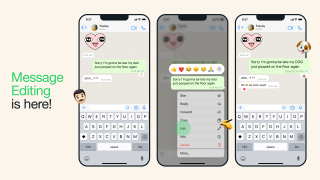
WhatsApp users will now be able to edit their messages. Users who want to edit one of their WhatsApp messages can do so by long-pressing on a sent message and choosing the 'Edit' option from the menu. Edited messages will display the label 'edited' alongside them. These edited messages, along with all the other messages, media, and calls within WhatsApp continue to be protected by end-to-end encryption. WhatsApp says that the feature is being rolled out to users globally and will be available to all WhatsApp users in the coming weeks. In a new update, WhatsApp now has support for 32 participants in a group voice call. Previously, the maximum number of users in a call for WhatsApp was 8. Apart from the group calls update, WhatsApp will also be updating designs for voice message bubbles and info screens for contacts and groups. Read more in our articles including "WhatsApp messages can now be edited" and "WhatsApp to allow groups calls up to 32 people".
WhatsApp users will now be able to edit their messages. Users who want to edit…
May 23, 2023
In a new update, WhatsApp now has support for 32 participants in a group voice…
Apr 23, 2022
If you’re a BlackBerry OS or Windows Phone 8.0 user and is currently using the…
Dec 27, 2017
WhatsApp has rolled out a feature that would allow users to link their account to…
Nov 6, 2021
WhatsApp has announced that it is rolling out its group calls and video features to…
Jul 31, 2018Facebook-owned cross-platform instant messaging client, WhatsApp, has announced WhatsApp Web – the desktop version of…
May 11, 2016WhatsApp users will now be able to edit their messages. Users who want to edit one of their WhatsApp messages can do so by long-pressing on a sent message and choosing the 'Edit' option from the menu.
Edited messages will display the label 'edited' alongside them. These edited messages, along with all the other messages, media, and calls within WhatsApp continue to be protected by end-to-end encryption. WhatsApp says that the feature is being rolled out to users globally and will be available to all WhatsApp users in the coming weeks.
Our coverage of WhatsApp messages includes: "WhatsApp messages can now be edited"; "WhatsApp to allow groups calls up to 32 people"; "WhatsApp will no longer support BlackBerry OS and Windows Phone 8.0 after December 31". Each article provides unique insights and information.