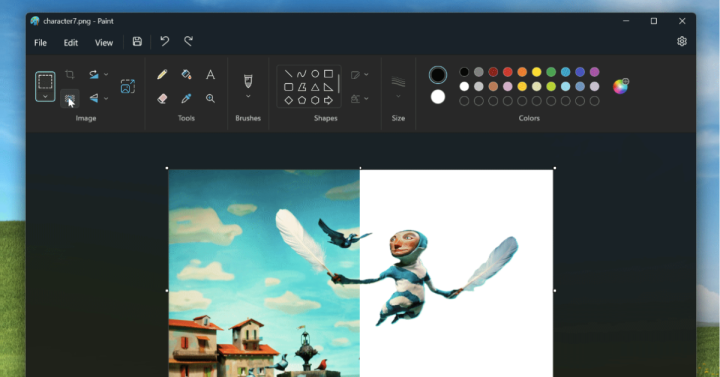

As one of the original apps on Windows, Paint has been where many have been introduced to creating art on Windows. Now, Paint will begin rolling out an update that will introduce the ability to remove backgrounds. The update is currently only available to Windows Insiders in the Canary and Dev Channels (version 11.2306.20.0). [caption id="attachment_343851" align="alignnone" width="1805"] Image credit: Windows[/caption] The background removal button can be found on the toolbar on the top left under the image category. I've had the beta version of Windows 7 installed on my Intel Core 2 Quad, a Compaq Presario, and an Atom-based netbook for about a week now and so far, Microsoft's upcoming operating system gave a fairly good impression. I've been a Windows Vista user for about a year now and I am fairly satisfied with its performance. So, trying out Windows 7 for the first time didn't really made a huge impact. And contrary to what other have reported, too me somewhere around 1.5 to 2.5 hours to completely install Windows 7 which is dependent on the rig I'm running it on. Read more in our articles including "Paint on Windows can now remove backgrounds with just one click" and "Windows 7 Preview: Less of the Same".

As one of the original apps on Windows, Paint has been where many have been…
Sep 9, 2023I’ve had the beta version of Windows 7 installed on my Intel Core 2 Quad,…
Jan 15, 2009Microsoft has finally announced the SKUs of their upcoming OS, Windows 7. The line-up didn’t…
Feb 4, 2009

Instagram has rolled out a new feature that allows creators to add unique captions to…
Jun 20, 2026
Canva has officially launched Offline Mode, allowing users to create and edit designs without an…
Jun 10, 2026As one of the original apps on Windows, Paint has been where many have been introduced to creating art on Windows. Now, Paint will begin rolling out an update that will introduce the ability to remove backgrounds.
The update is currently only available to Windows Insiders in the Canary and Dev Channels (version 11.2306.20.0). [caption id="attachment_343851" align="alignnone" width="1805"] Image credit: Windows[/caption] The background removal button can be found on the toolbar on the top left under the image category. I've had the beta version of Windows 7 installed on my Intel Core 2 Quad, a Compaq Presario, and an Atom-based netbook for about a week now and so far, Microsoft's upcoming operating system gave a fairly good impression.
Our coverage of windows paint includes: "Paint on Windows can now remove backgrounds with just one click"; "Windows 7 Preview: Less of the Same"; "The 6 flavors of Windows 7". Each article provides unique insights and information.