

Over the years, we’ve seen the TV change its appearance and functionality that it became more than just a favorite past time. It has allowed the internet to reshape it to give birth to the now famous but too expensive Smart TVs. So how about us with ordinary TVs and cheaper HDTVs gotta do? This is where the Smart TV Boxes comes. In our case, the Noontec A9 gladly paid a visit to give our dumb TVs a fighting chance. Check out our full review after the jump.

The Noontec A9 Smart TV Box is a device that handles all your media and internet connectivity then displays it on your TV. Simply put, just connect it to your HDTV and it will work like a Smart TV.
A9 Smart TV Box Design and Construction
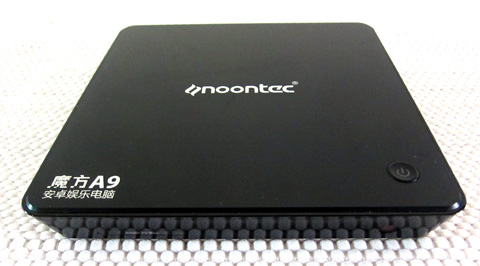
The A9 looks like a simple, slim yet elegant black box that is made of glass but is actually made of metal panels and glossy plastic. It is small with a decent amount of heft, similar to that of a box of a dozen Hopia and will sit comfortably next to your HDTV without taking a lot of space.
The top of the device is where most of the aesthetics fall under. It is mounted with a glossy piece of plastic that looks like a slab of glass. Here, you’ll find the Noontec logo and model number and the power button.
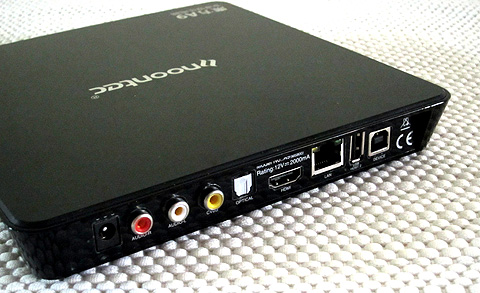
An IR receiver is located on the front of the device. On the left side are a USB port and an SD Card reader. The rest of the sides are covered in vents to keep the box cool. Take a look at the back and you’ll find the power jack, HDMI port, another USB port, composite interface, optical audio interface and the LAN port.
Android in a Box
Turn on the device and you’ll find Android 2.3.1 Gingerbread running the whole thing. Noontec didn’t customize the UI so the whole interface looks like an Android smartphone being displayed in landscape mode. If you have tried Android Gingerbread, you’re not missing much as the experience is similar.
You still get an access to the Google Play Store so you can download some apps. Just connect to the internet using LAN or WiFi connectivity then login your Google credentials and you’re good to go. I managed to download Angry Birds Space out of curiosity and worked just fine. If you’re wondering how I played it, it’s just a matter of using the track pad and holding a button (I’ll talk about this later on). Ordinary apps such as the music player and video player are there.
If you need to surf the internet you can just use the default browser or install a different one if you like. Social networking is not a problem. Just download the dedicated apps and you’ll be updating your statuses in no time. Skype calls are awesome too. I used the webcam with microphone that came with the package and made a video call. I must say, seeing the person you’re talking to on a big display is really satisfying. Now I know why Oprah likes this.
Multimedia Playback
This is where the Noontec A9 shines the most. It has all the video ports needed to connect to your TV. Just plug your external HDD or USB and the A9 will detect all the media stored inside. And since this is Android, music and video playback is not a problem. It can play almost all formats but you can easily download other media players from the Play Store if needed. The YouTube app is also present so you can easily stream HD and non-HD content.
Wireless Controls
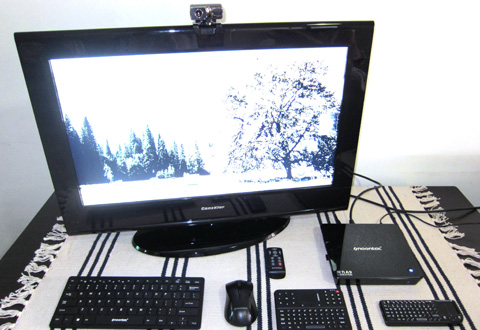
One of the coolest things of having an A9 Smart TV Box is the wireless controls. The review package came with one IR remote, two wireless remote controls with track pad and mini keyboard, a bigger wireless keyboard and a wireless mouse.

The IR remote, wireless mouse and the big wireless keyboard are powered by AAA batteries while the other controls have internal batteries that can be charged via USB. The track pad is just a 2 x 2 inch square. Your thumb should fit right in but the space is very limited especially when you have to move the cursor around.
Conclusion
The Noontec A9 Smart TV Box is a very capable multimedia player and internet device for your TV. 98% of the time I just use this to play my movie files. I can surf the internet and use Facebook and Twitter but the Android experience is just too weird for me in this kind of setup and UI. It gets even weirder when I try to play games, although I admit that seeing Angry Birds on a big display is hilarious. But in a nutshell, the A9 is definitely a great addition to your entertainment system and a loving partner to your dumb TV.
Suggested retail price of the Noontec Cube A9 is Php6,900. You can also get additional accessories on top of the basic ones included in the box (the Cube A9, Wireless Remote, Cables, etc.). To use a physical keyboard instead of the virtual keyboard on the screen, there’s a compatible Wireless Keyboard & Mic (Php4,600) or if you want to do some video conferencing, you can also get a compatible USB Camera (Php1,750).
Noontec A9 Smart TV Box specs:
OS: Android 2.3.1
CPU: Cortex-A8
Frequency: 1.2GHz
RAM: 512MB
NAND FLASH: 4GB
GPU: Vivante GC800, support OpenGL ES 2.0 and Open VG
Hardware decoding: Ceva MM3000, Multi-format full-HD video decoder
WiFi: 802.11b/g/n
Remote control: wireless keyboard & mouse
LAN: RJ45 for 100M Ethernet
USB input: USB host x 2
Card input: 2 in 1 card reader, SD/SDHC/MMC
Video out: HDMI, AV
Audio out: stereo R/L, optical, HDMI
Video codec: MPEG-1/2/4, H.263, H.264, XVID, RV, AVS, VC-1, VP8
Video file: MKV, AVI, MP4, MOV, 3GP, MPG, VOB, RMVB/RM, FLV,TS, WEBM, WMV, ASF
Audio file: MP3, AAC, WAV,WMA, M4A,OGG, FLAC,APE
Photo file: JPG, BMP, GIF, PNG,JPEG
Product dimension: 189.7 x 189.7 x 26.4 (L x W x H)
Product weight: 600g
What we liked about the Noontec A9:
• Attractive design
• Wide range of multimedia playback
• Multiple wireless controls available
• Android apps
What we didn’t like about the Noontec A9:
• Very basic Gingerbread UI
• Wireless controls need some getting used to





through noontec a9 smart tv box,whether unload from computer?