Google is updating Google Chrome on Android tablets and foldables with a new bookmarks bar, bringing the experience closer to desktop.
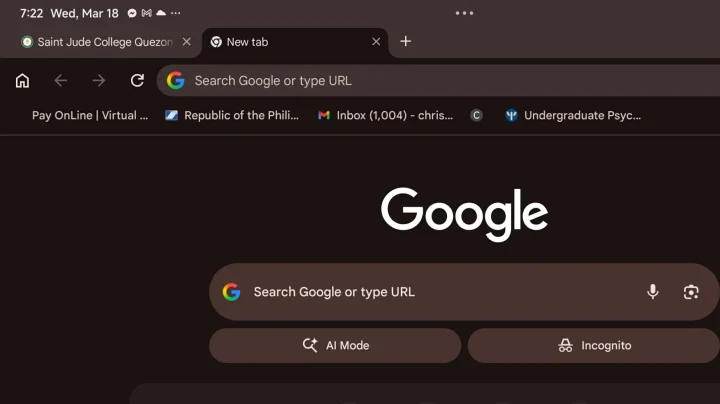
The bookmarks bar appears below the address bar and spans the full width of the screen, showing saved sites with both icons and labels. Bookmark folders are also supported and can be opened directly from the bar.
A chevron icon at the end lets users access additional bookmarks that don’t fit on the screen, while an “All bookmarks” option opens the full bookmarks interface. Long-pressing a bookmark reveals its full URL.
The feature is designed for larger screens and is automatically hidden on smaller devices like smartphones.
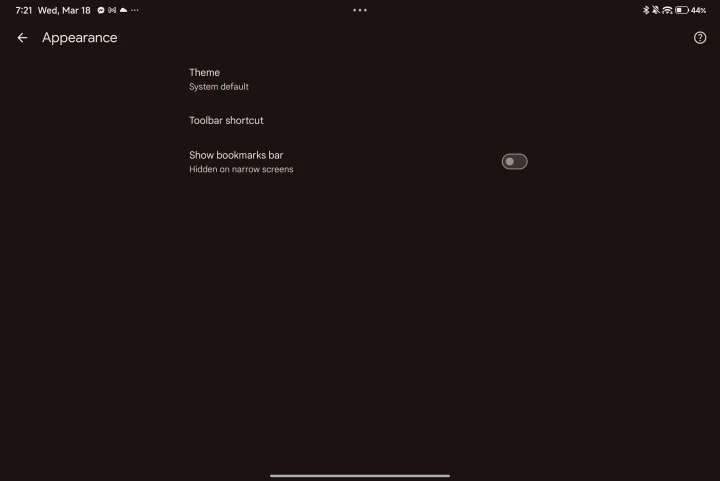
Users can enable it by going to Settings > Appearance > Show bookmarks bar. The update is rolling out with Chrome version 146 for Android.
This change is part of Google’s ongoing effort to make Chrome more optimized for tablets and foldable devices by aligning its interface with the desktop version.
Anton is into technology and gaming, with a growing interest in creative, tech-driven projects. He enjoys writing, editing, and experimenting with new tools, always learning and improving as he goes. Curious by nature, he likes building ideas, testing things out, and seeing where they lead.



0 Comments
Leave a Reply