infinix x yugatech

SanDisk outs a USB flash drive with built-in WiFi

Listen to article

SanDisk has released a new flash drive called the Connect Wireless Stick that comes with built-in WiFi, allowing you to wirelessly save and access files on your smartphones and tablets.
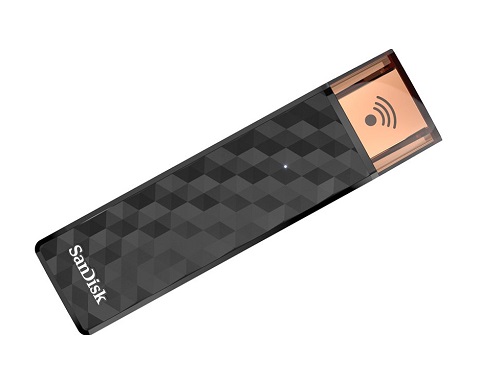
The SanDisk Connect Wireless Stick looks like a regular thumb drive and features the regular USB 2.0 connector so you can still plug it to your computer. The cool part is that it comes with a built-in WiFi so you can wirelessly manage your files and stream HD movies and music to up to three devices at the same time, and a built-in rechargeable Li-Ion battery which can last for up to 4.5 hours.

It comes in 16GB, 32GB, 64GB, and 128GB capacities, priced at $25, $40, $60, and $99, respectively.

source: SanDisk

Written by
Louie Diangson

Contributing writer at YugaTech, covering the latest in technology news and reviews.

View all posts by Louie Diangson →

16 Comments

LI
Lito · 11 years ago

Can this be used as a wireless print server by connecting it to a regular printer? That would make printing easier with the old printers.

Reply
MR
MrOrange · 11 years ago

I think Sandisk released a similar flash drive with battery and storage a few months/years back but it never became popular nor did it sell here in the Philippines.

Product:
Sandisk Connect Wireless Flash Drive

Reply
BE
berebekwa · 11 years ago

how does it work? adhoc or infrastructure?

Reply
BR
bryan_mmx · 11 years ago

only needs power source to work? or is it like the one released by Xiaomi that needs to be plugged in a pc?

Reply
EA
Easy E · 11 years ago

You need a powerbank (?)

Reply
.|
.|. · 11 years ago

this is cool but, how long is the battery life of this device to support the wifi?

Reply
SC
Scumbag · 11 years ago

Who says that this is a stand alone wifi? The article only says that it has a built in wifi so need for battery because it will works when you inject it on your USB port.

LO
Louie Diangson · 11 years ago

Updated the article with battery info. Sorry about that.

Leave a Reply

Loading next article...