infinix x yugatech

O+ Time Unboxed, Hands-on

Listen to article

Smartwatches have been on the rise in the recent months, and O+ wouldn’t want to miss on its current popularity as it banks on a low-cost wearable called Time as a local offering. We unboxed and got our hands on it for a short time, and here are our observations.

oplus-time (2)

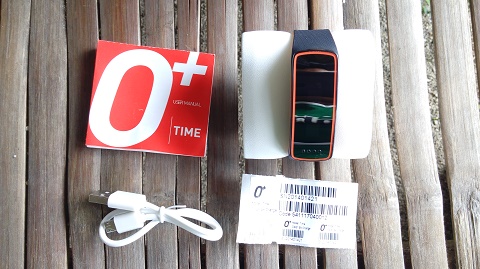
The package is very reminiscent to those of time pieces we usually buy. The contents are also minimal, as it only has the smartwatch wrapped in a cushion, a short microUSB cord which has a longer prong than the usual we see on smartphones, a manual, and serial stickers.
oplus-time (3)

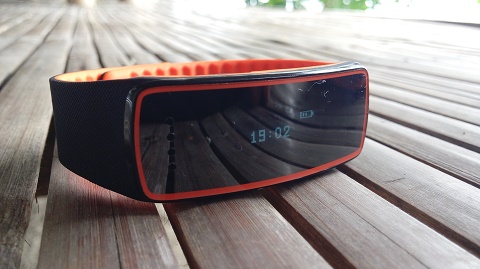
Upon a closer look at the O+ Time, the device is lightweight, and its colors may give an impression that it looks like a fancy sports or fitness device when seen from afar. The textured band doesn’t give off a vibe that it is a device you can buy for cheaps.

oplus-time

The notification panel features a OLED display that shows text and image in one color, reminiscent to the old phones of the yesteryear. The screen’s refresh rate seems to be different though, as we found it a bit hard to capture despite the perfect weather condition. The screen’s orientation, when worn, can also be a problem for some when read using the normal way we read the time off our watches.
oplus-time (1)

Connecting the smartwatch to an Android phone is easy, and so does accessing its menu (a press to go back/pres and hold to advance or select). You can call a contact, check messages, and notify you of alerts, but it needs a Bluetooth notifier app to fully utilize those features. The O+ Time is also equipped with a pedometer, but it is not as accurate it should be when we tested that function out.

O+ Time specs:
0.91-Inch OLED Display
Notifications
Text Message Reader
Hands Free Call
Alarms and Alerts
Bluetooth 3.0 + HS
Pedometer
Accelerometer
Li-Ion 150mAh
57.4 x 22.4 x 13.1 mm, 30 g

This new smartwatch from O+, along with another wearable called the O+ tag, is available for Php1,995.

Frequently Asked Questions

What items are included in the O+ Time smartwatch package?
The package contains the smartwatch wrapped in a cushion, a short microUSB cord with a longer prong, a manual, and serial stickers.
What type of display does the O+ Time use for notifications?
The notification panel features an OLED display that shows text and image in a single color, reminiscent of old mobile phones.
How does the O+ Time connect to an Android phone and access its functions?
Connecting to an Android phone is straightforward, with menu navigation using press‑to‑go‑back and hold‑to‑advance, and full call, message, and alert features require a Bluetooth notifier app.
React to this article:
Written by
Carl Lamiel

Carl Lamiel

Writer

Get in touch with Carl at @lamielcarl on Twitter or visit his website for more updates!

View all posts by Carl Lamiel →

20 Comments

GI
giem · 10 years ago

can this watch be synced with iphone?

Reply
TH
thokz ramos · 11 years ago

Wat bt notifier apps for o+ time

Reply
RI
Richard · 11 years ago

After using the watch for nearly a month,the cover of the charger got torn off. Yes the cover was detached so have to be patient in attaching the detached cover to avoid losing it. It’s really a waste of money buying this watch. This is the lesson of buying something that has not been reviewed by an independent blogger. Meron din kasi envelopmental blogger who lick the ass of the manufacturer if the price is right.

Reply
MI
miongb · 11 years ago

I have the cherry mobile g2 and it’s way better than the 0+ time.

Reply
LI
lito · 11 years ago

I’m not satisfied with the performance. Anyway free lang kasi sa binili kong o+air puede na pag tiagaan. Ok naman at hindi na ako naglalabas ng phobe kung may txt at call

Reply
TH
thokz ramos · 11 years ago

Ano bt notification para maopen inbox sa massge

RI
Richard · 12 years ago

I find this wearable not recommended to buy. I have using this watch for two weeks now and I am not happy with its performance. My reasons are:
1.The Bluetooth notification is not stable it goes on and off. Merely inserting the phone inside the pocket affects the connectivity.
2.Weak battery life. Four hours after continues use u you need to recharge the watch.
3.The lock of the bracelet is poor that just digging in your pants pocket will unlock it and might drop the watch or if your unlucky lost the watch because you did not notice.
4.Recieving calls will enable the watch to loudspeaker mode enabling the people around you to hear what you are discussing. No other mode like use the phone instead.

Reply
AT
atmaweapon · 11 years ago

Experience generally positive for me.
1. What phone are you using? I am using OnePlus One. Range is about 5m on mine before it disconnects. Auto connects when in range.
2. I get up to 9 hours on 1 full charge. frequent notif and vibrate.
3. Agree that the lock is poor. But if you notice, even branded smartwatches use a similar type of lock. Keep it loose to prevent this from falling off.
4. You can choose to use the handset earpiece from the phone. If you answer via the watch, it will ALWAYS go on loudspeaker mode.

Drawback, the Android app is not compatible with Android 5.0. Also the android app is recognized as “Mediatek Smartdevice” from the Play Store…this seem to be shady…

CH
chams · 12 years ago

150 mah ? hmmnnn

Reply
EA
Easy E · 12 years ago

Mahanap nga ito para makita ng live. Parang sobrang liit nga talaga nh screen.

Reply

Leave a Reply

Loading next article...