

Xiaomi announced the Mi Notebook Air last July and it’s the Chinese company’s first laptop. And from the looks of it, Xiaomi is taking a stab at Apple’s Macbook line-up.
The Mi Notebook Air comes in two variants – a larger 13.3-inch model that comes with a Core i5 CPU, 8GB RAM, Nvidia GeForce 940 MX and 256GB SSD and the one we bought to review is the entry-level variant that has a smaller 12.5-inch screen with full HD resolution, an Intel Core M3 processor, 4GB of RAM and 128GB SSD for storage.
From the size and configuration alone, we can say that the smaller variant is positioned to compete agains the 12-inch Apple Macbook which also runs on the same Intel Core M3 processor. The larger variant will complete against the 13.3-inch Apple Macbook Air.

Our review unit is the one in matte silver color with an all metal build. The Mi Notebook has striking similarities with the Macbook although it looks thicker on the sides, actually it’s thinner. The Macbook has a tapered bottom to make it look much thinner than it actually is. With a weight of just 1.07kg, the Mi Notebook is also very light.
There are no markings at the back of the lid to identify that it was made by Xiaomi. Xiaomi is giving the freedom to its users to customize the lid with sticker accessories. The only time you will see the Mi logo is when you open the lid.
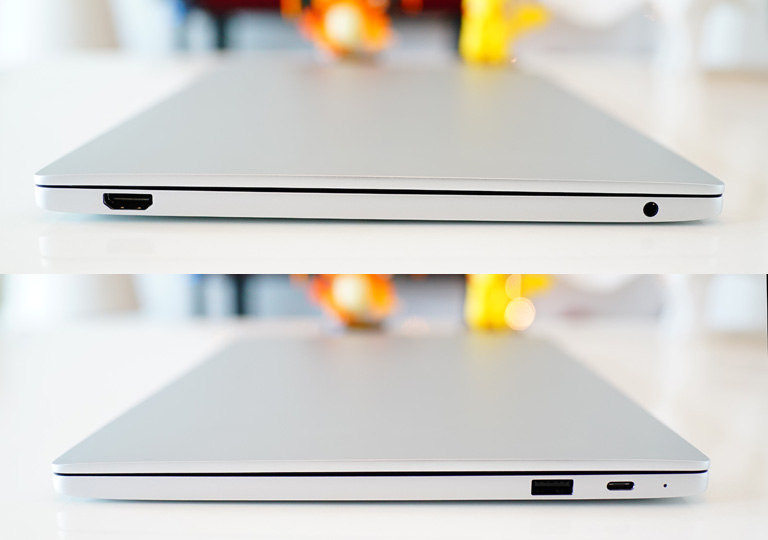
The laptop comes with a single USB Type C port for charging and another USB 3.0 for plugging other devices. What’s surprising is that Xiaomi managed to fit a full-sized HDMI port on the side and well as a 3.5mm audio port. What’s missing here is an SD card reader and a LAN port. The Mo Notebook Air also features dual speakers by AKG at the bottom.
The display panel is complete covered in glass from edge to edge. The bezels are very thin too and it reminds us of the one on the Dell XPS 13 though this one has no touchscreen to speak of. The screen is an IPS panel with a full HD resolution of 1920x 1820 pixels. It looks nice and crisp with just the right brightness when you need it.
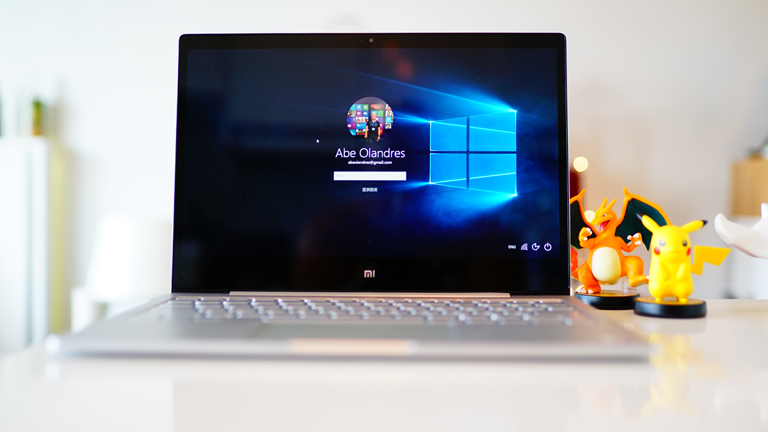
The trackpad is generously wide with a smooth glass layer on top. The same is true with the keyboard. They’re spaced pretty well with enough travel to comfortably type with. We really liked the backlit keyboard on this one and it’s actually at par with the one found in the Macbook Air.

The only problem we’ve had with this laptop is that the default operating system is the Chinese Single Language license of Windows 10 Home. We tried changing the default language to English from the Control Panel to no avail so we ended up re-installing the OS just to switch to English. The keyboard though is purely in English with no trace of Chinese characters so no problem there.
We’re not expecting much from a Core M3 processor and we’ve had quite a bit of experience with it on the Asus Transformer Book Chi and the 12-inch Macbook. It serves well for basic purposes such a office productivity tools, web browsing and simple photo editing. Don’t expect getting decent gaming experience with this one though the 13-inch model might be better than this.
Xiaomi Mi Notebook Air specs:
12.5-inch full HD IPS display @ 1920 x 1080 pixels
Intel Core M3 dual-core 0.9GHz processor
Turbo Boost 2.2GHz
Intel HD Graphics 515
4GB DDR3 RAM
128GB SSD via SATA
Backlit keyboard
WiFI 802.11ac
Bluetooth 4.1
AKG dual-speakers
1MP webcam
1 x USB 3.0
1 x USB Type-C charging port
HDMI port
12.9mm thick
1.07kg (weight)
600Whr Li-Po battery
Windows 10 OS
It’s a good first try for Xiaomi and so far we’re pretty impressed especially for the asking price. Xiaomi is not officially available in the Philippines but you can get the Mi Notebook Air over at Widget City for Php29,900 {see listing here}.





Hahaha. Kaya mura to malamang me tracking software na naman from China. Lol.