

It’s a shame that some mobile phone manufacturers continue to release devices with micro-USB ports. In this day and age of technology, USB-C (officially known as USB Type-C) has emerged as the standard for electronic devices, especially with smartphones. Any customer or smartphone user would most likely be disappointed if a certain smartphone isn’t equipped with a USB-C port.
Perhaps one reason that makes USB-C better is due to its symmetrical design in comparison to micro-USB. Plugging in your devices has never been this easy with USB-C. More importantly, it’s mainly because of the large bandwidth it can carry. USB-C takes universality to the next level by being an all-in-one connector for almost any purpose including data transfer, power and charging, and audio/video connection.
However, not all USB-C cables and ports are created equal. The fact that USB-C have varying speeds adds to the confusion. So, what specific USB-C do we typically need? See the graphic below for a quick guide.
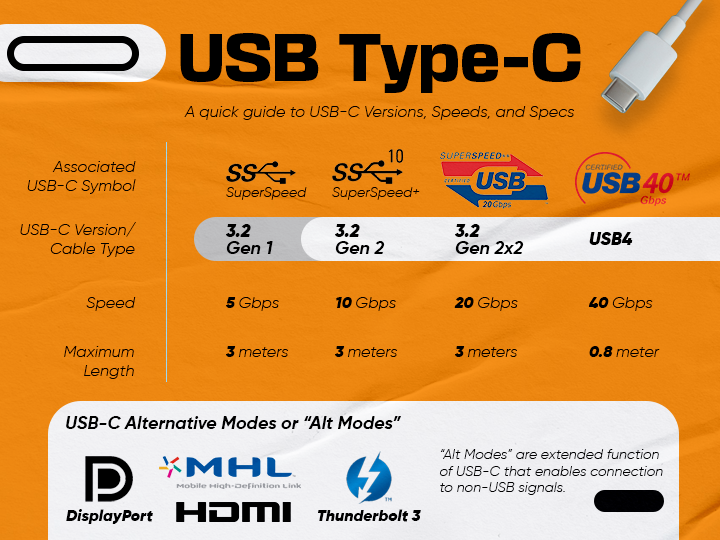
USB-C through the years
Indeed, there are a lot of details to process about USB Type-C. Let’s start with the major historical context first, shall we? USB Type-C specification version 1.0 was announced by USB Implementers Forum (USB-IF) (also known as USB Promoter Group) and then came to finality in 2014.
USB-C was since then adopted in electronics whose specification started with USB 3.2 Gen 1—that offered “SuperSpeed” of 5Gbps data transfer, enhanced power delivery up to 100W, native audio/video support, and backwards compatible with previous USB specifications.
[Note: USB 3.1 (or 3.1 Gen 2) and USB 3.0 (or 3.1 Gen 1) have been renamed to USB 3.2 Gen 2 and USB 3.2 Gen 1 accordingly.]
USB-C also utilized USB 3.2 Gen 2 specification only with double the transfer rate of 10Gbps called “SuperSpeed Plus” and with the same capabilities as Gen 1. Evidently, most USB-C ports today are based on USB 3.2 Gen 2 specification.
Jump to 2017 when USB-IF released the USB 3.2 Gen 2×2 which doubled the transfer rate at maximum of 20Gbps (“SuperSpeed 20Gbps”) from its predecessor. A compatible USB 3.2 Gen 2×2 should be connected to achieve the max speed, thus connecting previous versions won’t reach 20Gbps but only the speed of that specific USB generation. According to usb.org, this transfer speed is achieved through “multi-lane operation for new USB 3.2 hosts and devices allowing for up to two lanes of 10Gbps operation to realize a 20Gbps data transfer rate, without sacrificing cable length.”
And most recently in 2019, USB4 is introduced that supports the highest bandwidth to date, 40Gbps at max—the same bandwidth as Thunderbolt 3, thus its compatibility is compatible. USB4 supports up to 8K resolution at 60Hz with HDR10 color, and compatible as well with DisplayPort Alt Mode 2.0. Now that’s impressive considering it’s also possible to have multiple displays on USB-C.
To know more details about USB generations, READ: USB Generation Guide: What you Need to Know 14
USB-C flexibility in functionalities
With all that said, USB-C is much more compact and simpler, which are now common on mice, keyboards, and storage drives. It’s also present with a variety of other peripherals and devices such as laptops, tablets, smartphones, consoles, and even Macs. It’s perfect for usage with external hard drives and other portable data storage devices for people who need high-speed data transfer, especially those who have big video footage or large datasets.
As mentioned, USB-C also can push video capabilities over the same connection through “Alternate Modes” or “Alt Mode”. This enables video output with various adapters such as HDMI, DisplayPort, VGA and other types of video connectors on displays, TVs and projectors.
Furthermore, USB-C cables can also be used to supply power. They mostly carry at least 20V at 3A, for a total of 60W of input power. Some cables may carry 20V at 5A, resulting in faster charging times. The most significant distinction between 3A and 5A cables is that 5A cables can typically power laptops and monitors, whereas 3A cables cannot.
Note that all these operations are happening at the same time through a single cable/port. With the right ‘docking station’, you can connect all your extra displays, USB devices, memory cards, storage drives, and Ethernet while also charging your devices up to 100W simultaneously.
You might be asking how it could be much better with the incredible bandwidth, power capabilities, and alternative modes now accessible over USB-C. Well, increasing the cable length that USB-C can efficiently accomplish is currently one of the key areas of focus. Because as the cable distance gets longer, the data transfer rate is decreased. Although there are existing “active cables” that has boosted signal to maintain integrity of the data carried over through longer distances up to two meters. Still capped at that length and we’ll see newer technologies unfold to answer this limitation.
Ultimately, USB-C embarks a truly universal connector that will serve as the industry standard today and in the foreseeable future.
ADDENDUM: Adjusted article to correct USB 3.2 Gen 2 info and added USB4 iteration.






1 Comment
Leave a Reply