
If you still think a tablet is just a bigger phone, the HUAWEI MatePad 11.5 PaperMatte Edition (2025) might change your mind.
This year’s model aims to be more than just a content consumption device, it’s designed as a full-on portable productivity and creativity workstation, bundled with a keyboard, stylus, and pre-installed apps that let you get to work (or play) right out of the box.

And here’s the kicker: you get all that for under PHP 22K.
So, let’s see if this tablet really delivers on its promise of delivering a PC-like experience in a compact package.
Design and Build
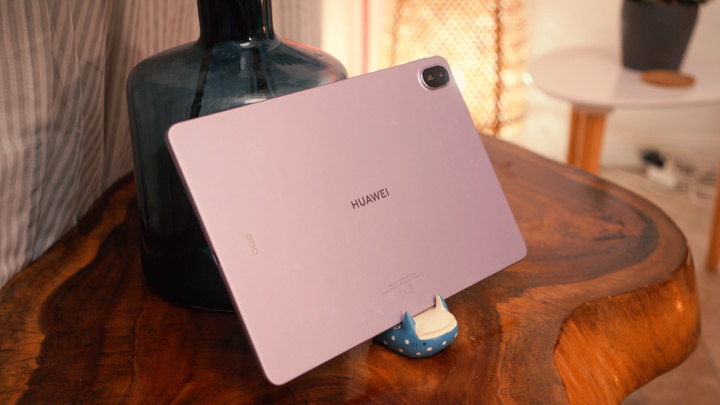
Our review unit came in its Violet colorway, but it’s also available in Space Gray.
The tablet itself is slim at just 6mm and weighs around 500 grams, making the MatePad 11.5 highly portable. The device is clad in glass and aluminum with a matte finish, giving it a modern and minimalist look.

Also found at the back is the 13MP main camera that’s perfect for scanning physical documents and alike. The HUAWEI logo can also be found smack in the middle with metal contact points for first party accessories like the smart keyboard.
Stylus and Accessories
Speaking of accessories, one of the biggest advantages of the MatePad is that it comes bundled with accessories with a single purchase.

This includes the M-Pencil (3rd Gen), which magnetically attaches to the top of the tablet with wireless charging support. With its ultra-low latency, paired with the PaperMatte texture, writing or sketching feels very close to pen-on-paper.

We also get the Smart Keyboard, a compact but surprisingly tactile chicklit keyboard that doubles as a case. It also snaps to the back of the tablet magnetically, and we can even detach and use it untethered when we want to type away from the tablet.
With the help of function key shortcuts a user could even practically use it as a remote.
Display & Multimedia
The HUAWEI MatePad 11.5 (2025) sports an 11.5-inch 2.5K 3:2 FullView TFT LCD panel with a resolution of 2200 × 1440, a smooth 120Hz refresh rate, and 600 nits of peak brightness.

Like we mentioned, this tablet does not sport a typical glossy screen. It features a PaperMatte layer that cuts down glare and reflections, making it much easier to use under bright lighting conditions or during long hours of reading and writing.
Certified by TÜV Rheinland for low blue light and reflection-free comfort, it’s clearly built with eye comfort in mind with a bonus for digital illustrations. Colors are accurate, text looks sharp, and the matte finish makes a huge difference when working in harsh-lit environments.

Do note that colors may not “pop” as much as glossy OLED panels but the more accurately represented color reproduction can also be a pro for some.
For entertainment, the quad STEREO speakers deliver a clear and balanced sound, making this a solid device for watching pre recorded lectures, or streaming our favorite shows and movies on Netflix and alike.

Take note that at the time of writing, even though the tablet’s display gets Widevine L1 certification for streaming video content in 4K and above resolutions, as well as HDR support; streaming content on the more popular apps like Netflix, Youtube, etc. results in Widevine L3 playback only.
The only app so far that can take advantage of its full certification is Amazon Prime Video. And the only workaround for the rest of the most popular streaming apps would be to stream from any installed browser like Chrome or the native one pre-installed.
Performance

Running the tablet’s operations is the brand’s in-house Kirin T82B chipset which features an octa-core processor with clock speeds that reach up to 2.29 GHz. Our review unit is configured with 8GB of RAM and 256GB of internal storage.
While not flagship-level, this setup handles multitasking, productivity, and creative work reliably with the help of its efficient operating system.

It won’t be topping benchmark charts with this tablet, but when it comes to real-world use it handled our day-to-day productivity workflows with ease. We ran into no major issues with casual use like video streaming and quick gaming sessions here and there, with some room for some quick sketches and doodles with the pre-installed GoPaint app.
OS, Apps and UI

Running on HarmonyOS 4.3, the MatePad has plenty of productivity tricks like Multi-Window and App Multiplier, for split-screen multitasking and optimized landscape operation for certain apps. There’s also SuperHub for drag-and-drop sharing across apps, and SuperDevice for transferring seamlessly with other HUAWEI devices.
Google apps also run smoothly thanks to AppGallery’s updated workflows. Whether we’re typing up scripts and articles in Docs, presenting in Meet, or binging videos on YouTube, the experience is much simpler and more reliable in 2025 with almost no qualms.

For digital artworks, GoPaint is a highlight. This is HUAWEI’s answer to Procreate, and it already comes pre-installed for free. Combined with the M-Pencil, it’s a capable tool for digital illustration or casual sketching.
Battery and Charging
Battery life is strong point for this tablet. Inside is a 10,100 mAh battery that supports 40W SuperCharge, producing around 12 hours of screen-on time with typical use.

That’s enough to last through back-to-back lectures, meetings, or long creative sessions. Charging is fairly quick for a tablet of this size, and unlike some competitors, you don’t need to buy a faster charger separately.
Conclusion
The HUAWEI MatePad 11.5 PaperMatte Edition (2025) stands out by offering what most tablets don’t: a complete productivity setup out of the box.
Between the bundled M-Pencil, Smart Keyboard, and pre-installed apps like WPS Office and GoPaint, it’s built for students, young professionals, and creatives who want a laptop-like experience without spending laptop-level money.
At PHP 21,999 we get that nice keyboard included in the box. We’re getting a matte, eye-friendly display, all-day battery life, smooth multitasking software, and the tools to be productive from day one.
Those who missed out on pre-order promos can expect the M-Pencil (3rd Gen) to cost an additional PHP 3,999. It’s a great stylus from the brand for those looking to get their digital illustration skills leveled up!

If you’ve been holding out for a tablet that can truly replace a laptop for school, work, or creative projects, the MatePad 11.5 PaperMatte Edition is one of the smartest buys of 2025, especially for budgets under PHP 30,000.
What we LIKED:
- Overall perfromance
- Nice accessories
- PaperMatte display for drawing
What we Liked LESS:
- Youtube app can still be better optimized
HUAWEI MatePad 11.5 PaperMatte Edition (2025) specs:
11.5-inch TFT LCD display, 2456 × 1600 resolution, 60/90/120Hz refresh rate
Kirin T82B octa-core processor
Mali-G610 GPU
8GB RAM
256GB internal storage
13MP f/1.8 rear camera, autofocus
8MP f/2.0 front camera, fixed focus
Wi-Fi 802.11 a/b/g/n/ac/ax, 2×2 MIMO
Bluetooth 5.2 (BLE, SBC, AAC, LDAC)
USB Type-C (USB 2.0, OTG support)
Quad-speaker system, HUAWEI Histen 9.0
HarmonyOS 4.3
10,100mAh battery, 40W HUAWEI SuperCharge
262.63 × 177.53 × 6.1 mm
515g
Violet, Space Gray (colorways)


but no sim card slot. too consuming for data.