
まだタブレットを単なる大きなスマートフォンだとお考えなら、HUAWEI MatePad 11.5 PaperMatte Edition (2025) がその考えを変えるかもしれません。
今モデルは単なるコンテンツ消費デバイスではなく、フルポータブルな生産性と創造性のワークステーションとして設計されており、キーボード、スタイラス、そしてすぐに作業(または遊び)を開始できるプリインストールアプリが同梱されています。
そしてここが肝心な点ですが、これらすべてをPHP 22,000円未満で手に入れることができます。
では、このタブレットがコンパクトなパッケージでPCのような体験を提供するという約束を本当に果たすのか見てみましょう。
デザインと構築
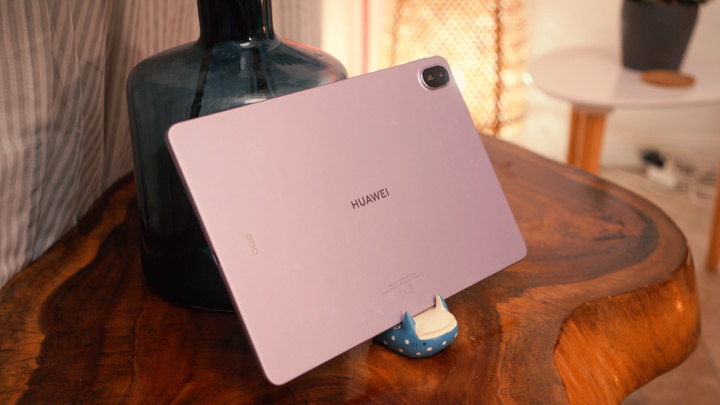
レビュー用ユニットはバイオレットカラーで届きましたが、スペースグレイでも利用可能です。
タブレット本体は厚さ約 6mm と薄く、重量も約 500 グラムで、MatePad 11.5 は非常に携帯性に優れています。ガラスとアルミニウムを組み合わせ、マット仕上げを採用することで、モダンでミニマルなデザインを実現しています。

背面には、物理文書や類似物のスキャンに最適な 13MP メインカメラも搭載されています。また、中央には HUAWEI ロゴが配置され、スマートキーボードなどのファーストパーティ製アクセサリー用の金属接点も備えています。
スタイラスとアクセサリー
アクセサリーについて言えば、MatePadの最大の利点の一つは、単一の購入でアクセサリーが一式付属していることです。

これには、タブレットの上部に磁気式で取り付けられ、ワイヤレス充電に対応するM-Pencil (3rd Gen)が含まれます。超低遅延とペーパーマットテクスチャを組み合わせることで、筆記やスケッチは紙へのペン書きに近い感覚を実現します。

また、コンパクトでありながら驚くほど打鍵感が良い「Smart Keyboard」も用意されています。これはケースとしても機能し、タブレットの背面に磁気式で取り付け可能です。必要に応じて取り外してケーブルなしで使用することもでき、タブレットから離れた場所でもタイピングが可能です。
ファンクションキーのショートカットを活用すれば、ユーザーは実質的にリモコンとして使用することも可能です。
ディスプレイとマルチメディア
HUAWEI MatePad 11.5 (2025) は、解像度 2200 × 1440 の 11.5 インチ 2.5K 3:2 フルビュー TFT LCD パネルを搭載し、滑らかな 120Hz リフレッシュレートとピーク輝度 600 ニトを備えています。

ご説明した通り、このタブレットは一般的な光沢のある画面を採用していません。PaperMatte層を備えており、まぶしさや反射を軽減し、明るい照明下や長時間の読書・執筆時にも使いやすくなっています。
TÜV Rheinland により低ブルーライトおよび反射のない快適性が認証されており、目の快適性を考慮して設計されていることは明らかです。デジタルイラストレーションにも優れています。色は正確で文字は鮮明に表示され、マット仕上げは過酷な照明環境での作業において大きな違いをもたらします。


執筆時点では、このタブレットのディスプレイは 4K 以上の解像度でのストリーミング動画コンテンツに Widevine L1 の認証を取得し、HDR サポートも備えていますが、Netflix や YouTube などより人気のあるアプリでストリーミングコンテンツを再生すると、Widevine L3 による再生のみとなります。
現在、その完全な認定を最大限に活用できる唯一のアプリはAmazon Prime Videoです。その他の最も人気のあるストリーミングアプリに対する唯一の回避策は、Chromeや事前にインストールされているネイティブブラウザなど、インストールされている任意のブラウザからストリーミングすることです。
パフォーマンス

タブレットの動作を担うのは、同ブランドが自社で開発したKirin T82Bチップセットです。このチップセットはオクタコアプロセッサを搭載し、最大2.29 GHzまでのクロック速度を実現しています。当レビュー機は、8GBのRAMと256GBの内部ストレージで構成されています。
フラッグシップレベルではありませんが、このセットアップは効率的なオペレーティングシステムのサポートにより、マルチタスク、生産性、クリエイティブ作業を確実に処理します。

このタブレットではベンチマークチャートの首位を争うことはないでしょうが、実際の使用においては日常の生産性ワークフローを容易に処理しました。動画ストリーミングや時折行う軽いゲームといったカジュアルな利用において大きな問題はなく、プリインストールされたGoPaintアプリで簡単なスケッチや落書きをする余地もあります。
OS, Apps and UI

Running on HarmonyOS 4.3, the MatePad has plenty of productivity tricks like Multi-Window and App Multiplier, for split-screen multitasking and optimized landscape operation for certain apps. There's also SuperHub for drag-and-drop sharing across apps, and SuperDevice for transferring seamlessly with other HUAWEI devices.
Google apps also run smoothly thanks to AppGallery’s updated workflows. Whether we’re typing up scripts and articles in Docs, presenting in Meet, or binging videos on YouTube, the experience is much simpler and more reliable in 2025 with almost no qualms.

For digital artworks, GoPaint is a highlight. This is HUAWEI’s answer to Procreate, and it already comes pre-installed for free. Combined with the M-Pencil, it’s a capable tool for digital illustration or casual sketching.
Battery and Charging
Battery life is strong point for this tablet. Inside is a 10,100 mAh battery that supports 40W SuperCharge, producing around 12 hours of screen-on time with typical use.

That’s enough to last through back-to-back lectures, meetings, or long creative sessions. Charging is fairly quick for a tablet of this size, and unlike some competitors, you don’t need to buy a faster charger separately.
Conclusion
The HUAWEI MatePad 11.5 PaperMatte Edition (2025) stands out by offering what most tablets don’t: a complete productivity setup out of the box.
Between the bundled M-Pencil, Smart Keyboard, and pre-installed apps like WPS Office and GoPaint, it’s built for students, young professionals, and creatives who want a laptop-like experience without spending laptop-level money.
At PHP 21,999 we get that nice keyboard included in the box. We’re getting a matte, eye-friendly display, all-day battery life, smooth multitasking software, and the tools to be productive from day one.
Those who missed out on pre-order promos can expect the M-Pencil (3rd Gen) to cost an additional PHP 3,999. It's a great stylus from the brand for those looking to get their digital illustration skills leveled up!

If you’ve been holding out for a tablet that can truly replace a laptop for school, work, or creative projects, the MatePad 11.5 PaperMatte Edition is one of the smartest buys of 2025, especially for budgets under PHP 30,000.
What we LIKED:
- Overall perfromance
- Nice accessories
- PaperMatte display for drawing
What we Liked LESS:
- Youtube app can still be better optimized
HUAWEI MatePad 11.5 PaperMatte Edition (2025) specs:
11.5-inch TFT LCD display, 2456 × 1600 resolution, 60/90/120Hz refresh rate
Kirin T82B octa-core processor
Mali-G610 GPU
8GB RAM
256GB internal storage
13MP f/1.8 rear camera, autofocus
8MP f/2.0 front camera, fixed focus
Wi-Fi 802.11 a/b/g/n/ac/ax, 2×2 MIMO
Bluetooth 5.2 (BLE, SBC, AAC, LDAC)
USB Type-C (USB 2.0, OTG support)
Quad-speaker system, HUAWEI Histen 9.0
HarmonyOS 4.3
10,100mAh battery, 40W HUAWEI SuperCharge
262.63 × 177.53 × 6.1 mm
515g
Violet, Space Gray (colorways)


but no sim card slot. too consuming for data.