
Adunay daghang mga gaming keyboard sa merkado karon, pero matag panahon, makakita ka og usa ka produkto nga dayon naghatag og maayong unang impresyon bisan pa dili pa kini gisaksak.
Kini ang akong karanasan sa MCHOSE Ace 68 GT.
Apan ang kalidad sa pagtukod lang dili makahimo og maayong keyboard.
Mao ni akong paghunahuna bahin sa MCHOSE Ace 68 GT.
Disenyo ug Kalidad sa Pagtukod
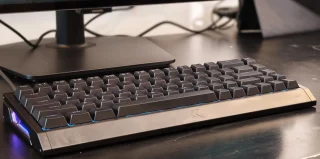
Kini nga mas gagmayng porma sa pagkakita makita dayon sa mga user nga nag-ayo og limpyo nga setup sa lamesa. Kini nag-okupar og gamayng espasyo nga dili medyo kusog, ug naghatag usab og dugang nga lugar alang sa paglihok sa mouse samtang nagdula og dula.
Aronon nga nagkalainlain, mao ang konstruksyon sa aluminyo.
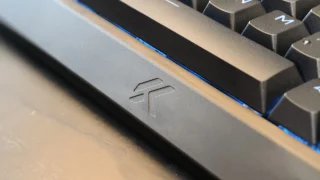
Busa sa daghang mga gaming keyboard nga nag-uban og aluminum top plates ug plastic housing, ang Ace 68 GT gigamit og tibuok aluminum chassis nga morag labing lig-on. Walay makita nga flex o creaking sa bisan unsang bahin sa keyboard. Ang matag parte morag kusog nga gipagsama, naghatag og impresyon nga gihimo kini aron magpadayon.
An gibug-aton usab nagdumala sa kinatibuk-ang karanasan.
Kasagaran sa 1.4kg, ang keyboard klaro nga sa mas bug-at nga kategorya. Sa una, wala ko naglaum nga kini ka bug-at, pero human og dugay na nga paggamit niini, nagsugod ko nga mapadayon ang gahom sa daghang timbang. Gidugangan sa mga rubber feet sa ubos, lig-on nga nagpabilin ang keyboard sa lamesa ug gamay ra nga mosaklit bisan sa panahon sa pagdula og dula.
Siguro, ang timbaw dili para sa tanan. Ang mga user nga regular nga nagdala ilang keyboard padung sa trabaho, eskwelahan, mga turnamyo, o gaming events mahimong makakita nga mas lisod kini dalhan. Apan alang sa permanenteng desk setup, ang timbaw nahimong usa ka niini nga kusog.
Sa design, ang Ace 68 GT naghatag og maayong balanse tali sa minimalist ug gaming nga estetika.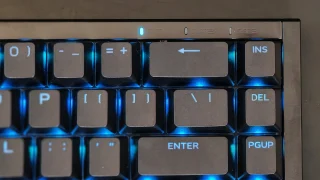
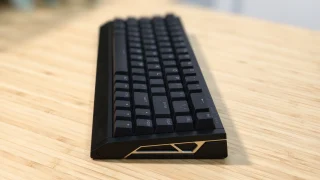
Usa ka gamay nga butang nga gihisgutan mao ang gitas-on sa keyboard.
Kahit adunay gamay nga anggulo sa atubangan nga dako, gikita nako nga ang keyboard medyo mas taas kaysa sa akong kasagaran. Dili kini nakapahinaw, pero samtang nagtrabaho og dugay, makasulod ko og pagkadismaya sa akong mga bukton. Usa ka wrist rest posibleng mao ang solusyon niini ug maghimo sa mas komportable nga paggamit sa dugay nga panahon.
Ana ang Iyang Gidala sa Ace 68 GT
Unsa pa sa iyang premium nga konstruksyon, ang Ace 68 GT usab gipakete og mga feature nga gidisenyo alang sa mga entusiast ug kompetitibong mga magdula.
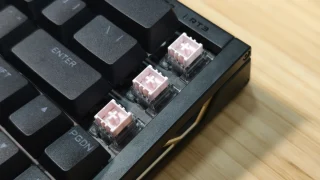
Gamit sa keyboard ang Mount Tai Pink Magnetic Switch GT nga gipares sa usa ka next-generation Hall Effect sensor.
Busa sa mga tradisyonal nga mechanical switches nga nag-depende sa physical contact points aron ma-register ang pagpindot sa butang, ang Hall Effect switches naggamit og magnetic sensing technology. Kini naghatag sa keyboard nga makadetect sa pagpindot sa butang nga mas presiso ug mag-unlock sa advanced features sama sa adjustable actuation ug Rapid Trigger.
Nagpahayag ang MCHOSE nga adunay ultra-low latency nga 0.06ms, 16,000Hz polling rate, ug 256K scan rate. Bisan pa sa kadaghanan sa mga user dili makahimo og sukod niining mga numero sa tinuig nga paggamit, kini nagdugang sa paspas ug responsive nga pagkasensibilyar sa keyboard.
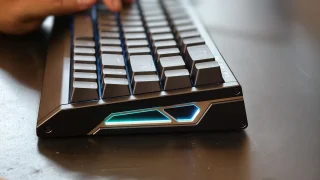
Ang dugang nga mga feature nga nag-focus sa pagdula lakip ang Rapid Trigger, SOCD, Dynamic Keystroke, Mod Tap, Toggle Keys, suporta sa macro, ug lapas nga RGB customization.
Kaalam sa Pag-type
While gaming features are important, most people still spend a significant amount of time typing. For me, much of my testing involved writing articles, checking emails, browsing websites, and handling everyday productivity tasks.
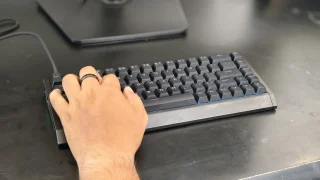
Thankfully, the Ace 68 GT performs well in this area. The keyboard feels quick and responsive during daily use. Every key press feels consistent, and after only a short adjustment period, typing became second nature.
One thing I particularly enjoyed was the sound profile. The switches produce a sound that sits somewhere between quiet and pronounced. It isn't overly loud, but it also doesn't sound muted. The result is a satisfying typing experience that remains pleasant without becoming distracting to people nearby.
The larger keys also performed well during testing. The spacebar, Enter key, Shift keys, and Backspace key all felt stable, and I didn't notice any significant rattling that would negatively affect the overall typing experience.
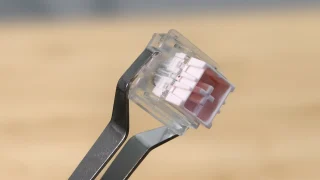
The Hall Effect magnetic switches also contribute significantly to the keyboard's feel.
Compared to traditional mechanical switches, the keys require very little force to activate. This makes the keyboard feel fast and effortless, whether you're typing documents or navigating through daily tasks.
The downside is that the switches can feel almost too sensitive at times.
During my first few days with the keyboard, I occasionally activated keys unintentionally simply because I wasn't used to how little force was required. As I spent more time with the Ace 68 GT, accidental presses became less frequent, but it's still something worth noting for users transitioning from heavier switches.
As for the 65% layout, I adapted to it almost immediately. Since my laptop also uses a relatively compact layout, the transition felt natural. Users coming from full-sized keyboards may require some adjustment time, but the layout provides a good balance between functionality and desk space.
Software Experience
The Ace 68 GT can be configured through both a web-based driver and a desktop application.
Getting started was straightforward. The software can be downloaded directly from MCHOSE's website, and the overall setup process only took a few minutes. The interface itself is easy to understand and doesn't overwhelm users with unnecessary complexity.
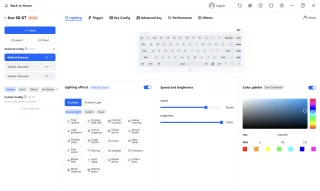
During my testing, I mainly used the software to customize RGB lighting effects. There were enough lighting options available to personalize the keyboard without making the process complicated.
For users who want more advanced customization, the software also provides access to adjustable actuation settings, Rapid Trigger controls, macros, and other performance-related features.
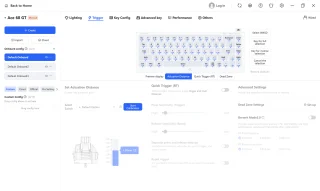
One thing I appreciated was the availability of both web-based and desktop software options. Users who prefer not to install additional programs can simply use the browser-based version, while those who want a dedicated application still have that choice available.
Overall, the software felt polished and easy to use.
Gaming Performance
Gaming is where many of the Ace 68 GT's features begin to make sense.
During my testing, I primarily played Valorant and Dota 2.
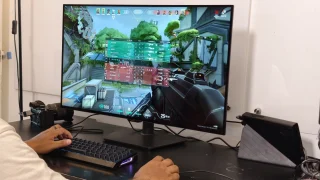
In Valorant, the keyboard immediately felt responsive. Every movement, ability activation, and key press translated directly into in-game actions without feeling delayed.
Compared to some of the keyboards I've used previously, I noticed a slight improvement in responsiveness. It's not the kind of difference that instantly transforms your gameplay, but it does contribute to a more connected and precise feeling during matches.
Part of that responsiveness likely comes from the keyboard's low-latency design, high polling rate, and magnetic switch technology.
The Ace 68 GT also supports Rapid Trigger, which dynamically adjusts key reset points instead of relying on fixed reset distances. This allows keys to react faster when pressed repeatedly and can be useful in competitive titles where quick directional changes matter.
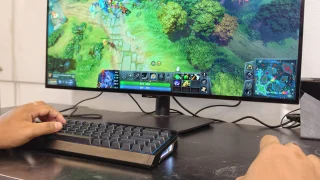
I also played several Dota 2 matches using the keyboard.
Here, the experience was equally enjoyable. Activating skills, using hotkeys, and communicating with teammates felt natural throughout my sessions. The responsive switches and pleasant sound profile combined to create an enjoyable gaming experience overall.
The only downside I encountered while gaming was related to the switches' sensitivity.
Because the keys require very little force to activate, there were moments when I accidentally pressed the spacebar or nearby keys. This wasn't a constant issue, but it happened often enough to be worth mentioning.
For users who prefer lighter switches, this may not be a problem. Those coming from heavier mechanical switches, however, should expect a short adjustment period.
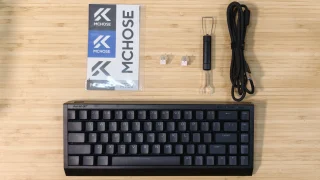
What's in the Box
- MCHOSE Ace 68 GT Keyboard
- USB Type-C Cable
- Key & Switch Puller
- 2 Spare Switches
- Dust Cover
- Function Card
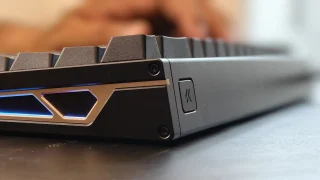
Price and availability
The MCHOSE Ace 68 GT is priced at USD 149 (around PHP 8,500) and is available through the official MCHOSE online store. It comes in Cyber Violet, Black Gold, Aero Silver, Champagne, and Crystal Pink color options.
Conclusion
What We Like
- Premium full aluminum construction
- Clean design that works for gaming and productivity setups
- Stable and heavy design that stays firmly in place
- Pleasant sound profile
- Adjustable actuation and Rapid Trigger support
- Bright but balanced RGB lighting
What We Don't Like
- Keyboard height may encourage users to use a wrist rest
- Switches can feel overly sensitive at first
- Wired-only design
- Heavy weight may not appeal to users who frequently travel
The MCHOSE Ace 68 GT left a positive impression during my time with it.
Its aluminum construction immediately gives it a premium feel, while the responsive Hall Effect switches, satisfying sound profile, and stable design make it enjoyable to use for both work and gaming.
The keyboard also backs up its gaming-focused positioning with features such as adjustable actuation, Rapid Trigger, SOCD support, and an easy-to-use customization software.
It's not a keyboard I would recommend for users who frequently move their setup around. Its wired-only design and heavier weight make it better suited for a permanent desk setup.
However, if you're looking for a compact gaming keyboard that combines premium materials, strong build quality, responsive performance, and a clean design, the MCHOSE Ace 68 GT is an easy keyboard to appreciate.
MCHOSE Ace 68 GT specs:
65% ANSI layout
0.06ms latency
16KHz polling rate
256K scan rate
0.001mm precision
0.1–3.4mm adjustable actuation
0.001–3.4mm rapid trigger
Mount Tai Pink Magnetic Switch GT
Next-Gen Hall Effect Sensor
Dual-Core 512MHz MCU
In-House Tianwen Solution system
Carbon Fiber (Black / Silver) plate
Cherry Profile PBT (Shine-through) / Frosted Translucent (Selected Colors) keycaps
North-Facing ARGB lighting
SOCD / RS / DKS / MT / TGL / Macros functions
Web Driver (No Install) / Desktop Driver software
320.0 × 127.8 × 37.6 mm size
1440g ±2g weight
Colors: Cyber Violet, Black Gold, Aero Silver, Champagne, Crystal Pink.




0 Comments
Leave a Reply