
Hoy en día hay muchos teclados para juegos en el mercado, pero de vez en cuando, te encuentras con un producto que deja una excelente primera impresión incluso antes de conectarlo.
Esa fue mi experiencia con el MCHOSE Ace 68 GT.
Lo primero que llamó mi atención no fue su iluminación RGB ni sus características enfocadas en juegos. Fue el peso. En el momento en que lo tomé, inmediatamente se sintió más premium que la mayoría de los teclados para gaming que he usado recientemente. Su construcción completa de aluminio le da una sensación sólida y sustancial que destaca de inmediato.
Pero la calidad de construcción por sí sola no hace un buen teclado.Aquí está mi opinión sobre el MCHOSE Ace 68 GT.

Diseño y Calidad de Construcción
El Ace 68 GT es un teclado compacto de 65%, lo que significa que elimina el teclado numérico y algunas teclas adicionales presentes en diseños más grandes, manteniendo las esenciales al alcance.
Para los usuarios que prefieren una configuración de escritorio más limpia, la huella más pequeña es inmediatamente notable. Ocupa menos espacio sin sentirse demasiado apretado, y también deja más espacio para el movimiento del ratón al jugar.
Lo que realmente destaca, sin embargo, es la construcción de aluminio.
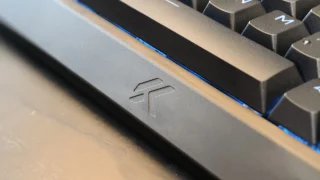
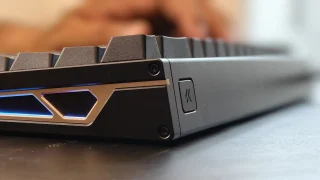
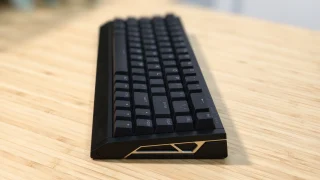
A diferencia de muchos teclados para juegos que combinan placas superiores de aluminio con carcasas de plástico, el Ace 68 GT utiliza un chasis completamente de aluminio que se siente excepcionalmente robusto. No hay flexión ni crujidos perceptibles en ninguna parte del teclado. Cada componente parece estar ensamblado con precisión, dando la impresión de que fue construido para durar.
El peso también juega un papel importante en la experiencia general.
Aproximadamente a las 1.4kg, el teclado definitivamente es de un peso considerable. Inicialmente, no esperaba que fuera tan pesado, pero después de pasar más tiempo con él, comencé a apreciar el peso adicional. Combinado con las patas de goma en la parte inferior, el teclado se mantiene firmemente asentado sobre el escritorio y rara vez se desplaza, incluso durante sesiones de juego.
Ciertamente, el peso no será para todos. Los usuarios que llevan regularmente su teclado al trabajo, la escuela, torneos o eventos de juego pueden encontrarlo menos conveniente de transportar. Sin embargo, para una configuración de escritorio permanente, el peso se convierte en una de sus fortalezas.
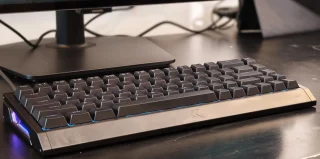
Diseño: el Ace 68 GT logra un equilibrio agradable entre estética minimalista y de juegos.
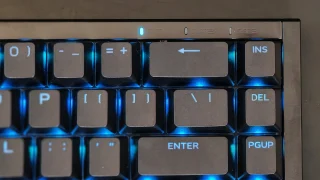
La iluminación RGB sigue el mismo enfoque. La luz es lo suficientemente brillante para darle al teclado un aspecto colorido, pero nunca se siente excesiva ni distractora. Añade personalidad sin desviar la atención del diseño general.
Una pequeña cosa que vale la pena mencionar es la altura del teclado.
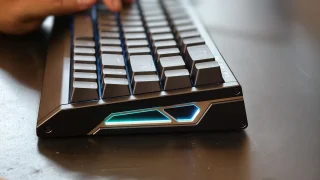
Aunque el borde frontal tiene un ligero ángulo, aún encontré que el teclado es un poco más alto de lo que estoy personalmente acostumbrado. No era incómodo, pero durante sesiones más largas, pude sentir cómo se acumulaba tensión en mis muñecas. Un reposamuñecas probablemente resolvería este problema y haría el uso prolongado más cómodo.
Lo que el Ace 68 GT aporta a la mesa
Además de su construcción premium, el Ace 68 GT también viene cargado con características dirigidas a entusiastas y jugadores competitivos.
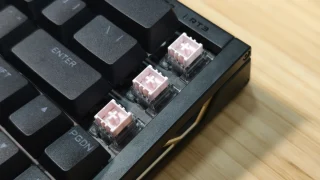
El teclado utiliza interruptores magnéticos GT de color Rosa Monte Tai, combinados con un sensor de efecto Hall de próxima generación.
A diferencia de los interruptores mecánicos tradicionales que dependen de puntos de contacto físico para registrar las pulsaciones, los interruptores de efecto Hall utilizan tecnología de detección magnética. Esto permite que el teclado detecte las pulsaciones con mayor precisión y desbloquee funciones avanzadas como la actuación ajustable y el disparo rápido (Rapid Trigger).
MCHOSE afirma una latencia ultra baja de 0.06ms, una tasa de sondeo de 16,000Hz y una tasa de escaneo de 256K. Aunque la mayoría de los usuarios no podrá medir esos números en el uso real, contribuyen a la sensación rápida y receptiva del teclado.
El Ace 68 GT también soporta una actuación ajustable desde 0.1mm hasta 3.4mm, permitiendo a los usuarios personalizar la sensibilidad de cada tecla. Los jugadores pueden configurar distancias de actuación extremadamente cortas para entradas más rápidas, mientras que otros pueden preferir puntos de actuación más profundos para reducir las pulsaciones accidentales.
Las características adicionales centradas en los juegos incluyen Rapid Trigger, SOCD, Teclado Dinámico, Mod Tap, Teclas de Conmutación, soporte para macros y una amplia personalización RGB.
Experiencia de escritura
While gaming features are important, most people still spend a significant amount of time typing. For me, much of my testing involved writing articles, checking emails, browsing websites, and handling everyday productivity tasks.
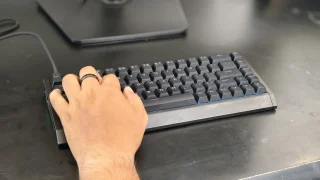
Thankfully, the Ace 68 GT performs well in this area. The keyboard feels quick and responsive during daily use. Every key press feels consistent, and after only a short adjustment period, typing became second nature.
One thing I particularly enjoyed was the sound profile. The switches produce a sound that sits somewhere between quiet and pronounced. It isn't overly loud, but it also doesn't sound muted. The result is a satisfying typing experience that remains pleasant without becoming distracting to people nearby.
The larger keys also performed well during testing. The spacebar, Enter key, Shift keys, and Backspace key all felt stable, and I didn't notice any significant rattling that would negatively affect the overall typing experience.
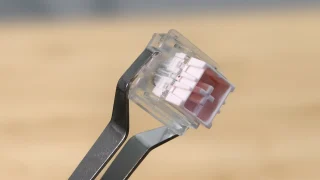
The Hall Effect magnetic switches also contribute significantly to the keyboard's feel.
Compared to traditional mechanical switches, the keys require very little force to activate. This makes the keyboard feel fast and effortless, whether you're typing documents or navigating through daily tasks.
The downside is that the switches can feel almost too sensitive at times.
During my first few days with the keyboard, I occasionally activated keys unintentionally simply because I wasn't used to how little force was required. As I spent more time with the Ace 68 GT, accidental presses became less frequent, but it's still something worth noting for users transitioning from heavier switches.
As for the 65% layout, I adapted to it almost immediately. Since my laptop also uses a relatively compact layout, the transition felt natural. Users coming from full-sized keyboards may require some adjustment time, but the layout provides a good balance between functionality and desk space.
Software Experience
The Ace 68 GT can be configured through both a web-based driver and a desktop application.
Getting started was straightforward. The software can be downloaded directly from MCHOSE's website, and the overall setup process only took a few minutes. The interface itself is easy to understand and doesn't overwhelm users with unnecessary complexity.
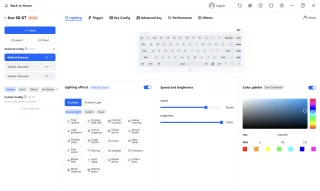
During my testing, I mainly used the software to customize RGB lighting effects. There were enough lighting options available to personalize the keyboard without making the process complicated.
For users who want more advanced customization, the software also provides access to adjustable actuation settings, Rapid Trigger controls, macros, and other performance-related features.
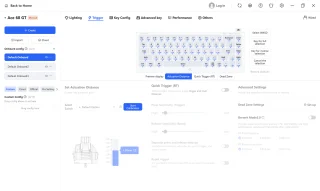
One thing I appreciated was the availability of both web-based and desktop software options. Users who prefer not to install additional programs can simply use the browser-based version, while those who want a dedicated application still have that choice available.
Overall, the software felt polished and easy to use.
Gaming Performance
Gaming is where many of the Ace 68 GT's features begin to make sense.
During my testing, I primarily played Valorant and Dota 2.
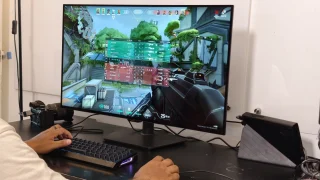
In Valorant, the keyboard immediately felt responsive. Every movement, ability activation, and key press translated directly into in-game actions without feeling delayed.
Compared to some of the keyboards I've used previously, I noticed a slight improvement in responsiveness. It's not the kind of difference that instantly transforms your gameplay, but it does contribute to a more connected and precise feeling during matches.
Part of that responsiveness likely comes from the keyboard's low-latency design, high polling rate, and magnetic switch technology.
The Ace 68 GT also supports Rapid Trigger, which dynamically adjusts key reset points instead of relying on fixed reset distances. This allows keys to react faster when pressed repeatedly and can be useful in competitive titles where quick directional changes matter.
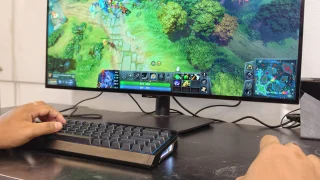
I also played several Dota 2 matches using the keyboard.
Here, the experience was equally enjoyable. Activating skills, using hotkeys, and communicating with teammates felt natural throughout my sessions. The responsive switches and pleasant sound profile combined to create an enjoyable gaming experience overall.
The only downside I encountered while gaming was related to the switches' sensitivity.
Because the keys require very little force to activate, there were moments when I accidentally pressed the spacebar or nearby keys. This wasn't a constant issue, but it happened often enough to be worth mentioning.
For users who prefer lighter switches, this may not be a problem. Those coming from heavier mechanical switches, however, should expect a short adjustment period.
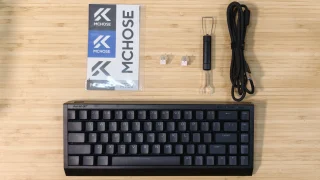
What's in the Box
- MCHOSE Ace 68 GT Keyboard
- USB Type-C Cable
- Key & Switch Puller
- 2 Spare Switches
- Dust Cover
- Function Card
Price and availability
The MCHOSE Ace 68 GT is priced at USD 149 (around PHP 8,500) and is available through the official MCHOSE online store. It comes in Cyber Violet, Black Gold, Aero Silver, Champagne, and Crystal Pink color options.
Conclusion
What We Like
- Premium full aluminum construction
- Clean design that works for gaming and productivity setups
- Stable and heavy design that stays firmly in place
- Pleasant sound profile
- Adjustable actuation and Rapid Trigger support
- Bright but balanced RGB lighting
What We Don't Like
- Keyboard height may encourage users to use a wrist rest
- Switches can feel overly sensitive at first
- Wired-only design
- Heavy weight may not appeal to users who frequently travel
The MCHOSE Ace 68 GT left a positive impression during my time with it.
Its aluminum construction immediately gives it a premium feel, while the responsive Hall Effect switches, satisfying sound profile, and stable design make it enjoyable to use for both work and gaming.
The keyboard also backs up its gaming-focused positioning with features such as adjustable actuation, Rapid Trigger, SOCD support, and an easy-to-use customization software.
It's not a keyboard I would recommend for users who frequently move their setup around. Its wired-only design and heavier weight make it better suited for a permanent desk setup.
However, if you're looking for a compact gaming keyboard that combines premium materials, strong build quality, responsive performance, and a clean design, the MCHOSE Ace 68 GT is an easy keyboard to appreciate.
MCHOSE Ace 68 GT specs:
65% ANSI layout
0.06ms latency
16KHz polling rate
256K scan rate
0.001mm precision
0.1–3.4mm adjustable actuation
0.001–3.4mm rapid trigger
Mount Tai Pink Magnetic Switch GT
Next-Gen Hall Effect Sensor
Dual-Core 512MHz MCU
In-House Tianwen Solution system
Carbon Fiber (Black / Silver) plate
Cherry Profile PBT (Shine-through) / Frosted Translucent (Selected Colors) keycaps
North-Facing ARGB lighting
SOCD / RS / DKS / MT / TGL / Macros functions
Web Driver (No Install) / Desktop Driver software
320.0 × 127.8 × 37.6 mm size
1440g ±2g weight
Colors: Cyber Violet, Black Gold, Aero Silver, Champagne, Crystal Pink.




0 Comments
Leave a Reply