
Pada saat ini terdapat banyak keyboard gaming di pasaran, namun sesekali Anda menemukan produk yang langsung memberikan kesan pertama yang baik bahkan sebelum Anda mencolokkannya.
Berikut pengalaman saya dengan MCHOSE Ace 68 GT.
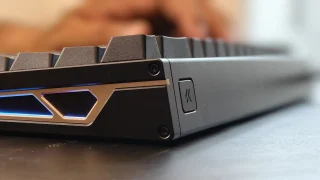
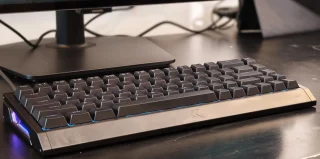
Bukan lampu RGB atau fitur yang berfokus pada permainan yang pertama kali menarik perhatian saya. Justru bobotnya. Saat saya mengangkatnya, langsung terasa lebih premium dibandingkan sebagian besar keyboard gaming yang pernah saya gunakan belakangan ini. Konstruksi alumunium utuh memberikannya kesan kokoh dan substansial yang langsung mencolok.
Tetapi kualitas konstruksi saja tidak membuat keyboard yang baik.
Inilah pendapat saya tentang MCHOSE Ace 68 GT.

Desain dan Kualitas Bangunan
Ace 68 GT adalah keyboard kompak berukuran 65%, yang berarti ia menghilangkan numpad dan beberapa tombol tambahan yang ditemukan pada tata letak lebih besar, sambil tetap menjaga fungsi esensial tetap mudah dijangkau.
Bagi pengguna yang lebih menyukai pengaturan meja yang lebih bersih, jejak yang lebih kecil langsung terasa. Perangkat ini menempati ruang lebih sedikit tanpa terasa terlalu sempit, dan juga menyisakan lebih banyak ruang untuk pergerakan mouse saat bermain game.
Apa yang benar-benar menonjol, bagaimanapun, adalah konstruksi aluminiumnya.
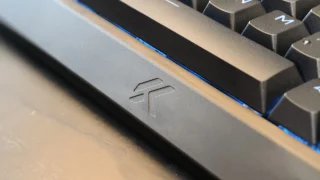
Berbeda dengan banyak papan ketik gaming yang menggabungkan pelat atas aluminium dengan bodi plastik, Ace 68 GT menggunakan sasis aluminium penuh yang terasa sangat kokoh. Tidak ada kelenturan atau suara berderit yang terdeteksi di mana pun pada papan ketik ini. Setiap bagian terasa dirakit dengan erat, memberikan kesan bahwa produk ini dibangun untuk tahan lama.
Berat juga memainkan peran utama dalam pengalaman secara keseluruhan.
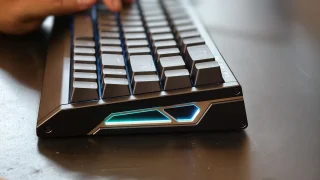
Kira-kira 1.4kg, keyboard ini memang termasuk yang cukup berat. Awalnya, saya tidak menyangka seberat ini, tetapi setelah lebih lama menggunakannya, saya mulai menghargai bobot tambahannya. Dipadukan dengan kaki karet di bagian bawah, keyboard tetap kokoh menempel di meja dan jarang bergeser, bahkan selama sesi gaming.
Tentu saja, bobotnya tidak akan cocok untuk semua orang. Pengguna yang secara teratur membawa keyboard mereka ke kantor, sekolah, turnamen, atau acara gaming mungkin menganggapnya kurang praktis untuk dibawa-bawa. Namun, untuk setup meja permanen, bobot tersebut justru menjadi salah satu kekuatannya.
Dari segi desain, Ace 68 GT mencapai keseimbangan yang baik antara estetika minimalis dan gaming.
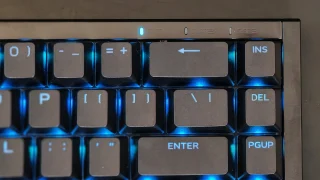
Pencahayaan RGB mengikuti pendekatan yang sama. Pencahayaannya cukup terang untuk memberikan tampilan berwarna-warni pada keyboard, namun tidak pernah terasa berlebihan atau mengganggu. Ini menambah kepribadian tanpa mengalihkan perhatian dari desain keseluruhan.
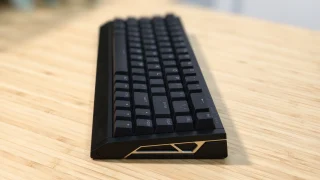
Satu hal kecil yang patut disebutkan adalah tinggi keyboardnya.
Sementara tepi depan memiliki sedikit kemiringan, saya masih merasa keyboard ini agak lebih tinggi dari yang biasa saya gunakan. Ini tidak tidak nyaman, namun selama sesi yang lebih lama, saya bisa merasakan ketegangan mulai muncul di pergelangan tangan saya. Wrist rest kemungkinan akan menyelesaikan masalah ini dan membuat penggunaan dalam jangka panjang lebih nyaman.
Apa yang Dibawa Ace 68 GT ke Meja
Selain konstruksi premiumnya, Ace 68 GT juga dilengkapi dengan fitur-fitur yang ditujukan bagi para penggemar dan gamer kompetitif.
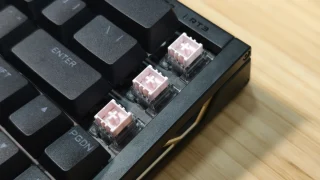
Papan ketik ini menggunakan sakelar magnetik GT Mount Tai Pink yang dipasangkan dengan sensor Efek Hall generasi berikutnya.
Berbeda dengan sakelar mekanis tradisional yang mengandalkan titik kontak fisik untuk mendaftarkan penekanan tombol, sakelar Hall Effect menggunakan teknologi sensor magnetik. Hal ini memungkinkan keyboard mendeteksi penekanan tombol dengan presisi lebih tinggi dan membuka fitur canggih seperti actuation yang dapat disesuaikan dan Rapid Trigger.
MCHOSE mengklaim latensi ultra-rendah sebesar 0.06ms, tingkat polling 16,000Hz, dan tingkat pemindaian 256K. Meskipun sebagian besar pengguna tidak akan dapat mengukur angka-angka tersebut dalam penggunaan dunia nyata, angka-angka ini berkontribusi pada sensasi keyboard yang cepat dan responsif.
Ace 68 GT juga mendukung pengaturan aktualisasi yang dapat disesuaikan dari 0.1mm hingga 3.4mm, memungkinkan pengguna untuk menyesuaikan seberapa sensitif setiap tombol terasa. Gamer dapat mengatur jarak aktualisasi yang sangat pendek untuk input yang lebih cepat, sementara yang lain mungkin lebih memilih titik aktualisasi yang lebih dalam untuk mengurangi penekanan tombol yang tidak disengaja.
Fitur tambahan yang berfokus pada permainan meliputi Rapid Trigger, SOCD, Dinamik Ketikan, Mod Tap, Tombol Toggle, dukungan makro, dan kustomisasi RGB yang luas.
Pengalaman Mengetik
While gaming features are important, most people still spend a significant amount of time typing. For me, much of my testing involved writing articles, checking emails, browsing websites, and handling everyday productivity tasks.
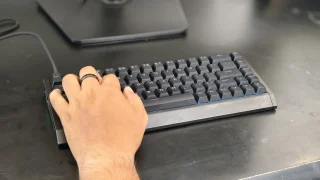
Thankfully, the Ace 68 GT performs well in this area. The keyboard feels quick and responsive during daily use. Every key press feels consistent, and after only a short adjustment period, typing became second nature.
One thing I particularly enjoyed was the sound profile. The switches produce a sound that sits somewhere between quiet and pronounced. It isn't overly loud, but it also doesn't sound muted. The result is a satisfying typing experience that remains pleasant without becoming distracting to people nearby.
The larger keys also performed well during testing. The spacebar, Enter key, Shift keys, and Backspace key all felt stable, and I didn't notice any significant rattling that would negatively affect the overall typing experience.
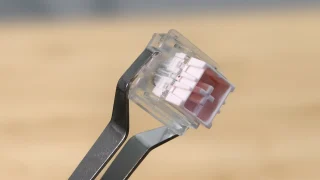
The Hall Effect magnetic switches also contribute significantly to the keyboard's feel.
Compared to traditional mechanical switches, the keys require very little force to activate. This makes the keyboard feel fast and effortless, whether you're typing documents or navigating through daily tasks.
The downside is that the switches can feel almost too sensitive at times.
During my first few days with the keyboard, I occasionally activated keys unintentionally simply because I wasn't used to how little force was required. As I spent more time with the Ace 68 GT, accidental presses became less frequent, but it's still something worth noting for users transitioning from heavier switches.
As for the 65% layout, I adapted to it almost immediately. Since my laptop also uses a relatively compact layout, the transition felt natural. Users coming from full-sized keyboards may require some adjustment time, but the layout provides a good balance between functionality and desk space.
Software Experience
The Ace 68 GT can be configured through both a web-based driver and a desktop application.
Getting started was straightforward. The software can be downloaded directly from MCHOSE's website, and the overall setup process only took a few minutes. The interface itself is easy to understand and doesn't overwhelm users with unnecessary complexity.
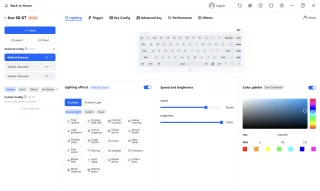
During my testing, I mainly used the software to customize RGB lighting effects. There were enough lighting options available to personalize the keyboard without making the process complicated.
For users who want more advanced customization, the software also provides access to adjustable actuation settings, Rapid Trigger controls, macros, and other performance-related features.
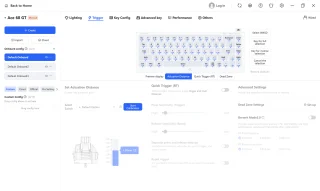
One thing I appreciated was the availability of both web-based and desktop software options. Users who prefer not to install additional programs can simply use the browser-based version, while those who want a dedicated application still have that choice available.
Overall, the software felt polished and easy to use.
Gaming Performance
Gaming is where many of the Ace 68 GT's features begin to make sense.
During my testing, I primarily played Valorant and Dota 2.
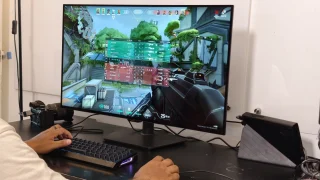
In Valorant, the keyboard immediately felt responsive. Every movement, ability activation, and key press translated directly into in-game actions without feeling delayed.
Compared to some of the keyboards I've used previously, I noticed a slight improvement in responsiveness. It's not the kind of difference that instantly transforms your gameplay, but it does contribute to a more connected and precise feeling during matches.
Part of that responsiveness likely comes from the keyboard's low-latency design, high polling rate, and magnetic switch technology.
The Ace 68 GT also supports Rapid Trigger, which dynamically adjusts key reset points instead of relying on fixed reset distances. This allows keys to react faster when pressed repeatedly and can be useful in competitive titles where quick directional changes matter.
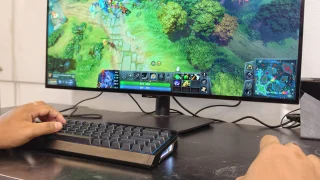
I also played several Dota 2 matches using the keyboard.
Here, the experience was equally enjoyable. Activating skills, using hotkeys, and communicating with teammates felt natural throughout my sessions. The responsive switches and pleasant sound profile combined to create an enjoyable gaming experience overall.
The only downside I encountered while gaming was related to the switches' sensitivity.
Because the keys require very little force to activate, there were moments when I accidentally pressed the spacebar or nearby keys. This wasn't a constant issue, but it happened often enough to be worth mentioning.
For users who prefer lighter switches, this may not be a problem. Those coming from heavier mechanical switches, however, should expect a short adjustment period.
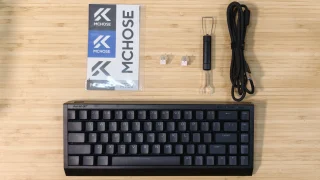
What's in the Box
- MCHOSE Ace 68 GT Keyboard
- USB Type-C Cable
- Key & Switch Puller
- 2 Spare Switches
- Dust Cover
- Function Card
Price and availability
The MCHOSE Ace 68 GT is priced at USD 149 (around PHP 8,500) and is available through the official MCHOSE online store. It comes in Cyber Violet, Black Gold, Aero Silver, Champagne, and Crystal Pink color options.
Conclusion
What We Like
- Premium full aluminum construction
- Clean design that works for gaming and productivity setups
- Stable and heavy design that stays firmly in place
- Pleasant sound profile
- Adjustable actuation and Rapid Trigger support
- Bright but balanced RGB lighting
What We Don't Like
- Keyboard height may encourage users to use a wrist rest
- Switches can feel overly sensitive at first
- Wired-only design
- Heavy weight may not appeal to users who frequently travel
The MCHOSE Ace 68 GT left a positive impression during my time with it.
Its aluminum construction immediately gives it a premium feel, while the responsive Hall Effect switches, satisfying sound profile, and stable design make it enjoyable to use for both work and gaming.
The keyboard also backs up its gaming-focused positioning with features such as adjustable actuation, Rapid Trigger, SOCD support, and an easy-to-use customization software.
It's not a keyboard I would recommend for users who frequently move their setup around. Its wired-only design and heavier weight make it better suited for a permanent desk setup.
However, if you're looking for a compact gaming keyboard that combines premium materials, strong build quality, responsive performance, and a clean design, the MCHOSE Ace 68 GT is an easy keyboard to appreciate.
MCHOSE Ace 68 GT specs:
65% ANSI layout
0.06ms latency
16KHz polling rate
256K scan rate
0.001mm precision
0.1–3.4mm adjustable actuation
0.001–3.4mm rapid trigger
Mount Tai Pink Magnetic Switch GT
Next-Gen Hall Effect Sensor
Dual-Core 512MHz MCU
In-House Tianwen Solution system
Carbon Fiber (Black / Silver) plate
Cherry Profile PBT (Shine-through) / Frosted Translucent (Selected Colors) keycaps
North-Facing ARGB lighting
SOCD / RS / DKS / MT / TGL / Macros functions
Web Driver (No Install) / Desktop Driver software
320.0 × 127.8 × 37.6 mm size
1440g ±2g weight
Colors: Cyber Violet, Black Gold, Aero Silver, Champagne, Crystal Pink.




0 Comments
Leave a Reply