
오늘날 시장에는 수많은 게이밍 키보드가 있지만, 가끔은 전원을 연결하기도 전에 바로 좋은 첫인상을 주는 제품이 등장합니다.
그것이 제가 MCHOSE Ace 68 GT 를 사용하며 겪은 경험입니다.
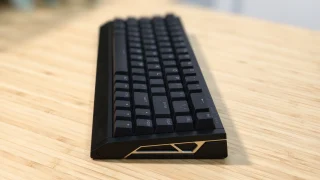
제가 먼저 눈여겨본 것은 RGB 조명이나 게이밍 중심 기능들이 아니었습니다. 무게였습니다. 이 제품을 손에 들자마자 최근 사용해 본 대부분의 게이밍 키보드들보다 훨씬 프리미엄한 느낌을 주었습니다. 전체 알루미늄 구조는 단단하고 견고한 감촉을 주어 한눈에 돋보이게 합니다.
하지만 빌드 품질만으로는 좋은 키보드가 되지 않습니다.
MCHOSE Ace 68 GT에 대한 제 생각을 공유합니다.

디자인 및 빌드 품질
Ace 68 GT 는 컴팩트한 65% 키보드로, 큰 레이아웃에 있는 숫자 패드와 일부 추가 키를 제거하면서도 핵심 기능은 손쉽게 사용할 수 있도록 설계되었습니다.
더 깔끔한 데스크 세트를 선호하는 사용자에게는 더 작은 발자국이 즉시 눈에 띕니다. 공간을 덜 차지하면서도 너무 답답하지 않으며, 게임 시 마우스 이동에 더 많은 여유 공간도 확보해 줍니다.
그러나 정말 돋보이는 점은 알루미늄 구조입니다.
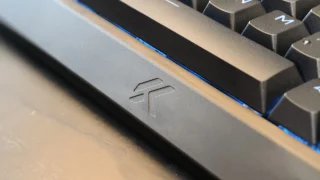
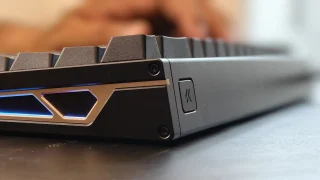
많은 게이밍 키보드가 알루미늄 상판과 플라스틱 하우징을 결합하는 것과 달리, Ace 68 GT는 전체 알루미늄 차시를採用하여 매우 튼튼한 느낌을 줍니다. 키보드 어디에서도 눈에 띄는 휨이나 삐걱거림이 없습니다. 모든 부품이 단단히 조립되어 있어 내구성을 위해 제작된 듯한 인상을 줍니다.
무게 또한 전반적인 경험에서 중요한 역할을 합니다.
1.4kg경에 키보드는 확실히 무거운 편입니다. 처음에는 이렇게 무거울 줄 몰랐지만, 더 오래 사용해 보니 추가된 무게가 오히려 마음에 들기 시작했습니다. 바닥의 고무 패드와 결합되어 키보드가 책상 위에 단단히 고정되어 있어 게임 세션 중에도 거의 움직이지 않습니다.물론 무게가 모든 사람에게 적합하지는 않습니다. 키보드를 직장에 학교, 토너먼트 또는 게이밍 이벤트에 정기적으로 휴대하는 사용자는 휴대하기가 덜 편리할 수 있습니다. 그러나 영구적인 데스크톱 설정의 경우 이 무게는 오히려 강점이 됩니다.
디자인 측면에서 Ace 68 GT는 미니멀리즘과 게이밍 감성 사이에서 훌륭한 균형을 이룹니다.
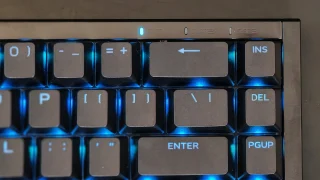
언급할 만한 작은 한 가지 사항은 키보드의 높이입니다.
전면 가장자리가 약간 경사져 있지만, 키보드가 제가 평소 익숙한 것보다 조금 더 높게 느껴졌습니다. 불편할 정도는 아니었지만, 장시간 사용 시 손목에 피로감이 쌓이는 것을 느낄 수 있었습니다. 손목 받침대를 사용하면 이 문제를 해결하고 장기간 사용 시에도 더 편안하게 사용할 수 있을 것입니다.
Ace 68 GT 가 제공하는 것들
프리미엄 제작을 넘어, Ace 68 GT는 엔터테이너와 경쟁 게이머를 위한 다양한 기능이 탑재되어 있습니다.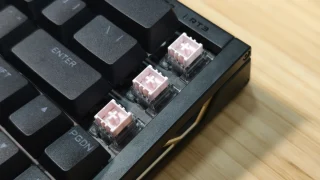
이 키보드는 마운타이 핑크 자기 스위치 GT와 차세대 홀 효과 센서를 결합하여 사용합니다.
물리적 접촉점을 통해 키 입력을 감지하는 기존 기계식 스위치와 달리, 홀 효과 스위치는 자기 센싱 기술을 사용합니다. 이를 통해 키보드는 더 높은 정밀도로 키 입력을 감지하고 조정 가능한 작동 거리 및 Rapid Trigger 와 같은 고급 기능을 활용할 수 있습니다.
MCHOSE는 0.06ms의 초저지연, 16,000Hz 폴링 레이트 및 256K 스캔 레이트를 주장합니다. 대부분의 사용자가 실제 사용 환경에서 이러한 수치를 측정할 수는 없으나, 이는 키보드의 빠르고 반응이 빠른 느낌을 만들어내는 요소입니다.
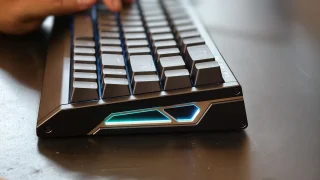
Ace 68 GT는 또한 0.1mm에서 3.4mm까지 조절 가능한 액추에이션을 지원하여 사용자가 각 키의 감도를 사용자 정의할 수 있습니다. 게이머는 더 빠른 입력을 위해 극도로 짧은 액추에이션 거리를 설정할 수 있는 반면, 다른 사용자는 실수 키 입력을 줄이기 위해 더 깊은 액추에이션 포인트를 선호할 수 있습니다.
추가적인 게이밍 중심 기능으로는 Rapid Trigger, SOCD, Dynamic Keystroke, Mod Tap, Toggle Keys, 매크로 지원 및 광범위한 RGB 커스터마이징이 포함됩니다.
타이핑 경험
While gaming features are important, most people still spend a significant amount of time typing. For me, much of my testing involved writing articles, checking emails, browsing websites, and handling everyday productivity tasks.
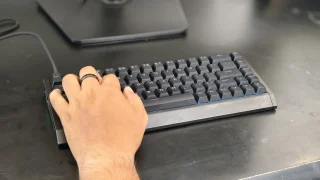
Thankfully, the Ace 68 GT performs well in this area. The keyboard feels quick and responsive during daily use. Every key press feels consistent, and after only a short adjustment period, typing became second nature.
One thing I particularly enjoyed was the sound profile. The switches produce a sound that sits somewhere between quiet and pronounced. It isn't overly loud, but it also doesn't sound muted. The result is a satisfying typing experience that remains pleasant without becoming distracting to people nearby.
The larger keys also performed well during testing. The spacebar, Enter key, Shift keys, and Backspace key all felt stable, and I didn't notice any significant rattling that would negatively affect the overall typing experience.
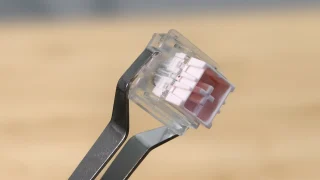
The Hall Effect magnetic switches also contribute significantly to the keyboard's feel.
Compared to traditional mechanical switches, the keys require very little force to activate. This makes the keyboard feel fast and effortless, whether you're typing documents or navigating through daily tasks.
The downside is that the switches can feel almost too sensitive at times.
During my first few days with the keyboard, I occasionally activated keys unintentionally simply because I wasn't used to how little force was required. As I spent more time with the Ace 68 GT, accidental presses became less frequent, but it's still something worth noting for users transitioning from heavier switches.
As for the 65% layout, I adapted to it almost immediately. Since my laptop also uses a relatively compact layout, the transition felt natural. Users coming from full-sized keyboards may require some adjustment time, but the layout provides a good balance between functionality and desk space.
Software Experience
The Ace 68 GT can be configured through both a web-based driver and a desktop application.
Getting started was straightforward. The software can be downloaded directly from MCHOSE's website, and the overall setup process only took a few minutes. The interface itself is easy to understand and doesn't overwhelm users with unnecessary complexity.
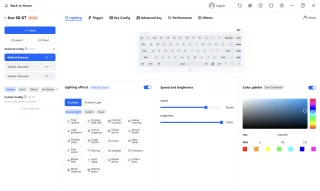
During my testing, I mainly used the software to customize RGB lighting effects. There were enough lighting options available to personalize the keyboard without making the process complicated.
For users who want more advanced customization, the software also provides access to adjustable actuation settings, Rapid Trigger controls, macros, and other performance-related features.
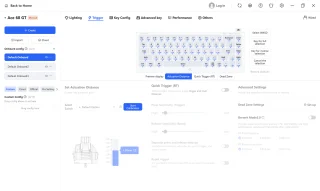
One thing I appreciated was the availability of both web-based and desktop software options. Users who prefer not to install additional programs can simply use the browser-based version, while those who want a dedicated application still have that choice available.
Overall, the software felt polished and easy to use.
Gaming Performance
Gaming is where many of the Ace 68 GT's features begin to make sense.
During my testing, I primarily played Valorant and Dota 2.
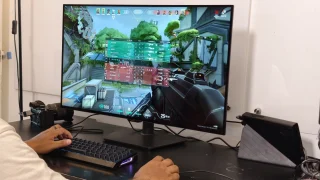
In Valorant, the keyboard immediately felt responsive. Every movement, ability activation, and key press translated directly into in-game actions without feeling delayed.
Compared to some of the keyboards I've used previously, I noticed a slight improvement in responsiveness. It's not the kind of difference that instantly transforms your gameplay, but it does contribute to a more connected and precise feeling during matches.
Part of that responsiveness likely comes from the keyboard's low-latency design, high polling rate, and magnetic switch technology.
The Ace 68 GT also supports Rapid Trigger, which dynamically adjusts key reset points instead of relying on fixed reset distances. This allows keys to react faster when pressed repeatedly and can be useful in competitive titles where quick directional changes matter.

I also played several Dota 2 matches using the keyboard.
Here, the experience was equally enjoyable. Activating skills, using hotkeys, and communicating with teammates felt natural throughout my sessions. The responsive switches and pleasant sound profile combined to create an enjoyable gaming experience overall.
The only downside I encountered while gaming was related to the switches' sensitivity.
Because the keys require very little force to activate, there were moments when I accidentally pressed the spacebar or nearby keys. This wasn't a constant issue, but it happened often enough to be worth mentioning.
For users who prefer lighter switches, this may not be a problem. Those coming from heavier mechanical switches, however, should expect a short adjustment period.
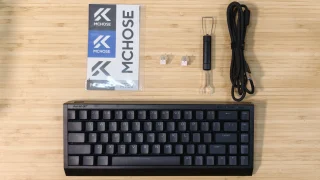
What's in the Box
- MCHOSE Ace 68 GT Keyboard
- USB Type-C Cable
- Key & Switch Puller
- 2 Spare Switches
- Dust Cover
- Function Card
Price and availability
The MCHOSE Ace 68 GT is priced at USD 149 (around PHP 8,500) and is available through the official MCHOSE online store. It comes in Cyber Violet, Black Gold, Aero Silver, Champagne, and Crystal Pink color options.
Conclusion
What We Like
- Premium full aluminum construction
- Clean design that works for gaming and productivity setups
- Stable and heavy design that stays firmly in place
- Pleasant sound profile
- Adjustable actuation and Rapid Trigger support
- Bright but balanced RGB lighting
What We Don't Like
- Keyboard height may encourage users to use a wrist rest
- Switches can feel overly sensitive at first
- Wired-only design
- Heavy weight may not appeal to users who frequently travel
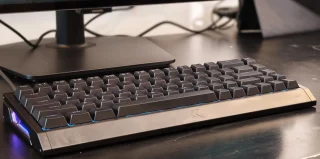
The MCHOSE Ace 68 GT left a positive impression during my time with it.
Its aluminum construction immediately gives it a premium feel, while the responsive Hall Effect switches, satisfying sound profile, and stable design make it enjoyable to use for both work and gaming.
The keyboard also backs up its gaming-focused positioning with features such as adjustable actuation, Rapid Trigger, SOCD support, and an easy-to-use customization software.
It's not a keyboard I would recommend for users who frequently move their setup around. Its wired-only design and heavier weight make it better suited for a permanent desk setup.
However, if you're looking for a compact gaming keyboard that combines premium materials, strong build quality, responsive performance, and a clean design, the MCHOSE Ace 68 GT is an easy keyboard to appreciate.
MCHOSE Ace 68 GT specs:
65% ANSI layout
0.06ms latency
16KHz polling rate
256K scan rate
0.001mm precision
0.1–3.4mm adjustable actuation
0.001–3.4mm rapid trigger
Mount Tai Pink Magnetic Switch GT
Next-Gen Hall Effect Sensor
Dual-Core 512MHz MCU
In-House Tianwen Solution system
Carbon Fiber (Black / Silver) plate
Cherry Profile PBT (Shine-through) / Frosted Translucent (Selected Colors) keycaps
North-Facing ARGB lighting
SOCD / RS / DKS / MT / TGL / Macros functions
Web Driver (No Install) / Desktop Driver software
320.0 × 127.8 × 37.6 mm size
1440g ±2g weight
Colors: Cyber Violet, Black Gold, Aero Silver, Champagne, Crystal Pink.




0 Comments
Leave a Reply