Compartir archivos de Dropbox con grupos de Facebook

¿Quieres compartir archivos de Dropbox con grupos de Facebook? Aquí tienes algunas opciones útiles.

  1. Instala la extensión oficial de Dropbox para Facebook: Esta herramienta permite compartir archivos directamente desde Dropbox a grupos de Facebook de manera sencilla.

  2. Utiliza enlaces compartidos: Puedes compartir enlaces únicos de Dropbox con miembros de grupos de Facebook para que puedan acceder a los archivos.

  3. Configura permisos específicos: Asegúrate de establecer permisos adecuados para evitar problemas de seguridad.

Recuerda siempre verificar la configuración de seguridad de tus cuentas para proteger tus datos.

Listen to article

If you’ve been using Facebook Groups, you’ll notice that there’s an option there to upload a file from your computer and share it with your peers. Facebook has now extended that feature, allowing you to share Dropbox files as well.

All you need to do is link your Facebook account to your Dropbox account. To do this just login to Dropbox – go to Settings – Account settings – then connect with Facebook.

Once finished, just click on ‘Add File’ and you can share documents, photos and videos directly from Dropbox. Your Facebook Groups members can then like or comment on whatever shared on the group’s wall. If you make changes to the files, the group will automatically get an update.
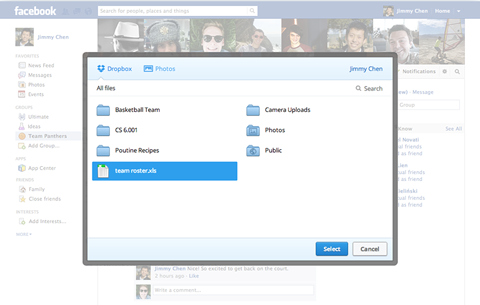
Dropbox mentioned that they’re already rolling out the feature and we should be able to use it soon.

{source}

React to this article:
Written by
Diangson Louie

This article was written by Louie Diangson, Managing Editor of YugaTech. You can follow him at @John_Louie.

View all posts by Diangson Louie →

2 Comments

MA
Mark · 14 years ago

Nice!

Reply

Leave a Reply

Loading next article...