Adaptador PowerLine Edimax y AP Inalámbrico

Listen to article

Tengo dos enrutadores/puntos de acceso WiFi en mi apartamento de dos pisos para poder cambiar entre ellos si uno falla. Sin embargo, la señal WiFi es a veces un poco débil en algunas áreas, así que pensé que una versión más potente del estándar draft-N resolvería ese problema.

Parece que hay otra forma de sortear eso. El dispositivo transforma toda la red eléctrica de su casa o edificio en una especie de red cableada. El distribuidor me envió 2 unidades demo para probar y se llama Adaptador PowerLine Edimax de 200 Mbps con Punto de Acceso Inalámbrico de 150 Mbps (sí, un nombre largo). ¡Ahora sí es internet por las líneas eléctricas! (a nivel micro, por supuesto).
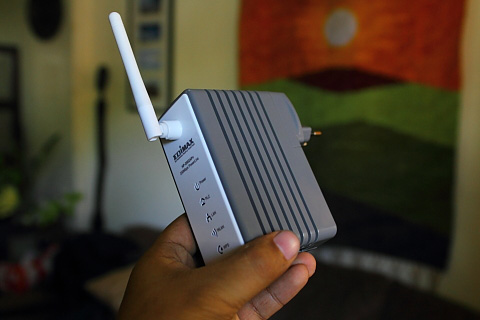
Necesitas tener al menos dos de estos para que funcionen. El primero lo conectas a la toma de corriente y lo enlazas a tu router DSL. El segundo lo enchufas a otra toma de corriente donde deseas extender tu WiFi. Solo asegúrate de que ambos dispositivos estén conectados a la misma red eléctrica de tu casa o edificio.

La conectividad de Internet fluirá desde su router DSL hacia el primer dispositivo y luego a las líneas eléctricas que van al segundo dispositivo. Este segundo dispositivo puede funcionar como un punto de acceso WiFi con una velocidad local de hasta 150 Mbps. Al mismo tiempo, el dispositivo también cuenta con un puerto LAN que puede utilizar si su PC o estación de trabajo no tiene capacidades WiFi.

Creo que esto es lo mejor para edificios de varios pisos como hoteles o resorts donde las cabañas o villas están espaciadas muy lejos. El propósito principal aquí realmente es eliminar la necesidad de agregar más cables, ya que las líneas eléctricas pueden servir como sustituto.

Aunque tiene algunas limitaciones, como que la cobertura por cable de energía es de hasta 200 metros (distancia entre dos dispositivos a través de las líneas eléctricas). El punto de acceso WiFi tiene una velocidad máxima de 150 Mbps, mientras que el adaptador PowerLine puede transportar hasta 200 Mbps. Las unidades aún no están disponibles en tiendas, pero el precio minorista estimado es de Php3,500 cada una.


Frequently Asked Questions

How does the Edimax PowerLine Adapter extend WiFi?
It uses the building's electrical wiring to transmit internet from the router to a second device that acts as a wireless access point.
What is required for the devices to work together?
Both devices must be plugged into wall sockets on the same electrical wiring network of the house or building.
Can the second device connect to non-WiFi devices?
Yes, it has a LAN port for plugging in a PC or workstation without WiFi capabilities.
React to this article:
Written by
Abe Olandres

Abe Olandres

Editor-in-chief

Abe is the founder and Editor-in-Chief of YugaTech with over 20 years of experience in the technology industry. He is one of the pioneers of blogging in the country and is considered by many as the Father of Tech Blogging in the Philippines.

View all posts by Abe Olandres →

58 Comments

PH
Phishine Technology · 15 years ago

Phishine® 200 AV mini powerline adapter takes advantage of your home’s existing electrical wires to transfer data while simultaneously transferring traditional power. That means, with no additional wiring required, users can simply plug the Phishine® 200 AV mini into existing power sockets and instantly establish a networking infrastructure. With high-speed data transfer rates of up to 200Mbps, users can enjoy HD video streaming, online gaming, VoIP or any other bandwidth intensive tasks for work or play.—From Phishine Technology Co., Ltd

Reply
SO
Sonofa · 15 years ago

meron na po ba ito ngayon?

Reply
NA
Nash · 16 years ago

Pwedeng gawin ito sa pinas..matagal na nga ang ganitong process dito sa US since 2001 p..it will probably cut your bill and expand its use compare on wireless broadband that has a limited usage..It will be much better if you have laptops..so you can go on any part of your house if you want..and it’s not only for Wifi but also for DSL and broadband(not the wireless one) users..you only need a router, modem and of course a DSL or broadband line..

Reply
CH
cheap rooms · 16 years ago

Just want to say thank you. I was feeling very good while reading that post.

Reply
BU
Building Wire · 16 years ago

Thank you so much for the post, i have started reading that and just after couple of min, i found it very interesting. Just want to say thanks…

Reply
OT
Otie · 16 years ago

@Beeps, yes you can connect multiple devices provided na single circuit lang sya, di po tatawid ng kuntador. Btw, ang distance po nyan is 300metres @ 200Mbps speed rate.

Reply
BE
Beeps · 16 years ago

Abe,

Can we connect multiple edimax equipments on all floors? lets say a hotel got 6 floors; and definitely we need to install every 200m across the grounds per floor of the hotel.

Reply
JE
Jerry · 16 years ago

I have two WiFi routers/access points in my 2-story apartment so I can switch between the two anytime one of them goes down.

<– Why need to specify 2-story apartment when you can simply say 'I have two WiFi routers/access points in apartment'? Hehehehe! You are not boastful is it?

Reply
IC
Ice · 15 years ago

Boss kaya may 2 storey yan is to know na yun isa nasa taas yun isa nasa baba.. pag sinabi naman nya i have two wifi routers at my house pano mo malalaman kung saan nya nilagay wifi router nya at take note may dead spot pa nga sya …

kung bibili ka nga ng router sa shop, at tatanong mo kung ano coverage eh tinatanong ng mga SALES kung gaano kalaki bahay mo… alangan sabihin mo sa SALES.. “ah basta BAHAY”?

MA
manong · 16 years ago

paano pag brown-out?

joke!

Reply
MI
Miata Mommy · 16 years ago

We live in a townhouse with the modem on the G/F and our room in the attic. Is is probably our only option (other than dropping a LAN cable out our window all the way down to the G/F). Been seeing Cisco/Linksys version of this online for years, but I agree it’s a tad bit expensive. Plus, I’m not sure it can withstand the massive power fluctuations we’ve been having lately.

Reply
JA
Jason · 16 years ago

yung PC ko sa office naka ganyan, pero yung wired.. nasa testing stage na kasi ng PLDT yang BOPL = Broadband Over Power Lines…

Reply
AN
ANON · 16 years ago

Linksys has this product for years already.

Reply
OR
OR9L · 16 years ago

beta testing palang siguro sa US noon yan eh ngayon ok na kaya for commercial use na dito sa atin :)

Reply
OS
osting · 16 years ago

sa US ko ito nakikita dun sa bahay ng friend ko…usong uso toh dun…grabe tagal na ito ha…ngayon lang dumating sa pinas?

Reply
KE
kevinn · 16 years ago

It’s practical enough for use if wi-fi signals won’t budge thru the walls and if the powerlines are clean and you know your power circuit layout around the house.

I’ll stick with a wireless router instead.

Reply
RY
rye · 16 years ago

astig…. good timing I was thinking of buying another access point to cover the whole house. thanks abe! I wish we’ll know when will this be available on the market.

Reply
MA
marvin · 16 years ago

This device is being used in U.S. for a long time already. Di lang nag click sa pinas because of price, and I believe some “fairy tales” about how our electricity work in our country.

I’ve actually seen this device 10 years ago on an old computer television show, but it’s slower than the 10mbps LAN and prone to interference.

Reply
AB
Abe Olandres Editor-in-chief · 16 years ago

Estimated retail price is Php3,500 each.

Reply
DA
daddy joey · 16 years ago

Meralco Communications. hehe!

Reply
SK
skagen · 16 years ago

internet over powerlines, interesting indeed. i hope its cheap :D

Reply
PA
pao · 16 years ago

interesting! i wonder how much it is.

Reply
GI
Giogagz · 16 years ago

galing naman. ya yuga the best to sa mga hotel or resort. Pero sa bahay sayang lang kasi isp net speed ng smartbro/globe tatoo bro/sun bro ay up to 1mbps/2mbps/3mpbs. Sayang ung 197mbps. hehehe.

Reply
JO
Jon · 16 years ago

I’ve seen similar devices before already. Though the ones available before did not come with a wireless access point, simply for a wired network. I do believe CDRking has one too.

On another note, I do remember reading an article somewhere about Meralco testing Internet over power lines too. That was 2 years ago I think. Any news on that Sir Abe?

Reply
NI
Nicolo Marvin Dy Quieng · 16 years ago

is this a router? or you should buy router so that this could be use..

Reply
AB
Abe Olandres Editor-in-chief · 16 years ago

@nicolo – will get back to you on that.

@patricross – yes, WiFi draft-N compatible.

Reply
PA
patrickross · 16 years ago

Abe,

Is this wireless N already?

Reply
NI
Nicolo Marvin Dy Quieng · 16 years ago

How much is the device and where can we buy one? Thanks

Reply

Leave a Reply

Loading next article...