

Higher-end tablets today aren’t just for videos and browsing anymore, they’re full-blown productivity machines capable of replacing laptops in many use cases.
The HUAWEI MatePad 12 X (2026) embraces this shift by combining a large, high-refresh display, long battery life, strong performance, and cool accessory integration into one package.

With support for dedicated productivity tools like the keyboard, M-Pencil Pro, and mouse, HUAWEI is pushing the MatePad 12 X toward those who want a portable workstation that they can use for both creation and consumption.
Interested? Let’s get into it.
Design and Construction

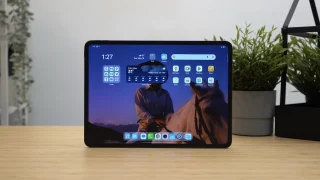
The MatePad 12 X continues HUAWEI’s sleek minimalist design. Its 12-inch PaperMatte display is wrapped in a premium metal chassis just under 6 mm thin and weighing about 555g, which is impressively light considering its large footprint.
The tablet feels solid without being bulky, and its understated styling makes it suitable for both professional and personal use
Our review unit is in the white colorway that gets a metallic paint job, which in turn introduces this subtle glitter look most can notice when staring at the rear panel too long. But it is worth mentioning that it’s also available in Green.

On the top side of the tablet are its noise-cancelling microphones, volume rocker, and an area for where the M-Pencil Pro can magnetize and charge wirelessly.
Found on both left and right sides are the stereo speaker grilles. Its red-accented power button keeps left while the USB Type-C port for charging and wired data transfers can be seen on the right.

Included in our package is a Smart Magnetic Keyboard which seamlessly connects to the MatePad 12 X with the brand’s NearLink technology.
The accessory itself magnetizes to the tablet’s back and transforms it into a laptop-like setup instantly. The chick-lit style keys are responsive and not too mushy, and we like how there are at least two levels of incline we can adjust to.

Pairing the tablet with any BT mouse can enhance the desktop-style workflow, giving us precise cursor control that’s especially useful in split-screen multitasking or document editing.
Overall for design and build, we like it. The white colorway looks very clean and we appreciate the contrast in the different surface textures from the tablet itself and magnetic keyboard accessory.
Display, Multimedia and Biometrics

The centerpiece of the MatePad 12 X is its 12-inch PaperMatte display, boasting a 2800 × 1840 resolution, 30 – 144Hz adaptive refresh rate, and a peak brightness of about 1,000 nits.
The PaperMatte surface not only reduces glare but also improves tactile feel especially when paired up with the M-Pencil Pro, making it excellent for sketching, note-taking, or annotation.

The MatePad 12 X in combination with the M-Pencil Pro, reduces slipping and gives you a more pen-on-paper sensation. This enhances accuracy and user control, which is especially appreciated during long creative sessions.
Furthermore, the M-Pencil Pro features 10,000+ pressure levels, tactile vibration feedback in the form of a quick access menu which users can access with a tighter grip or pinch. And a button at the end we can physically press to open pretty much any app of our choice once configured.
It feels really nice for illustrations and the added features can definitely improve efficiency once users get used to them.

When it came to streaming and watching videos on this tablet, like most HUAWEI devices, it was great but with some software caveats. But hardware-wise it’s an excellent high resolution Widevine L1 certified IPS display.
Audio performance complements the visuals via its six-speaker HUAWEI SOUND system, which produces rich, balanced sound for video calls and media playback.
They can get really loud at higher volumes but could use some more punch in the highs in my opinion.

For biometrics, there’s only an optical face unlocking option which truthfully works fine and as intended. No issues to report here, but it is worth mentioning that the tablet could have trouble with recognition in pitch black conditions.
Cameras
The MatePad 12 X includes a 50 MP rear camera and an 8 MP front camera.

Camera performance isn’t flagship smartphone level, but it’s adequate for productivity scenarios such as scanning documents or taking quick reference photos. There is a necessity to hold the tablet steady for about a second due to some sort of shutter or post-processing lag. Or basically, we noticed that for the best results, users need to stay still for a second after taking the shot.
Could not load album. Please check the URL.
The front camera quality is actually pretty good for video conferencing with a wide field of view, as well as good clarity and exposure for virtual calls or online learning with a max recording format of 1080p at 30fps.
OS, Apps and UI

Out of the box it runs on HarmonyOS 4.3, the MatePad 12 X offers the usual multitasking tools and features one would come to expect from a smart tablet in 2025; like split-screen windows, floating windows, and task docking that make it feel closer to a PC than a typical Android tablet.

There are no major issues to mention here, whether we’re drafting emails with the help of the keyboard accessory, annotating PDFs with the M-Pencil Pro, sketching in GoPaint, and even using Docs or WPS Office in split screen or with pop-up windows; Everything just works as they should.
Performance and Benchmarks
The HUAWEI MatePad 12 X houses their in-house HiSilicon Kirin T90A that features an octa core CPU with clock speeds that go up to 2.49 GHz. Our review unit is configured with 12GB of LPDDR4X RAM and 256GB of UFS 3.1 storage, giving it plenty of headroom for multitasking, large documents, and multimedia storage.

Performance across general use, productivity tasks, and even moderate creative workloads was consistently smooth. Check-out our benchmark scores below:
| Device: | HUAWEI MatePad 12 X (2026) |
|---|---|
| Chipset: | HiSilicon Kirin T90A |
| RAM | 12GB |
| Antutu v11 | 1,309,705 |
| Geekbench 6 Single-Core | 1,503 |
| Geekbench 6 Multi-Core | 4,446 |
| Geekbench 6 OpenCL | 3,302 |
| Geekbench 6 Vulkan | 3,412 |
| 3DMark Wild Life | 4,362 (26.12 Avg. FPS) |
| PCMark Work 3.0 | 10,071 |
| Antutu v11 Storage | 180,622 |
| Seq. Write | 4,242.5 MB/s |
| Seq. Read | 2,788.5 MB/s |

These scores position the MatePad 12 X comfortably in the upper midrange to flagship performance tier for productivity-oriented tablets.
CPU performance is responsive, with strong single-core and multi-core results ideal for everyday tasks, extensive multitasking, and content creation. GPU scores show capable graphics performance for visual apps and casual gaming but place emphasis on balanced thermal and power efficiency over raw gaming prowess.
The storage read and write speeds ensure fast app launches, quick file transfers, and minimal lag when working with large media or documents.
Overall, the benchmark profile matches what you’d want in a powerful productivity tablet, a device that stays responsive under load and doesn’t slow down when switching between tasks or applications.
Battery

With a 10,100 mAh battery, the MatePad 12 X delivers excellent endurance. It easily lasts a full workday with mixed use.
The tablet supports 66W HUAWEI SuperCharge, which replenishes battery quickly during short breaks.
For heavy users who rely on video editing, multitasking, or creative work, this battery capacity and charging support make the tablet reliable throughout the day without having to always reach for a power bank or look for a wall outlet.
In our PCMark Work 3.0 Battery Test, the HUAWEI MatePad 12 X (2026) garnered a result of 13 hours and 45 minutes.
Connectivity

The MatePad 12 X covers all essential connectivity options one would need from a tablet, which is dual-band Wi-Fi and Bluetooth 5.2 with high-quality audio codecs.
And no, there isn’t any cellular support for this tablet.
Conclusion

Before we wrap up this review, let’s talk about price.
The HUAWEI MatePad 12 X (2026) costs PHP 37,999 with the 12+256GB config being the only one officially available in the Philippines.
It is one of the most compelling tablets in its class for users who prioritize productivity without tethering themselves to a bulky laptop. Its large high-refresh PaperMatte display, smooth performance, long battery life, and efficient multitasking features make it suitable for students, creative professionals, and anyone who wants to do real work on a tablet.

What truly elevates the experience is the 3-in-1 Productivity ecosystem where the tablet, Huawei’s Smart Magnetic Keyboard, M-Pencil Pro, and a mouse work in harmony to create a flexible, laptop-like environment. Whether you’re typing up reports, sketching concepts, annotating PDFs, or juggling multiple apps, the MatePad 12 X adapts to your workflow.
It doesn’t chase pure gaming benchmarks, nor does it try to be a full desktop OS replacement. Instead, it focuses on the everyday productivity sweet spot and for its target audience, that’s precisely where it excels.
What we LIKED:
- Papermatte Display (IPS)
- Build
- M-Pencil Pro
- Smart Keyboard accessory
What we Liked LESS:
- Software woes
- Battery Life

HUAWEI MatePad 12 X (2026) specs:
12.0-inch PaperMatte display (2800 × 1840), 30 – 144Hz adaptive refresh rate
1,000 nits peak brightness, P3 wide colour gamut,
Kirin T90A octa-core chipset
12GB LPDDR4X RAM
256GB UFS 3.1 internal storage
50 MP rear camera
8 MP front camera
10,100 mAh battery
66W HUAWEI SuperCharge
HarmonyOS 4.3
Wi-Fi 2.4/5GHz
Bluetooth 5.2 (AAC/LDAC)
USB-C 3.1 Gen 1
NearLink accessory connectivity
Six-speaker HUAWEI SOUND system
555 g (weight)
270 x 183 x 5.9 mm (dimensions)
White, Greenery (colors)




Nice guide — the tips are simple but effective. Thanks!