

O+ USA recently released a wearable device called the O+ Tag, a water resistant Bluetooth-enabled pendant that connects to your Android smartphone. It acts as an SMS reader, pedometer, and retrieves notifications from your smartphone. Find out what we think of the device by reading our hands on and first impressions below.
The O+ Tag is a plastic device that resembles a narrow pendant. On the front is the small black and white LED display. On the right side are a couple of buttons for Power/Lock/Back and Scroll/Select (press to Scroll, press and hold to Select). Found on the left side is a flap that covers the microUSB port. Right on top is the small speaker, while down at the bottom is the pinhole for the mic. Found at the back is the O+ logo.

On hand, the O+ Tag is light which is good if you’re wearing it around your neck. The sides has a rubber-like strip which gives it a ruggedized appeal. The Tag’s display is protected by a film of plastic but it’s prone to scratches which makes it look ugly to look at when viewed up close. When powered on the Tag initially shows the time and battery level. Press and hold the Select button for a couple of seconds and it will bring up the menu of its features: Phonebook, Call History, Messages, Bluetooth, Alerts, Phone Radar, Phone Finder, Pedometer, Sleep Monitor, Bluetooth to Selfie, and Settings.
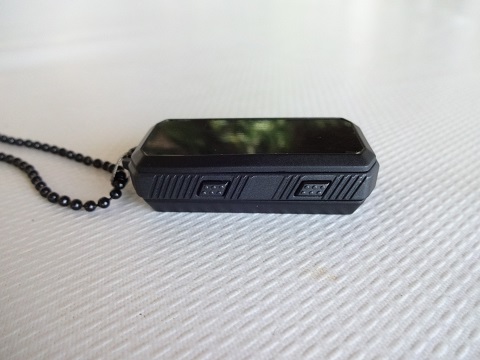
To connect your Android smartphone to the Tag, just turn on Bluetooth on both devices, make the Tag is discoverable and pair to like any normal Bluetooth device. Once connected, your smartphone might ask for permission to allow Tag to access your phonebook, just allow it and you’re good to go.
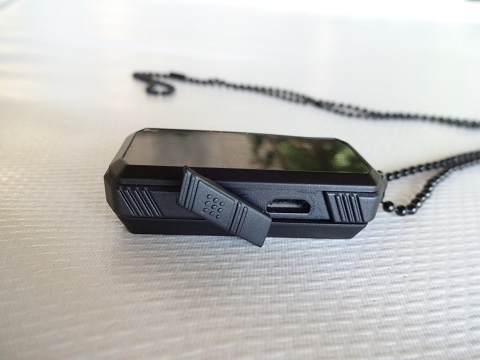
After pairing we were able to view our Phonebook and Call History. To view your messages and use the Bluetooth to Selfie feature, the BT Notifier app needs to be installed on your Android device first. We also tried the Pedometer feature but it’s not really accurate. There were times that we were walking and the steps didn’t even register. We jumped three times and it registered 9 steps. We also tried the Phone Finder feature but we always get the “Cannot find the phone” message.

The O+ Tag is a promising wearable device that aims to be different by not being a smartwatch like what most manufacturers are producing. It looks simple and rugged. It has practical uses like viewing your messages or phonebook, and answer calls without having to take your smartphone out of your pocket. It would have been nicer if all the features work properly and accurately. Perhaps a firmware update would resolve this.
Another good thing about the O+ Tag is its affordable price of Php1,995. But we think a more affordable price would make it more enticing to those who want to try a wearable for the first time.






how to download bt notifier? to use bt to selfie and to see the message at my o+ smartwatch please help me
I made a link, assuming that the software used for both the O+ Time and the O+ Tag are the same.