
Last year, Xiaomi’s sub-brand POCO surprised us all with the release of their own tablet, the POCO Pad. It wasn’t a bad first crack, seeing as it offered a nice screen complemented with above-average performance.

Fast forward to now, and POCO is back with not one, but two tablets before 2025 ends. In this article, we have the new POCO Pad X1 up for a review.
We’re here to see if it offers more bang for your buck than before. That said, let’s dive right in to see how it fares!
Design and Construction
At first glance, I feel like they could’ve kept the smaller POCO branding on the back from before. This is the first thing I noticed on our Pad X1, which comes in Blue colorway.

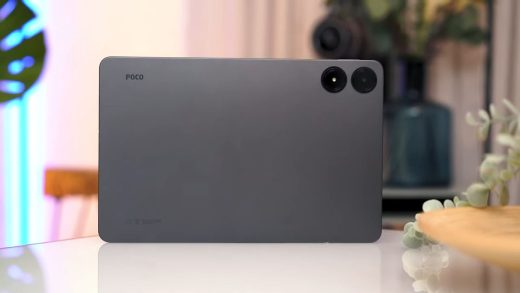
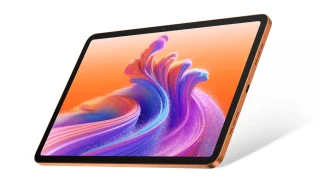
I must say, it looks pretty sleek. There are also metal contact points near the edge, which we assume is for quickly latching on to physical keyboards.
Once you cop a feel, it’s pretty hefty with a thickness of 6.18 millimeters, weighing 500 grams. Material-wise, it sports an aluminum unibody design with a matte finish. Still, it’s susceptible to fingerprints, which I’m not a fan of.


It has a flat screen and flat sides, however, it does have rounded corners to help users with their grip. What I liked seeing was its camera module, which is very Xiaomi flagship-inspired.

The tablet has a square-shaped module that appears to house more than one camera. But don’t be fooled, it’s actually just a single shooter with an LED flash just below it.

For buttons and ports, the power switch is situated on top if you hold the tablet vertically. Next to it are two speaker grilles and what I assume is a microphone.

On the bottom, we have the other two speakers and a Type-C port in the middle.


On the right, we have the volume rocker and two microphones on the top and bottom.
Unfortunately, the 3.5mm jack and microSD card slot are not here anymore. These were a couple of things we appreciated about the POCO Pad before.
Generally though, the tablet is fleshed out well. It looks nice, has tactile buttons, and feels sturdy enough.
Display, Multimedia, and Biometrics
Moving over to the screen, the POCO Pad X1 boasts an 11.2-inch IPS LCD with 3.2K resolution and a refresh rate of 144Hz. It supports Dolby Vision, wet touch technology, and comes with a few certifications (see specs below).

For an IPS panel, it’s pretty good; the bezels and all feel alright. It peaks at 800 nits of brightness, which is fair, considering tablets are often used indoors anyway.
If there’s anything to be wary about, it’s the absence of anti-glare coating and a glass protection.

Visuals come out clear, although held back a bit from deeper blacks and vivid colors as expected of an IPS panel. From experience, the viewing angles are alright.
The experience as a whole is complemented by its quad-speaker setup with Dolby Atmos. It’s fairly loud and can easily fill a room.

Moreover, it surprisingly sounds good. The stereo setup helped a lot with making the audio more immersive, with the highs and mids feeling balanced even at max volume.
Compared to the POCO Pad, you can feel more of the bass with this iteration of the tablet, which is quite the improvement.
Overall, the tablet certainly delivers a satisfying audio-visual experience. We were able to use it to watch YouTube videos in 4K at 2160p. Aside from that, browsing and gaming mostly felt smooth.
For biometrics, you only get face unlock. It’s pretty straightforward and works just as intended.
Cameras
For cameras, there’s not much to cover. The POCO Pad X1 comes with a simple setup, which consists of a 13-megapixel rear shooter and an 8-megapixel camera at the front.

Speaking of, the front camera has a couple of LED indicators for when it’s active.

This is something we haven’t seen in a while, and we feel like they could’ve added more functionality for this if it also lights up for notifications as well.
The rear camera is serviceable for the most part, offering decent image quality and color accuracy even under low light. Meanwhile, the front camera is okay, too, although my issue with it is the beautify feature.
POCO Pad X1 Rear Camera Samples
Monday, Nov 24, 2025

POCO Pad X1 2X Zoom Samples
Monday, Nov 24, 2025


Could not load album. Please check the URL.
Even when I turn it off, it still feels like it smoothens my skin by default. We have this hunch that maybe it’s relative to the low megapixel count, but that’s up in the air for now.
For video recording, the rear camera can shoot videos at 4K at 30 frames. However, it’s a bit jittery, and is probably the byproduct of an EIS system that needs more work.
Rear camera video sample:
Meanwhile, the front camera caps out at 1080p, 30 fps. Notably, we found that the audio from our sample videos came out pretty good. In other words, the tablet should be good for online meetings or classes.
Selfie camera video sample:
All things considered, the cameras are okay and get the job done. It’s not like users would opt for a tablet to take casual snaps for socials anyway.
OS, Apps and UI
The POCO Pad X1 shipped with Xiaomi HyperOS 2 based on Android 15 out of the box. Now though, it’s running the newest HyperOS 3 on top of Android 16 via an update.

We noticed a few differences including new icons for apps and notifications, a revamped control center, and more. There’s not much bloatware here either.

The pre-installed apps are useful, which includes Netflix and Spotify. Productivity apps include Mi Canvas, WPS Office, and LinkedIn.
Feature-wise, we found it strange that Circle to Search wasn’t working in this HyperOS 3 update. We’re hoping that it gets fixed in a future update, but, at least, we have Gemini support.

Floating windows or workstation still feels great to use. You can still have up to four apps running together in unison to make multitasking useful.

Lastly, there’s also the new Xiaomi HyperAI suite. This includes tools for AI Writing, AI Art, and other nifty tools.
These can help users communicate while encouraging productivity. There’s the AI Speech Recognition which can transcribe audio to text, while AI Subtitles can transcribe video calls into bilingual subtitles.
Performance and Benchmarks
Under the hood, the POCO Pad X1 is powered by a Snapdragon 7+ Gen 3 and an Adreno 732 GPU. It’s built on a 4-nanometer process node and clocks up to 2.8GHz.

In our benchmark tests, the tablet pumped out an AnTutu score of over 1.7 million. This is an insane leap from the POCO Pad’s score, which was over 600K. For reference, our review unit came with 8GB of RAM and 512GB of storage.
In terms of general use, cycling through various apps to multitask was fluid. There weren’t any stutters while I moved from one app to the other.
| Benchmark | Scores |
|---|---|
| Antutu v11 | 1,739,582 |
| Antutu Storage Test | 160,352 |
| S. Read | 30,082 |
| Speed | 4272.9MB/s |
| S. Write | 29,193 |
| Speed | 3923.1MB/s |
| Random Access | 38,145 |
| R. Speed | 1132.5MB/s |
| W. Speed | 1031.8MB/s |
| Mixed Multi-Random Access | 5,737 |
| Speed | 826.3MB/s |
| Mixed Random Access | 15,037 |
| Speed | 51.4MB/s |
| AI Read | 7,794 |
| Speed | 478.2MB/s |
| Multi-AI Read | 34,364 |
| Speed | 453MB/s |
| Geekbench 6.5 CPU Single Core | 1,843 |
| Geekbench 6.5 CPU Multi Core | 4,819 |
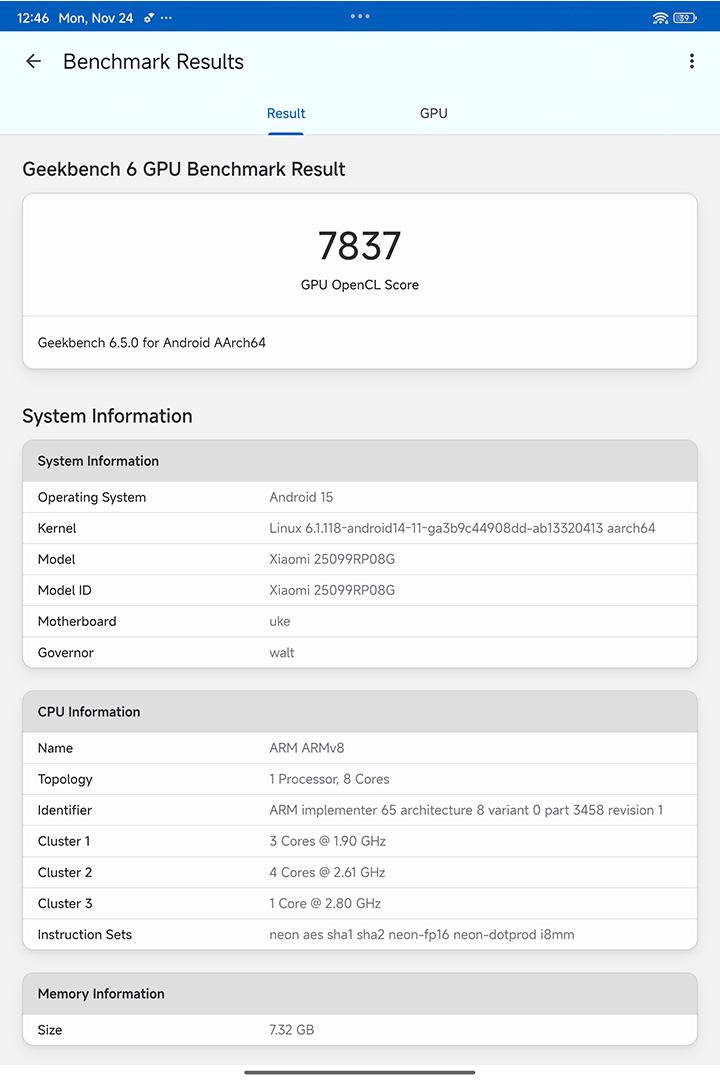
| Geekbench 6.5 GPU OpenCL | 7,837 |
| Geekbench 6.5 GPU Vulkan | 9,069 |
| PCMark Work 3.0 Performance | 15,008 |
| 3DMark Wild Life | Maxed Out |
Given the numbers in other tests, the tablet ran everything pretty well. To be specific, we tried playing Wuthering Waves on the device.

We tried setting the graphics settings to Max and while it is playable, the frame rates don’t reach above 40 FPS on average, and it can have frame drops from time to time. Dialing it down to Medium settings, that’s when we saw more stable FPS.




During our gameplay, the tablet heated up within minutes, but to be fair, that’s when the graphics settings were set to Max. So, I’d keep it to Medium settings to not stress out the chipset that much.
Battery and Connectivity
Moving on, the POCO Pad X1 packs an 8,850mAh battery with support for 45W of wired fast charging. Thankfully, a charging brick comes with the box for those curious.

As mentioned, I’ve mostly used the tablet for multimedia purposes, browsing, and a bit of gameplay with Wuthering Waves. From experience, the battery life’s pretty decent, which also reflected in our benchmarks.

In PCMark’s Work 3.0 battery test, the POCO Pad X1 offered an uptime of 12 hours and 49 minutes. In our video loop test, the tablet offered playback for a whopping 32 hours and 30 minutes.
For connectivity, the tablet supports Wi-Fi 6E and Bluetooth 5.4 standards. These all worked pretty well with no gripes on our end.
Conclusion
So, that wraps up our review on the POCO Pad X1. We’re glad to say that it’s a favorable pickup, with nods to its performance, battery life, and immersive audio.
Our gripes with the tablet are pretty minimal, which include the bigger POCO logo change and absence of Circle to Search. Come to think of it, the real bummer here is the tablet stepping away from the 3.5mm port and expandable storage.

Still, the pros very much outweigh the cons. The design change is subjective, plus we’re optimistic that the Circle to Search function will get resolved sooner than later. The tablet itself runs smoothly on most occasions, comes with great uptime, and provides a well-rounded audio-visual experience.
Well, we’ve made it to the end, but unfortunately, we didn’t have the official price of the POCO Pad X1 at the time of writing. For reference, the POCO Pad was priced at PHP 15,999, so readers should expect it to be within this range.
We’ll update the article once we get more details. But hey, what do you guys think of the tablet so far? Feel free to share your thoughts with us in the comment section below.
What we liked:
- Above-average performance
- Immersive, loud audio
- Decent battery life
What we didn’t like:
- Removal of 3.5mm audio port and microSD card slot
- POCO branding on back panel (smaller was better)
- Absence of Circle to Search on HyperOS 3
POCO Pad X1 specs:
11.2-inch 3.2K (3200 x 2136) IPS LCD, 345 ppi
144Hz refresh rate, 800 nits (peak, adaptive HDR)
Dolby Vision, wet touch technology
TUV certifications (low blue light, flicker free, circadian friendly)
85.4 percent screen-to-body ratio
Qualcomm Snapdragon 7+ Gen 3 (4nm, up to 2.8GHz)
Adreno 732 GPU
8GB RAM
512GB internal storage
13MP rear camera (f/2.2, PDAF)
8MP front camera (f.2.28)
Quad-speaker setup
Dolby Atmos, Hi-Res / Hi-Res wireless audio
Wi-Fi 6E
Bluetooth 5.4
GPS
Xiaomi HyperOS 2, Android 15 (upgradable to HyperOS 3)
Face unlock
8,850mAh battery
45W wired charging
251.22 x 173.42 x 6.18mm (dimensions)
500 grams (weight)
Blue, Grey (colors)


0 Comments
Leave a Reply