
वेब पर सर्फिंग करते समय अपने व्यक्तिगत विवरण को सुरक्षित रखना इस डिजिटल युग में अत्यंत महत्वपूर्ण है जहाँ जानकारी हर किसी की पहुँच में लगती है। जैसा कि है, कई कारण हैं कि आपको अपनी ब्राउज़िंग को सुरक्षित करना चाहिए: वेबसाइटें आपकी गतिविधि को ट्रैक करके आपको विशिष्ट विज्ञापन दिखाती हैं या उससे भी बुरा, लोग आपके बारे में जानकारी इकट्ठा करने की कोशिश करते हैं ताकि वे आपकी पहचान चुरा सकें।

So if you don't like the idea of companies giving advertisements specifically for you or if you're avoiding having your details falling on the wrong hands, here are a few ways for you to stay anonymous online.
Use secured browsers
सेनसरशिप परिहार उपकरण के रूप में वर्णित, Tor Browser उन प्रसिद्ध सुरक्षित ब्राउज़रों में से एक है जो विभिन्न प्लेटफ़ॉर्म (Windows, OS X, और Linux) के लिए व्यापक संगतता के साथ आता है। यह विभिन्न एन्क्रिप्टेड नोड्स के माध्यम से डेटा को बाउंस करके सुरक्षित ब्राउज़िंग प्रदान करने का लक्ष्य रखता है, जिससे आपकी वास्तविक पहचान और स्थान दोनों छिपे रहते हैं।

एक और अच्छा उदाहरण सुरक्षित ब्राउज़र का Epic है, जो मूल रूप से हर ब्राउज़िंग सत्र के बाद कुकीज़ और सभी प्रकार के ट्रैकर को हटा देता है। सभी साइटें जिन्हें आप देखे और खोजे गए प्रविष्टियाँ भी प्रॉक्सी के माध्यम से छिपी रहती हैं, इसलिए हमलावर आपका IP पता ट्रैक नहीं कर पाएंगे।

Do take note that since these tools perform additional steps to conceal your personal data, it could slow down your browsing experience and affect download or streaming speeds.
वेब प्रॉक्सी सेवाओं का उपयोग करें

A web proxy can be used for different reasons and is handy when you want to browse privately and don't want to leave cyber footprints behind. You may have encountered not being able to watch a specific video on YouTube as it's not available in your country and this is one instance a web proxy could be used for.
आपका IP पता लगभग आपके ऑनलाइन फ़िंगरप्रिंट जैसा है और वेब प्रॉक्सी सेवाओं जैसे Whoer.net का उपयोग करके, आप इसे छिपा सकते हैं ताकि जो इसे खोज रहे हैं, उनसे अपनी असली पहचान को छिपा सकें।

HideMe.be is also an easy to use tool that lets you hide your internet history using an encoded URL provided by the service. So if you need to visit a site that you otherwise wouldn't want to register on the browsing history, better use a web proxy. Some could also block dangerous browser scripts that can cause harm to your computer and other devices so it's a handy weapon to add in your arsenal of online security.
Additionally, there is a risk of hackers spying and monitoring your activity when you connect to a public Wi-Fi. They may also be able to intercept your passwords from browsing cookies so it really pays to be extra careful.
VPN का उपयोग करें
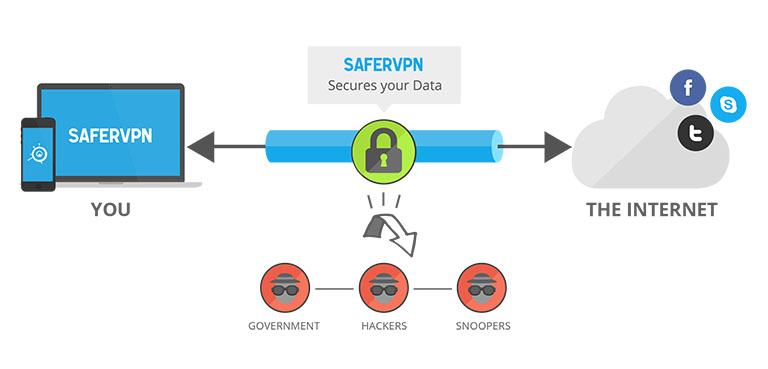
VPNs or virtual private network is an external secured network that lets you send and receive data as if your computer is directly connected to it. In turn, you could use it to secure wireless transactions, for example, and protect your personal identity in addition to hiding your real location.
SaferVPN या Hola! VPN भी ऐसे उपकरण हैं जिनमें ऊपर बताए गए अनुप्रयोगों के अलावा, आप व्यक्तिगत रूप से वह देश चुन सकते हैं जिससे आप “ब्राउज़िंग” करना चाहते हैं और नेटवर्क प्रतिबंधों को बायपास करके अनुपलब्ध साइटों को उपलब्ध बना सकते हैं।
ये केवल कुछ उदाहरण हैं उन उपकरणों और सेवाओं के जो इंटरनेट की सड़कों पर सुरक्षित रूप से चलने में मदद करते हैं। ऐसे दर्जनों अन्य मुफ्त और उपयोग में आसान विकल्प भी हैं, इसलिए यह आप पर निर्भर करता है कि आप कौन सा उपयोग करेंगे। बस सावधान रहें और सुनिश्चित करें कि आप जिन सेवाओं का उपयोग करते हैं वे वैध हैं और वास्तव में आपको इंटरनेट के दुष्ट लोगों से बचाएंगी।
For those who are already using a trusted tool for security, which do you use? Sound off in the comments field below to help others out.







ExpressVPN!