
To complement the Galaxy Note Pro 12.2, Samsung also announced more affordable yet powerful versions of their Android tablets with the Galaxy Tab Pro 8.4, Tab Pro 10.1 and Tab Pro 12.2.
With the Galaxy Tab Pro 12.2, the only major difference when compared against the Galaxy Note Pro 12.2 is just the S-Pen stylus. As such, if you put the two together, side-by-side, it will be hard to distinguish them except for that S-Pen slot located at the upper right corner of the Note Pro.

Samsung Galaxy Tab Pro 12.2 specs:
12.2-inch Super LCD display @ 2560×1600 pixels
Qualcomm Snapdragon 800 2.3GHz with Adreno 330 Graphics
3GB RAM
32GB, 64GB internal storage
up to 64GB via microSD card
LTE 150Mbps
WiFi 802.11a/b/g/n/ac
Bluetooth 4.0
NFC
IR blaster
GPS w/ aGPS support, GLONASS
8MP rear camera, BSI sensor
1080p @ 30fps
2MP front-facing camera
1080p video @ 30fps
7.95mm
732 grams (740g for LTE)
Android 4.4 Kitkat
The soft button layout on the Tab Pro is similar to the older ones, except that the old Options button on the left side of the physical Home button is now a Tab/Magazine button (with a slightly different icon printed on it).
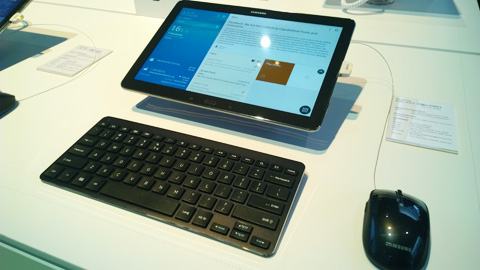
The slight difference in the gross weight can be attributed to the absence of the stylus. Everything else looked the same, including the faux leather back cover of the Tab Pro. Needless to say, the Tab Pro 12.2 is really huge but whatever disadvantage it brings in terms of weight and bulkiness, it makes up for the glorious display.
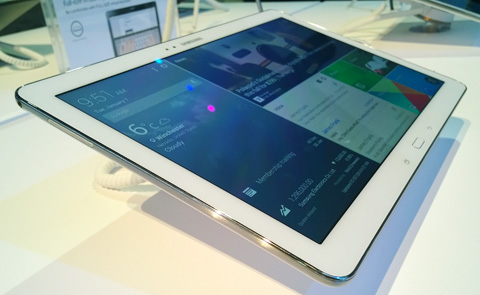
The same can be said with the Galaxy Tab Pro 10.1. The almost identical resemblance with the Galaxy Note 10.1 2014 Edition (see our review here) is undeniable.
Samsung Galaxy Tab Pro 10.1 specs:
10.1-inch Super LCD display @ 2560×1600 pixels
Qualcomm Snapdragon 800 2.3GHz with Adreno 330 Graphics
2GB RAM
16GB, 32GB internal storage
up to 64GB via microSD card
LTE 150Mbps
WiFi 802.11a/b/g/n/ac
Bluetooth 4.0
NFC
IR blaster
GPS w/ aGPS support, GLONASS
8MP rear camera, BSI sensor
1080p @ 30fps
2MP front-facing camera
1080p video @ 30fps
Li Ion 8,220mAh battery
7.3mm
469 grams (477g for LTE)
Android 4.4 Kitkat
The difference between the two would be the lower 2GB RAM on the Tab Pro 10.1 and absence of the S-Pen stylus. Another welcome addition would be the IR blaster which should act as a remote for other compatible appliances in the house.

Perhaps, the most interesting of the lot would be the Galaxy Tab Pro 8.4. Its got the highest pixel density of any tablet which is at 359ppi, even beating the iPad Mini 2 which is already at 325ppi.
Samsung Galaxy Tab Pro 8.4 specs:
8.4-inchSuper LCD display @ 2560×1600 pixels
Qualcomm Snapdragon 800 2.3GHz with Adreno 330 Graphics
2GB RAM
16GB, 32GB internal storage
up to 64GB via microSD card
LTE 150Mbps
WiFi 802.11a/b/g/n/ac
Bluetooth 4.0
NFC
IR blaster
GPS w/ aGPS support, GLONASS
8MP rear camera, BSI sensor
1080p @ 30fps
2MP front-facing camera
1080p video @ 30fps
7.2mm
331 grams (336g for LTE)
Li Ion 4,800mAh battery
Android 4.4 Kitkat

All three Galaxy Tab Pro devices will be available in either WiFi-only or WiFi+LTE variants. We believe that the WiFi-only variant will have the Exynos 5420 1.9GHz Quad Processor + 1.3 GHz Quad Processor with Mali-T628 Graphics just like in the Galaxy Note 10.1 2014 Edition. The LTE versions will be compatible with Globe and Smart LTE once they’re released in the Philippines.
Samsung representatives tell me these devices will arrive in the Philippines sometime in April.





for some it not convenient. i prefer bigger, specially for a technical jobs like construction.