

Seri ASUS ROG Zephyrus selalu menjadi lini premium merek ini, menggabungkan kekuatan dan portabilitas dalam bodi yang elegan. Iterasi tahun ini dilengkapi dengan prosesor Ryzen 9 4900HS paling kuat dari AMD dan GPU RTX 2060 dari NVIDIA. Seri ini juga menampilkan desain ANiME Matrix baru milik perusahaan serta sistem pendingin yang diperbarui. Apakah ini solusi gaming portabel Anda selanjutnya? Temukan di sini!
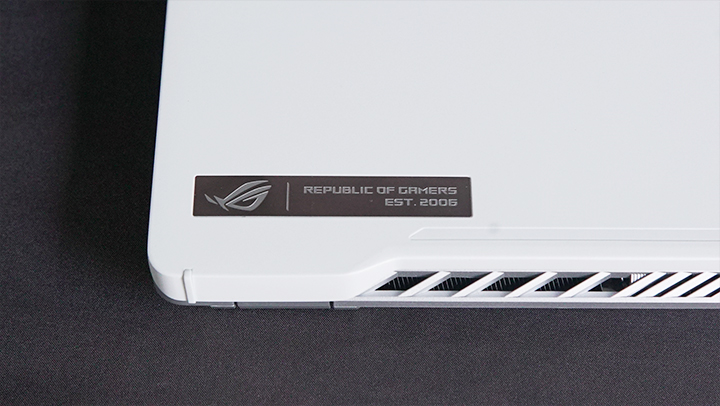
Desain dan Konstruksi
Sesuai dengan lini Zephyrus, G14 memiliki bodi ramping dengan finis matte. Kami mendapatkan unit dalam warna Moonlight White, dan percayalah ketika saya katakan bahwa tampilannya bersih. Namun, kelemahan memiliki laptop berwarna putih adalah bahwa ia cepat kotor. Untungnya, pelapisnya tidak mudah meninggalkan noda, dan Anda seharusnya bisa menjaganya tetap bersih selama Anda menyiapkan kain lap. Bodinya juga dibangun dengan kokoh, tanpa lekukan saat ditekan, diperas, atau dibengkokkan.

Duduk di atas tutupnya adalah desain ANiME Matrix milik ASUS, yang terdiri dari 1.215 mini-LED individu. Anda dapat menggunakannya untuk menampilkan animasi, pengaturan sistem, atau bahkan berfungsi sebagai visualizer audio saat memutar musik. Meskipun tidak terlalu mencolok saat terkena sinar matahari langsung (seperti terlihat pada foto), sejauh ini LED tersebut hanya berwarna putih, namun sesuai gaya khas ROG, saya rasa aman untuk mengharapkan varian RGB di masa depan.
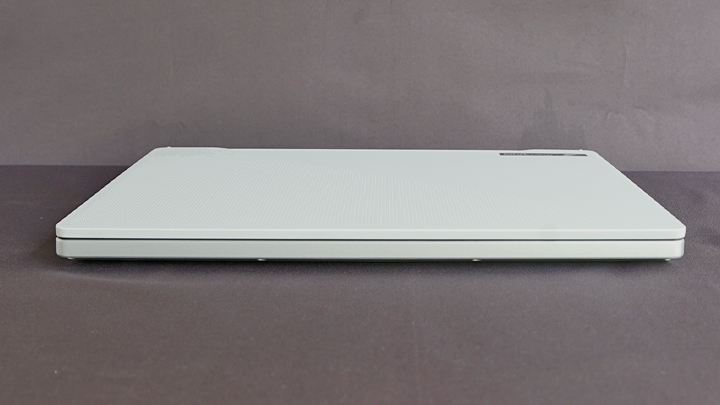
Bagian depan laptop ini polos, yang menambah kesan estetika yang bersihnya. Namun, kurangnya pijakan membuat pengoperasian dengan satu tangan menjadi sulit.
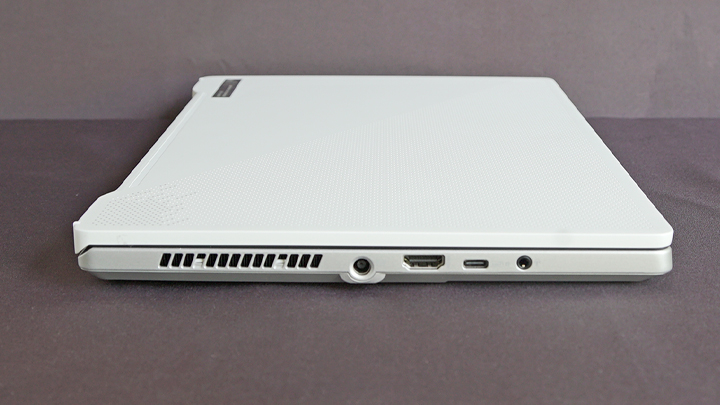
Dari sisi kiri, Anda memiliki gril ventilasi, colokan daya, port HDMI 2.0b berukuran penuh, USB Type-C dengan dukungan DisplayPort 1.4 dan Power Delivery, serta 3.5mm jack audio.
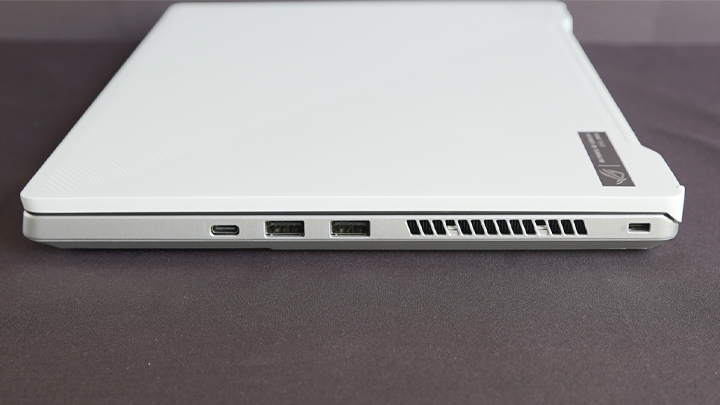
Dari sisi lain, Anda mendapatkan satu port USB Type-C lagi, dua port USB Type-A, sebuah gril pembuangan udara, dan celah kunci Kensington.
Saya berharap ASUS telah menempatkan port USB di sebelah kiri, karena colokan tersebut mengganggu gerakan mouse saya saat bermain game tembak-menembak sudut pandang orang pertama. Telapak tangan saya juga menjadi berkeringat seiring waktu, karena grille exhaust meniupkan udara panas langsung ke tangan saya. Menggunakan keyboard eksternal dan menjauhkan laptop (seperti Anda memindahkan monitor) adalah cara terbaik untuk digunakan saat bermain game.
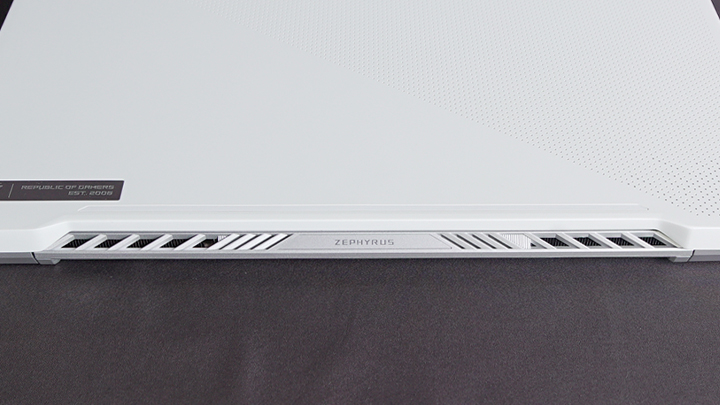
Juga terdapat kisi-kisi pembuangan udara di bagian belakang perangkat.
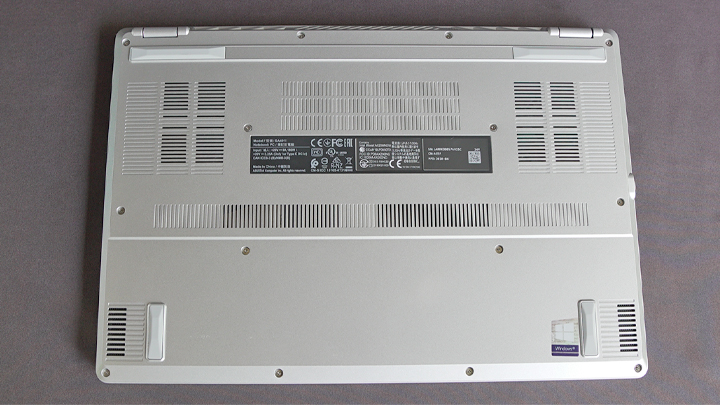
Membalikkan laptop tersebut, kami melihat empat kaki karet yang menjaga laptop tetap berada di tempatnya pada permukaan kaca, plastik, dan kayu. Di sana terdapat banyak grille intake di bagian bawah untuk membantu mendinginkan prosesor 8-core, serta dua speaker pemancar ke bawah yang terletak di bagian depan perangkat.
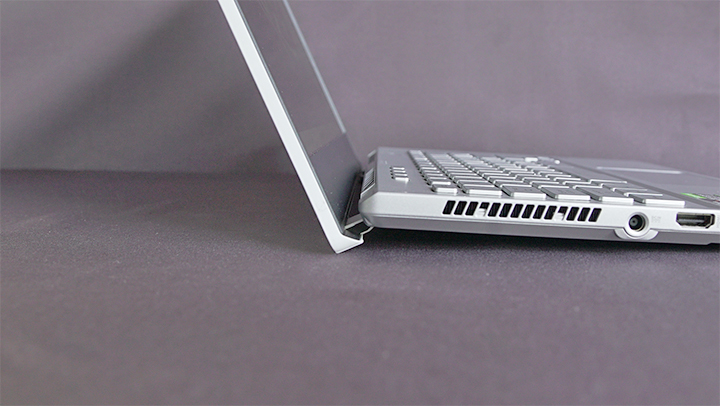
ROG juga telah beralih dari solusi pendinginan sebelumnya, menggantinya dengan sesuatu yang mirip dengan Ergolift yang ditemukan pada lini ultrabook mereka. Tidak hanya menjaga bagian dalam tetap bersih (terutama bagi pemilik hewan peliharaan), fitur ini juga memberikan ruang yang cukup bagi G14 untuk menghisap udara dari bawah. Perangkat ini tidak mengalami coil whine seperti laptop Zephyrus sebelumnya yang pernah saya gunakan, dan relatif senyap bahkan saat dibebani tugas berat.

Perangkat input pada G14 adalah salah satu yang terbaik yang pernah saya gunakan sejauh ini. Meskipun keyboardnya menggunakan gaya chicklet yang khas, tombol-tombolnya memerlukan gaya tekan aktuator yang memadai, tanpa pretravel dan memiliki post-travel yang cukup panjang. Ukuran dan jarak antar tombol dirancang dengan baik, sehingga memberikan pengalaman mengetik yang nyaman. Sayangnya, font-nya adalah font khas gamer yang tidak saya sukai. Sesuai ekspektasi, perangkat ini mendukung anti-ghosting dan N Key Rollover.
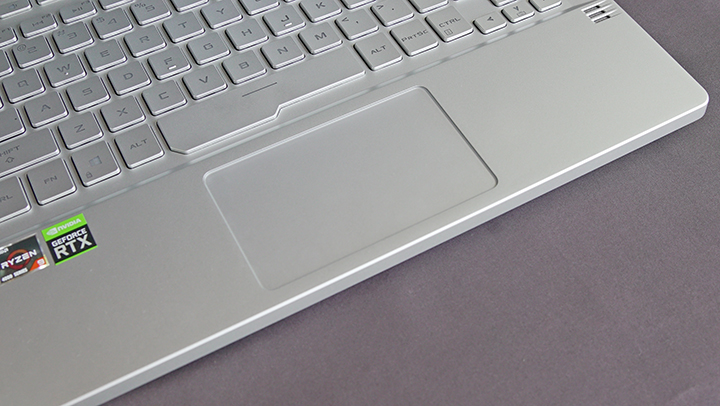
Peralatan ini juga dilengkapi dengan trackpad kaca yang kompatibel dengan presisi trackpad Windows. Ini adalah salah satu touchpad paling responsif dan akurat yang pernah saya gunakan. Tombol di bawahnya juga terasa taktil. Satu-satunya keluhan saya adalah fungsi ketukan tidak se-responsif yang saya inginkan saat menggunakan beberapa jari.
Tampilan dan Multimedia
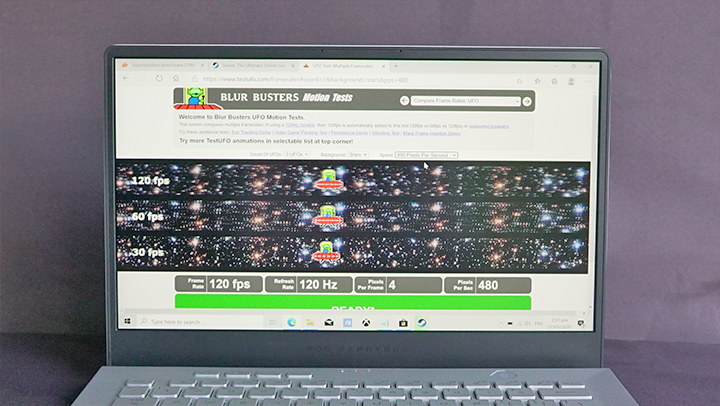
Zephyrus G14 dilengkapi dengan layar berlevel IPS berukuran 14 inci yang telah divalidasi Pantone. Bermain game, menonton film, dan konten multimedia lainnya merupakan pengalaman yang menyenangkan. Meskipun kami melihat sedikit ghosting, hal tersebut tidak terlalu terlihat saat bermain game.
Kualitas audio yang dihasilkan oleh empat speaker juga sangat baik, dengan bass yang kuat dan treble yang cukup detail. Kekurangannya terletak pada volume. Meskipun cukup baik saat berada di ruangan tertutup, suaranya tidak cukup keras untuk area terbuka yang luas.
Zephyrus G14 tidak dilengkapi dengan kamera web bawaan, namun setiap pembelian disertakan dengan webcam eksternal GC21. Performanya jauh lebih baik daripada kamera web bawaan pada umumnya, mampu merekam video Full HD pada 15FPS dan 2MP foto. Namun, perangkat ini tetap menggunakan satu port USB-A.
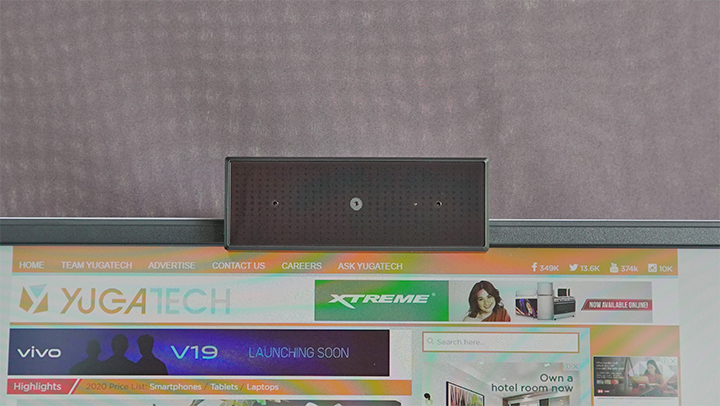
Beruntung, GC21 juga dilengkapi dengan mikrofon, karena memasang perangkat di atas laptop akan menutupi array mikrofon bawaan. Kedua mikrofon memiliki performa yang serupa. Mikrofon ini tidak mengurangi kebisingan lingkungan sebanyak yang diharapkan dan cukup sensitif untuk menangkap suara keyboard saat mengetik secara agresif. Suara terdengar jelas dan tidak ada masalah saat berbicara melalui Discord.
Sistem Operasi dan Aplikasi
Zephyrus G14 dilengkapi dengan Windows 10 Home yang sudah terpasang. Setelah diformat, Windows hanya membaca 934GB dari 1TB NVMe SSD. Berikut adalah hasil Crystal Disk Mark 6 untuk drive tersebut:
| Baca (MB/s) | Tulis (MB/s) | |
|---|---|---|
| Seq Q32T1 | 1946.6 | 1773.4 |
| 4KiB Q8T8 | 627.9 | 950.4 |
| 4KiB Q32T1 | 403 | 338.3 |
| 4KiB Q1T1 | 49.71 | 106.7 |
Hasil pengujian menunjukkan bahwa drive ini berada di tingkat atas laptop yang telah kami uji, mengungguli Dell G7 dalam semua pengujian. Namun, proses booting ke Windows lebih lambat dibandingkan lainnya, memakan waktu hingga 9,1 detik berdasarkan Task Manager.
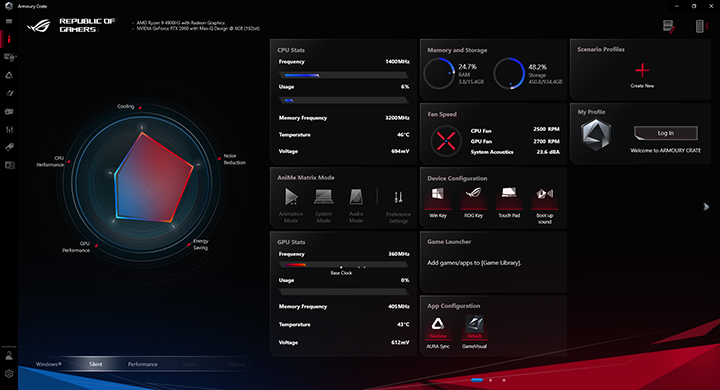
Selain Windows 10 aplikasi khas, ROG Zephyrus G14 juga dilengkapi dengan Microsoft Office, Radeon Settings Lite, Dolby Access, ROG Armory Crate, ROG Game Visual, dan McAffee yang sudah terpasang.
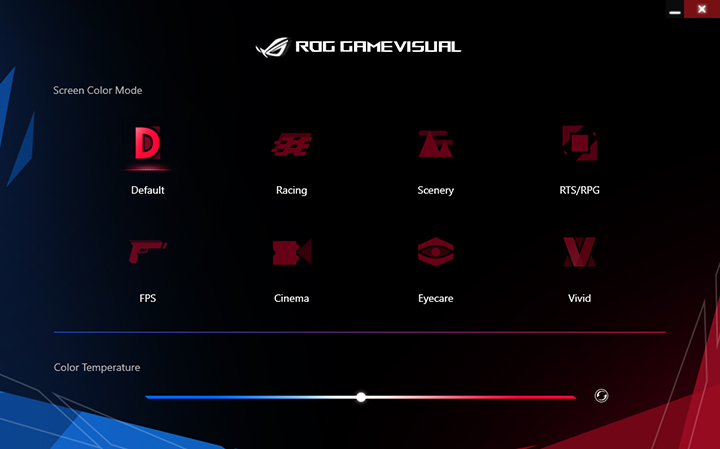
Berbagai mode kinerja, eksplorasi pencahayaan ANiME Matrix, dan konfigurasi pengaturan lainnya dapat ditemukan di Armory Crate. Sementara itu, Anda dapat mengaktifkan berbagai mode optimisasi layar seperti Racing, FPS, Cinema, dan Eyecare melalui ROG Game Visual.
Kinerja dan Termal
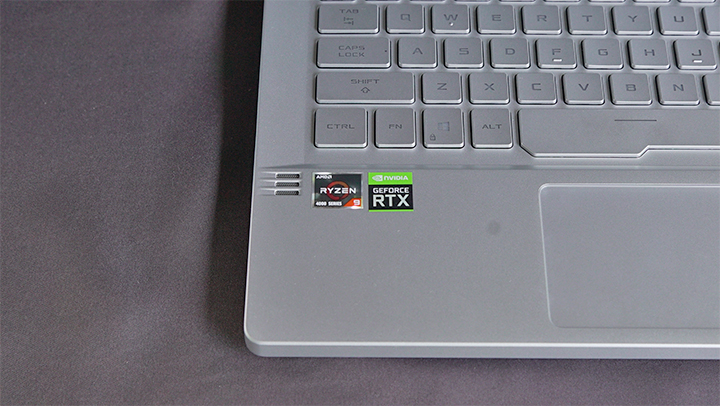
The Zephyrus G14 we have is the top of the line model, featuring an AMD Ryzen 9 4900HS processor with an NVIDIA GeForce RTX 2060 GPU. It's also equipped with 16GB of DDR4 RAM and a 1TB PCIe SSD.
We tested several synthetic and real-world benchmarks, including competitive titles, to see how well the G14 performs. All tests were done in an unairconditioned room with an ambient temperature of 33°C, plugged in the socket, with the feet raised an inch to allow better airflow. The laptop was tested in its vanilla, out of the box state, with no OS optimizations done, and no battery settings changed. Game benchmarks were run three times in succession, and the average was taken to take into account variance and throttling. Synthetic benchmarks, on the other hand, were run in 10-minute intervals to allow the laptop to cool.
First, we have the CPU benchmark Cinebench:
Cinebench R15
Cinebench R20
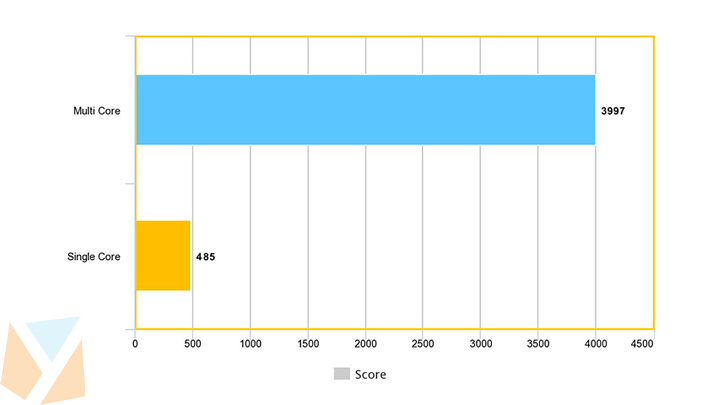
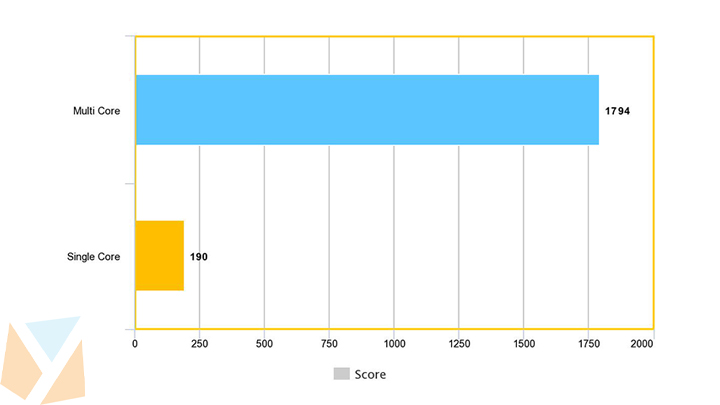
Based on the Cinebench scores, the Ryzen 9 4900HS is able to match the desktop 8-core Ryzen 7 3700X in the single-core test but falls by around 20% when compared to the multi-core tests. With AMD's 4000-series CPUs, laptops have finally caught up with their desktop counterparts, able to provide strong performance.
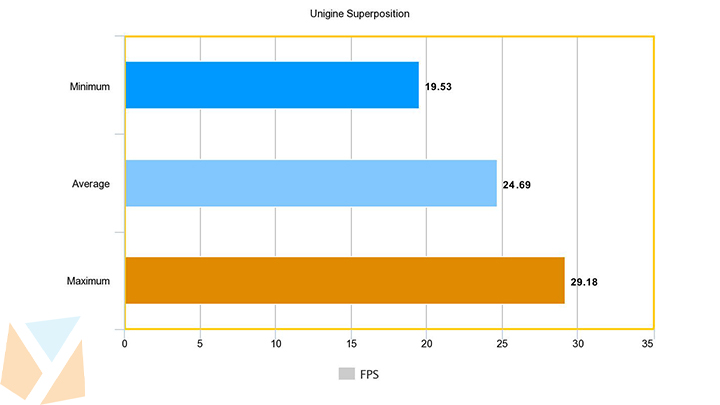
Heading over to the Unigine Superposition results, the NVIDIA GeForce RTX 2060 used in the Zephyrus G14 does appear to be cut down, scoring only 3,300 points, which is 50% less than its desktop counterpart.
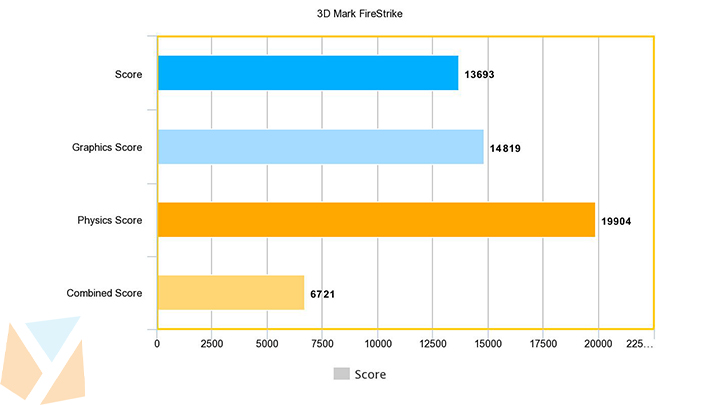
Testing both the CPU and GPU, we ran 3D Mark's DX11 test: FireStrike. While we would've wanted to test the DX12 test TimeSpy as well, we couldn't get it installed on the system for some reason.
Moving over to game tests, we tested mostly first-person shooters to take advantage of the high-refresh-rate display, and 2018's Shadow of the Tomb Raider for its RTX capabilities.
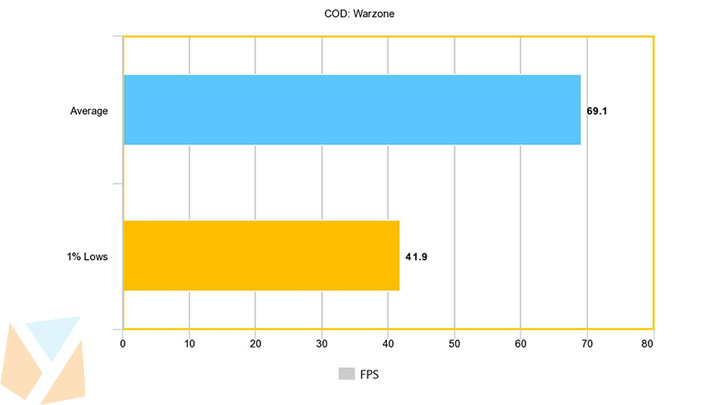
Starting with the recently released Call of Duty: Warzone, the G14 was not able to perform well in the title, averaging only 69FPS with the graphics turned to High.
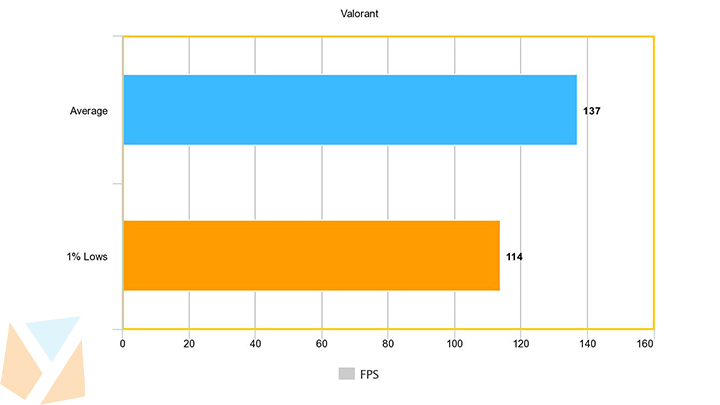
It did, however, fare better in Riot's recently released Valorant. Testing a full round of the "Spike Rush" game mode with competitive graphical settings, the G14 was able to achieve an average of 137 FPS, with a 1% low of 114 FPS. Do take note, though, that the GPU was not limited in this title. Despite the Ryzen 9's high single-core score, it was still not enough to run the game with higher frames.
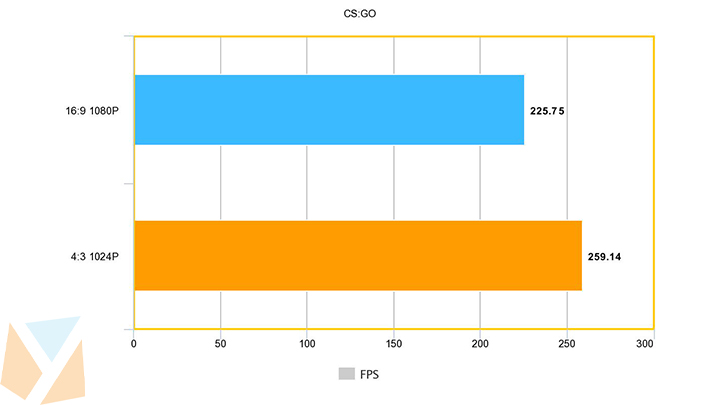
Moving over to CS:GO, we tested the game in Ulletical's community benchmark, running at both 16:9 at 1080P and 4:3 at 1024P with competitive graphical settings.
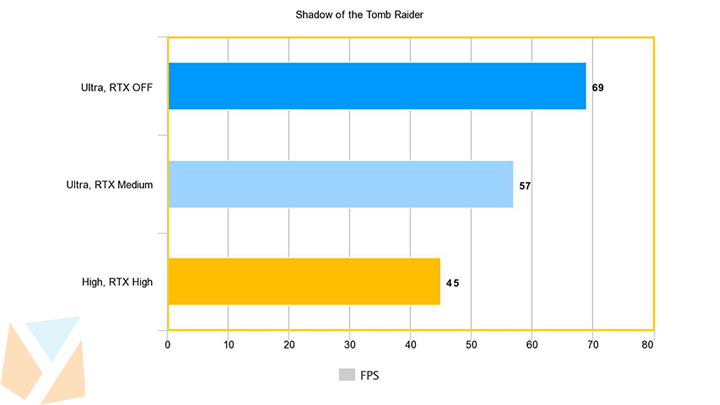
Lastly, we tested the RTX 2060's ray tracing performance with Shadow of the Tomb Raider. We tested the game in three graphical settings, letting the laptop cool in between. With the game set to Ultra, ray tracing turned off; it managed to average 69 FPS with the in-game benchmark. Turning ray tracing to medium saw a 12FPS decline. In an effort to balance the performance hit of ray tracing, we turned the visual preset down to High while turning RTX up to high. Based on our testing, you'd need to fine-tune your settings to take advantage of real-time ray tracing.
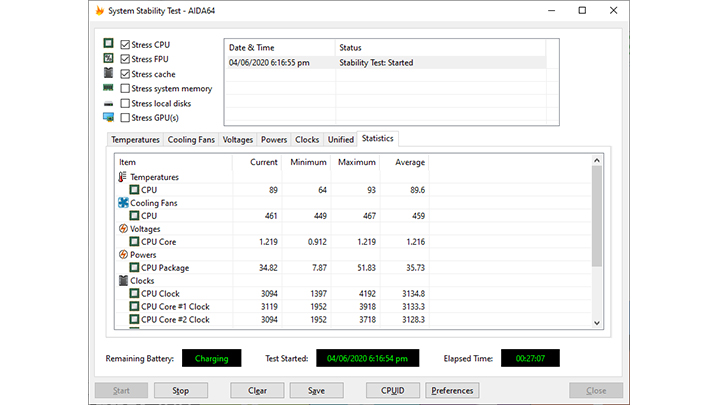
Next, we tested the laptop's thermal capabilities using Aida 64. Running the system stability test for 25 minutes, we recorded a maximum temp of 93C, averaging 90C. It also managed to keep all eight cores running at 3.1GHz while under full load.
As with most thin laptops, the Zephyrus G14 suffers from physical thermal issues. While it doesn't suffer from performance loss with continuous use, the frame itself feels hot to the touch. We measured the top of the keyboard and peaked at 51°C just after half an hour of Warzone. You'll definitely need to get yourself an external keyboard for this. Unfortunately, if you use the external webcam and a gaming mouse, you're going to run out of USB ports.
Battery Life
Using our standard video loop test, which includes playing a 1080p movie at 50% brightness, 50% volume with headphones, airplane mode turned, and a balanced power setting, the Zephyrus G14 was able to last 11 hours and 52 minutes.
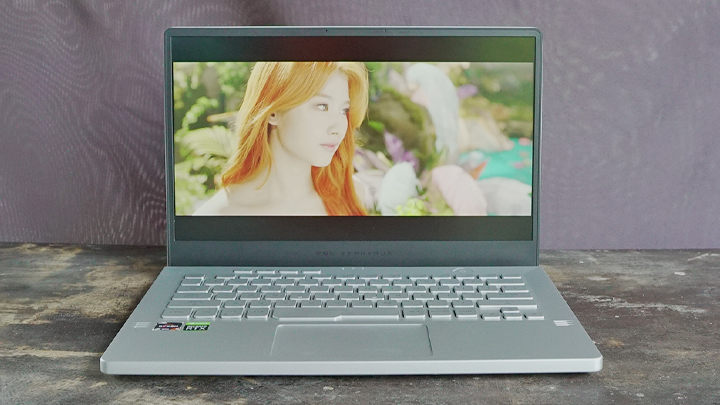
This is a strong showing for the Zephyrus G14, able to combine the battery life of an ultrabook despite its high-powered components. This may also be due to the Ryzen 9's ability to dynamically shift between the integrated Vega Graphics and NVIDIA RTX 2060. In any case, the G14 was able to beat out even laptops with the much more power-efficient U processors and standard 60Hz displays.
Conclusion
The ROG Zephyrus G14 isn't without fault. The biggest gripe is that it gets too hot to the touch, especially when gaming. You'd need to use an external keyboard if you're doing anything taxing for extended periods of time. It's also not the most value gaming laptop out there. ASUS' Strix line can offer you similar performance at a lower price. But if portability and aesthetic are really important to you, then it's an excellent choice. You shouldn't look at the Zephyrus G14 as a gaming laptop, but rather an amazing laptop that can game.
It's capable of providing users with almost everything you'd want in a laptop. It's ultra-portable, with a fast and color-accurate display, strong enough performance, with long battery life, and amazing input devices. It takes gaming laptops in a different direction, removing the stigma of a bulky, and gamer-Esque aesthetic and replaces it with a subtle, more subdued appearance. That is until you turn the ANiME Matrix on to showcase your creativity and passion for gaming.
Price:
14-inch FHD IPS, 120Hz
Ryzen 9 4900HS
NVIDIA GTX 1660Ti
8GB RAM + 1TB SSD
PHP 99,995
14-inch FHD IPS, 120Hz
Ryzen 9 4900HS
NVIDIA RTX 2060
16GB RAM + 1TB SSD
PHP 109,995
ROG Zephyrus G14 specs:
14-inch Full HD IPS display, 120Hz
Ryzen 9 4900HS
NVIDIA RTX 2060
16GB DDR4 RAM
1TB PCIe 2 SD
Quad speakers
Built-in array microphones
Intel WiFi 6
Bluetooth 5.0
1 x USB 3.2 Gen 2 Type-C W/ DisplayPort 1.4 and Power Delivery support
1 x USB 3.2 Gen 2 Type-C
2 x USB 3.2 Gen 1 Type-A
1 x HDMI 2.0b
1 x 3.5mm audio jack
1 x Kensington lock
Windows 10 Home
32.4 x 22.2 x 1.99cm
1.7kg





are the 1660ti variant with only 8gb RAM can be upgraded to 16gb RAM?
and are the webcam, mouse, and sleeve are only freebies for this promo?