infinix x yugatech

SSS meluncurkan portal web baru untuk anggotanya

Listen to article

Sistem Jaminan Sosial atau SSS Filipina telah meluncurkan portal anggota baru dengan perombakan desain lengkap yang memiliki fitur serupa dengan situs web yang sudah ada.
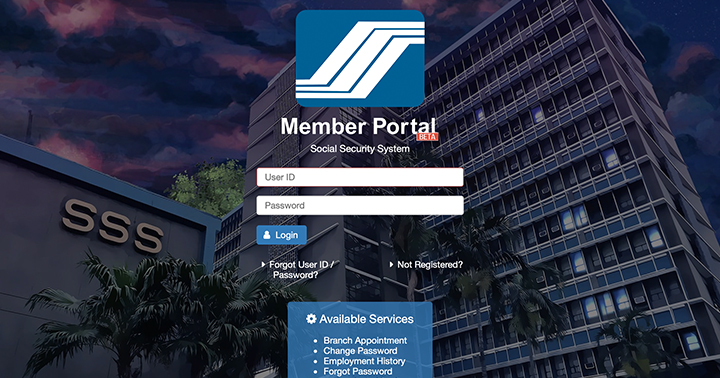
Setelah bertahun-tahun merekomendasikan pengguna untuk menggunakan Internet Explorer dalam mengakses situs webnya guna mendapatkan tampilan dan fungsionalitas optimal, portal web baru ini kini mendukung browser utama lainnya seperti Google Chrome dan Safari. Portal ini juga kini memiliki tata letak yang lebih baik dengan antarmuka bersih, pengalaman pengguna yang ditingkatkan, serta desain responsif untuk tampilan seluler yang lebih baik.

Layanan daring yang tersedia meliputi hal-hal berikut:

  • Jadwal di Cabang
  • Ganti Kata Sandi
  • Riwayat Pekerjaan
  • Lupa Kata Sandi
  • Pemberitahuan Kehamilan
  • Detail Anggota
  • Nomor Referensi Pembayaran (PRN)
  • Iuran Premi
  • Pendaftaran
  • Minta Catatan
  • Aplikasi Pensiun
  • Perbarui Informasi
tautan ini untuk mencoba Portal Anggota Beta SSS.
React to this article:
Written by
Heland Ortega

Heland Ortega

Writer

This article was written by Heland Ortega, Junior Contributor of YugaTech. He is a graduate of Information Technology and Multimedia Arts at FEU Institute of Technology in where he is also now working as a full-time faculty. You can follow him at @helandortega.

View all posts by Heland Ortega →

17 Comments

LI
Liberty · 7 years ago

Ilang beses ko na binuksan ung sss new portal, walang lumalabas na Generate PRN. Pati sa Android phone ko wala padin lumalabas na Generate PRN.

Reply
AN
Anon · 8 years ago

Yung pinaka importanteng feature na Loan application wala, anu ba yan.

Reply
OZ
Ozom · 8 years ago

Some pages still require IE to work :(

Reply
MA
Marcie · 8 years ago

No option for loan application/status.

Reply
SI
Silverlokk · 8 years ago

the new web portal now supports other major browsers like Google Chrome and Safari.

Not quite:

https://twitter.com/silverlokk/status/1023529605607477252

I did manage to use Firefox to register. Website told me to wait 30 mins (!) for an activation email. Got the email, captured in image on the left. Clicked on the link, was expecting it to log me in and prompt for a new password, which I didn’t have to enter when I first registered.

Take note of the message at the top right of the browser window >:(

Reply
LH
Lhon0901 · 8 years ago

It kind of looks like the SSS application for android, which just started working recently. I might use this for more detailed inquiries, however for me I would just continue using the Android app.

Reply
RA
Rabbitkun · 8 years ago

Finally they’ve updated their website, ilang years na rin yung pinagtiyatiyagaan ko sa IE yan.

Reply
GG
Gg · 8 years ago

Ahahahahahah! True

Leave a Reply

Loading next article...