

Viber na-update aging version 3.0, a mangteda ti popularna libreng messaging ken VoIP a serbisio para kadagiti PC ken Mac.
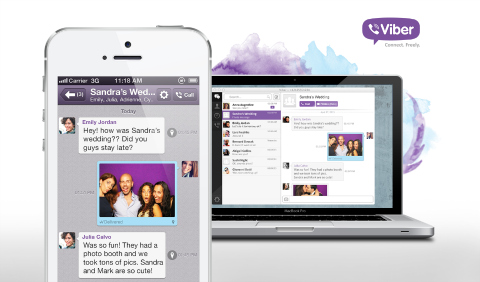
- Agpaspas a mapanawen ti tawag manipud iti Viber Desktop agingga iti Viber app babaen ti maysa a click wenno tap
- Dagiti naawat ken naipadutay a mensahe ket makita amin kadagiti device, ngem agbengingka lang idiay device nga inusarmo itan
- Dagiti mensahe ken konbersasion a mapapatay manipud iti maysa a device ket maalisen amin kadagiti device
Itaaddan pay, dagiti user ket maitedda met a gumawa iti video call manipud iti desktop agingga iti dadduma pay nga Viber users.
Daytoy a 3.0 release ket inayon pay ti naipababaan ken napudno a Viber app para iti Android ken iOS, ken ita ket addaan kadagiti sumaganad a sangkap:
- Mga mensahe a video
- Bagong mga sticker
- Status ti last online
- Naimbag nga eksperiensia iti naipakita a litrato
- Panangimprobar ti performance
- Bagong voice engine
- Android version security fix
Kanayon a kayo a mangsubli iti Viber Desktop, ibabaw ti Windows installer ditoy, ken ti Mac installer ditoy.
{sursio}



In case you have problems with endless download: 1. Open C:\Users\\AppData\Local\Viber\log.log
2. Locate “MainTools.DownloadFiles: filesUrl” string and copy the URL mentioned there.
3. Just copy this URL in browser. You will download a pack.exe file. This is a self-extracting archive.
4. Put it into any folder you want to have the Viber in and run.
5. That’s it. Run Viber.exe and enjoy.