infinix x yugatech

How to Download and Install Pokemon GO on your Android Device

Listen to article

As we have previously reported about the release of Pokemon GO in Android devices here in the Philippines, fans kept on asking how they  can play the game on their devices. Some users also reported that they are having trouble in installing the game with common errors such as “parsing error” and “black screen splash”. Downloading and installing the game is as easy as pie, check out our guide below:

First, we have to check if your device is supported. Here’s the official list of supported devices  for Android from Niantic’s website.

  • Android 4.4 to Android 6.0.1
    (Android N will not be supported until the official Android release)
  • Preferred resolution of 720×1280 pixels (Not optimized for tablet)
  • Strong internet connection (Wi-Fi, 3G, or 4G)
  • GPS and Location Services
  • Intel CPUs are not supported

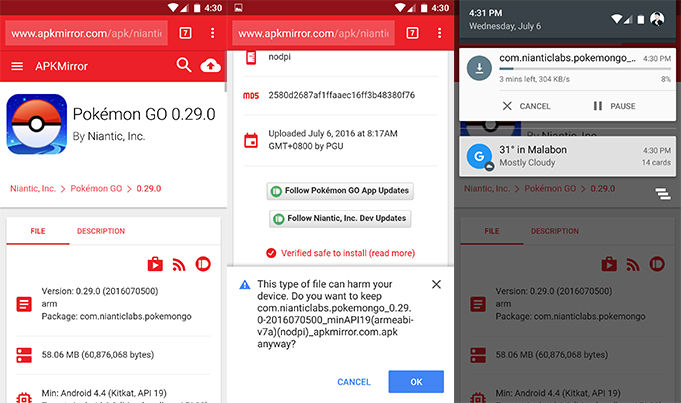
Next, download the APK file from APK Mirror. Note that this file is signed by Google, thus allows you to update the game in the Play Store when the new version is out.
pokemon go 1

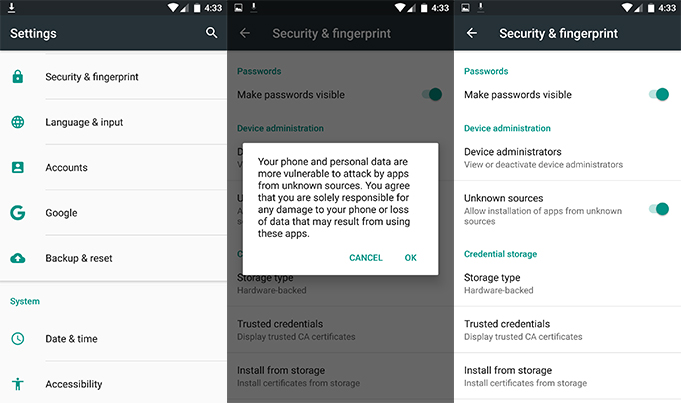
Then, Go to Menu > Settings > Security > and activate Unknown Sources to allow your phone to install apps from sources other than the Google Play Store.
pokemon go 2

After that, select and install the Pokemon GO APK file.
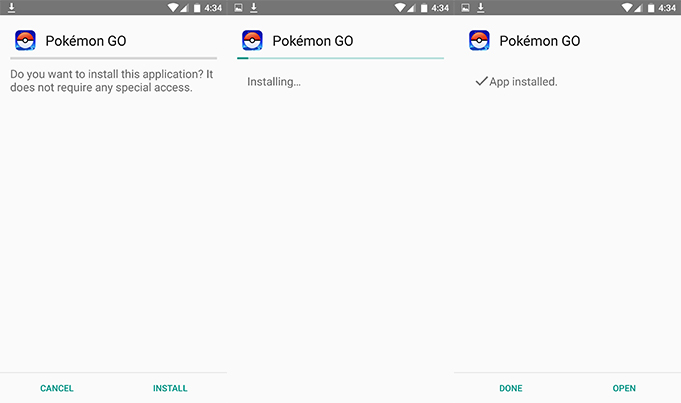
pokemon go 3

Finally, you could now have fun and enjoy playing Pokemon GO! Also, make sure both your GPS and internet (whether Wi-Fi, 3G or 4G) connection is strong to avoid interruption.
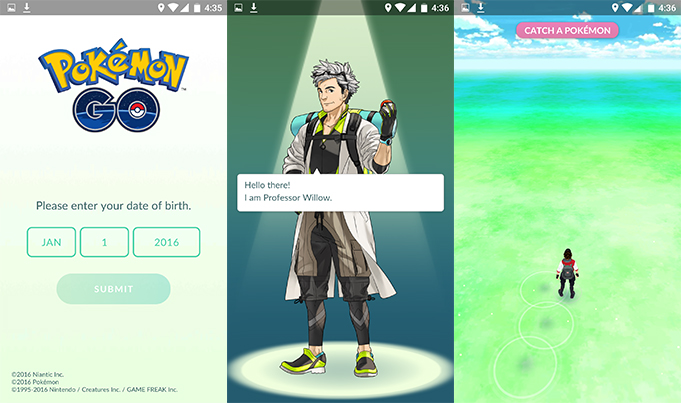
pokemon go 4

If you are still facing some issues with game installation, let us know in the comment section below.

Update: Here are instructions on how to download to your iOS (iPhone and iPad).

Frequently Asked Questions

What Android version is required to play Pokemon GO?
Android 4.4 to Android 6.0.1 is required.
Why does my device show a 'parsing error' when installing Pokemon GO?
The article does not specify the cause of parsing errors.
Where can I download the Pokemon GO APK file?
The APK file can be downloaded from APK Mirror.
React to this article:
Written by
Heland Ortega

Heland Ortega

Writer

This article was written by Heland Ortega, Junior Contributor of YugaTech. He is a graduate of Information Technology and Multimedia Arts at FEU Institute of Technology in where he is also now working as a full-time faculty. You can follow him at @helandortega.

View all posts by Heland Ortega →

110 Comments

CH
ChApp11 · 9 years ago

PLEASE HELP! I have already installed Pokemon Go on my Alcatel One Touch Flash Plus but whenever I try to log on it always says “Pokemon Go is not compatible with this device”. How is this possible when I already surpass the requirements needed to play this game? ????????????????

Reply
CH
ChApp11 · 9 years ago

Pokemon Go on my Alcatel One Touch Flash Plus but whenever I try to log on it always says “Pokemon Go is not compatible with this device”. How is this possible when I already surpass the requirements needed to play this game? ????????????????

Reply
RO
romz · 10 years ago

please help me,i cant play pokemon go for my samsung j1,

Reply
IM
imeerk · 10 years ago

Not install to may phone plss release to jelly bean phone…

Reply
DA
darklord · 10 years ago

Install IP Address Proxy like Hotspot app then install next the pokemon go app.. everytime you run the Pokemon go app. change your IP address.

Reply
JA
Jamez Revilla · 10 years ago

Are the pokemon go is still block in the philippines?

Reply
MA
marx05 · 10 years ago

you can check server status at this link http://www.mmoserverstatus.com/pokemon_go

JH
jhonjoshuajovero · 10 years ago

I installed it..But unfortunately stop

Reply
SH
shaun · 10 years ago

i have installed it but it wont load

Reply
MY
MyTwoCents · 10 years ago

Yuga please check if the link you provided is infected. Seems additional permission was asked upon activating gps but in the permission details, they are not there. I have no idea how to check the hash code. Make sure first it’s clean.

Reply
KE
Kenster · 10 years ago

So sad for intel cpu, i have asus zenpad s 8.0???????????????????????? 4gig ram

Reply
VI
Vins · 10 years ago

i downloaded the game but it says “got a problem parsing the file” when i tried to install

Reply
PE
peace · 10 years ago

Well I have downloaded it my problem is they said they will ban ur phone if u install apk file and I can’t find any pokemon
I only found charmander

Reply
AL
Alexis Villanueva · 10 years ago

how?

AL
Alexis Villanueva · 10 years ago

HELP ME GUYS… I can’t download it.. my phone is SAMSUNG GALAXY S model GT-S7582 version 4.2.2 please reply this i need it

Reply
AR
argomall (@argomall) · 10 years ago

Pokemon GO woks with Android 4.4 version and above.

PE
Pedro · 10 years ago

Parse error? The APK SDK Is newer than you Android’s version thus, the error.

Reply
WH
Wheizky · 10 years ago

parse error!!!how would you help me about that

Reply
GI
Gian · 10 years ago

Every time I download the apk and try to,install it it gives me a message called,parse error!!! Help!!

Reply
KU
Kurt Everett Werden (Chewie) · 10 years ago

It gives me a black screen and gives me a parsing error. I can’t download in Google Play. It doesn’t even have it on there. I have a Samsung galaxy s4.

Reply
MA
marrkow · 10 years ago

its force stop to me in my android kitkat 4.4.2 after the loading its force stop

Reply
WY
Wyn · 10 years ago

I have installed this game… at the first option.. it asked me if i want to turn the camera on or not for ar mode… i choose maybe later.. yet i cant turn it on after that
When i found a pokemon.. i press the ar mode.. yet its just a white screen behind the pokemon.. what should i do?? How can i turn it on?

Reply
DE
Dennis S. · 10 years ago

Sorry guys, but non-official countries have been blocked by the servers — you can still download the apk and run it, but because it uses your phone’s GPS and IP addresses to determine the location of its users, the app will not work unless you’re actually physically located in the USA, Australia or New Zealand.

Reply
RO
Ronnie A. Nidea · 10 years ago

Justice for Asus zenfone 5 or 2…haist..pls fix to allow intel cpu..

Reply
SA
Sam (@ImSamReyes) · 10 years ago

Panong hindi tayo mababablocked 1 apk libo ang gumamit. pati pag download sa tamang site kinatamaran goodluck satin imbes na naeenjoy na natin nganga tayong lahat

Reply
ZE
Zeus · 10 years ago

Temporarily blocked tayo kasi di pa official sa philippines ang pokemon go. Wait nalang natin.

Reply
MA
marvs? · 10 years ago

…waaa naka install gyud.. Totoo na kaya ito?.. Is it true na locked po ang region natin? Already catched a squirtle..hindi pa ako makalabas sa ngayon kasi 1am pa..baka totoong pokemon (aso????????) pa ang makita ko sa camera at makagat pa ako.. Hahahha ..hope to hear a good news for Philippine users..

Reply
MY
myke · 10 years ago

Intel users not supported?

Reply
CA
Carlo Malolos · 10 years ago

Hi! I can’t install my app. I already enabled the unknown sources feature of my phone. But I can’t tap the install button.

Reply
JE
Jerikko · 10 years ago

Ang lungkot naman tsk. #JusticeforIntelUsers

Reply
NE
Neil Cañedo · 10 years ago

Not working in jellybean 4.2 :( Hoping that it can install in jellybean 4.2

Reply
KY
Kyoshirou · 10 years ago

Pag naka connect ako sa wifi… ok sya… I am using globe mobile data… and I’m getting “GPS Signal not found” I open Google map and it works just fine… ano kaya problema – Note5

Reply
DE
dearickkeo moto e2 · 10 years ago

when clicking sign up in google, it force stop.

Reply
JE
Jepoy · 10 years ago

Pagkatapos ko magkagym. Nagkaroon ng server error several times. Tapos ilang beses din naghang pagkahuli sa ibang pokemon tulad ng seadra at kingler

Reply
JA
jan00 · 10 years ago

pag press ko po sa signup woth google nag stopped working po sya

Reply
JR
Jr · 10 years ago

Parse error sakin. Xiaomi mi4

Reply
MA
Marx05 · 10 years ago

I played it for awhile then after a few hours i dont see any pokemon, gym or pokemon stop..just walking on a plain map..i hope the server is on maintenance and fix the problem.

Reply
GA
Gabo · 10 years ago

i’m having the exact same problem. help with this please.

KE
Kevin Scrima · 10 years ago

I’ve tried other sites. It’ll download but won’t letme install. Ill try here and see if it’s any different.

Reply
RO
rockd · 10 years ago

It worked with my Zenfone Max but my map is bare, my character is there but without any pokemon or structures, btw i was able to get one as my initial pokemon.

Reply
RA
RAS · 10 years ago

i always get GPS signal not found.

Reply
KA
KanonRock · 10 years ago

Tapping the “Install” button doesn’t do anything. But the “Cancel” button is working just fine. The screen of my phone doesn’t have problems.

Reply
AR
Arch · 10 years ago

Same here. T.T

RE
Rey · 10 years ago

App not installed. I’m using Alcatel OneTouch Idol X+

Reply
ZE
zelo28 · 10 years ago

Location issue even if I turn on the location services

Reply
WE
Westeros · 10 years ago

The game is not working anymore. Maps are wiped out and no more pokemons appearing. It’s like we’ve been blocked in the system.

Reply
SU
Sundae · 10 years ago

Same here

GA
Gabo · 10 years ago

I’m getting this same problem. help please!

RO
Ronaldq · 10 years ago

>intel cpu not supported
That sucks. I’m a zenfone 2 user.

Reply
HE
Herbert Berger · 10 years ago

I can’t get a valid gps location.
Device: OnePlus One
Android: 5.1 COS
I tried it with Root Cloak and other tools but I’m not getting a valid gps signal in Pokemon Go.
Other Apps like Ingress or Google Maps work flawlessly.
Do you know what to do?

Reply
L
L · 10 years ago

Same here :(

RA
RAS · 10 years ago

i always get GPS signal not found.

JA
jaypeetanbsit · 10 years ago

not working in zenfone 5

Reply
RI
Rix · 10 years ago

Kase intel cpu po ang zen5 kaya not supported

ZE
zen2user · 10 years ago

t’sucks that it doesn’t support intel cpu’s.

Reply

Leave a Reply

Loading next article...