

HUAWEI MatePad 12 X (2026) Review



Apart from the lightweight Inspiron 13 7370, Dell also released a second laptop to their new Inspiron 13 7000 portfolio. Say hello to the Inspiron 13 7373 2-in-1 laptop, as the name suggests this particular device has a few different modes. The company’s new 2-in-1 notebook is targeted towards consumers in need of a flexible yet light and updated device. We were given a chance to experience this little transformer and here are our initial thoughts.
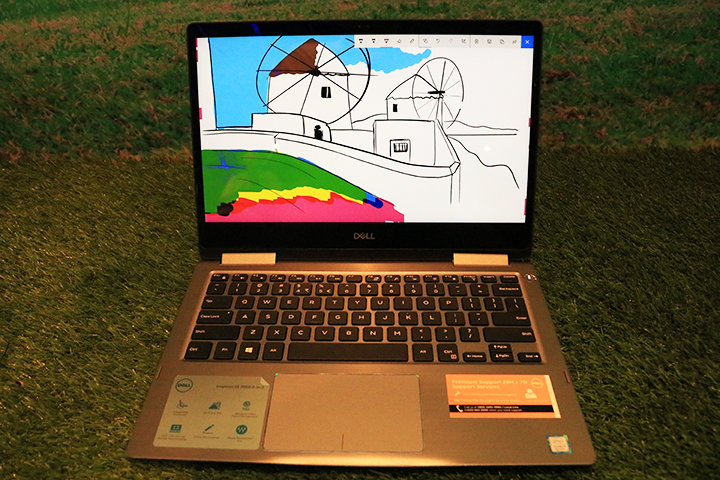
The Inspiron 13 7373 2-in-1 could easily be mistaken as the 7370’s sibling as they are almost the same in build and looks, save for the fingerprint scanner which is absent in the 7373. The power button though is at the same exact spot, the rest of the device is almost identical even the build quality and structure. The screen has little flex and the keyboard deck is as solid as a rock. The hinges too are relatively well-built, as it should be since it’ll most likely be stressed out from the constant shifting of modes. The laptop itself is quite thin and light, making it a portable enough device to carry around.
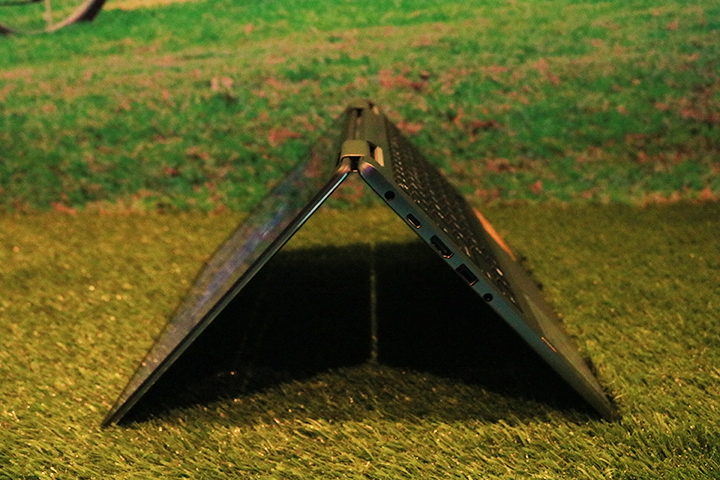
Speaking of modes, the laptop has four — Laptop, Tent, Stand, and Tablet. Each mode caters to different kinds of uses depending on the user’s needs, it certainly isn’t the first 2-in-1 out there but it might very well be one of the best in terms of build quality.

The laptop sports the same 13-inch Full HD IPS display as the 7370, only this time it’s a touchscreen panel. The display itself produces nice colors and has good accuracy and viewing angles, it’s also very responsive to the touch and registers gestures relatively quickly. The panel also has thin side bezels although the top and bottoms ones are kinda thick. Nevertheless, the notebook has good screen real-estate and screen to body ratio.
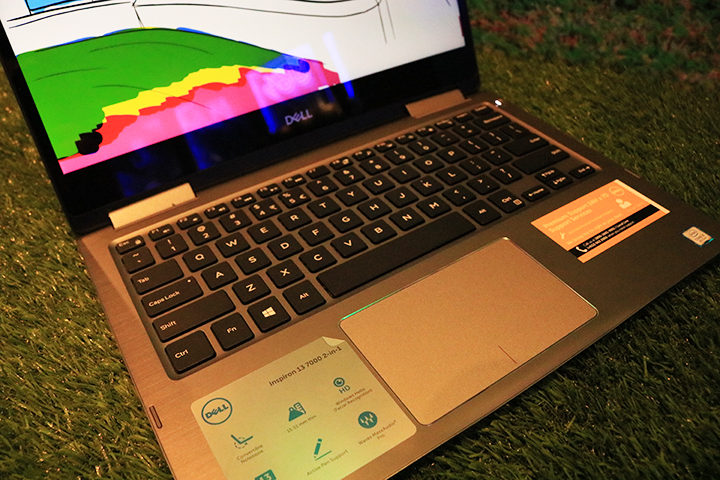
Moving on to the keyboard and trackpad. The Inspiron 13 7373 2-in-1 is equipped with a TKL (tenkeyless, no numpad) keyboard that has good travel distance and tactile feedback. However, like the 7370, the arrow keys are small which might cause some missed key presses at times. Backlighting is also present and brightness is adjustable. As for the trackpad, it has a grain-like surface that is smooth enough for fingers to glide on and is responsive to commands and gestures. The two buttons for the left and right click functions are also good, providing enough haptic and acoustic feedback when clicked.
I/O is basically the same as the 7370. We have a Kensington lock, USB 3.1 Gen 1 Type-A port, and a Multi-card reader on the right and the power input, USB 3.1 Gen 1 Type-C port, HDMI port, USB 3.1 Gen 1 Type-A port with power share, and Audio port on the left.
The Inspiron 13-7373 2-in-1 is perfect for anyone looking to have a flexible notebook. It has a respectable screen, solid build, an above average keyboard, and a slim and light profile. Then again this laptop targets a particular niche and if you are not part of that niche then you might as well just pick up the Inspiron 13 7370, which is basically the same device but with a lower price tag. Nevertheless, anyone needing a 2-in-1 notebook should keep an eye out for the Inspiron 13 7373 2-in-1.
Dell Inspiron 13 7373 2-in-1 specs:
13.3-inch FHD (1920 x 1080) IPS Truelife LED-Backlit Narrow Border Touch Display
360-degree hinge
8th Generation Intel Core i5-8250U 1.60GHz Processor
Intel UHD Graphics 620
8GB DDR4 2400Mhz
256GB PCIe NVMe SSD
Backlit, spill-resistant keyboard, Multi-touch gesture-enabled precision touchpad with integrated scrolling
Supports Pen and Facial Recognition
Infrared camera for Windows Hello
WiFi 802.11ac + Bluetooth 4.2
USB 3.1 Gen 1 Type-C
USB 3.1 Gen 1 Type-A
USB 3.1 Gen 1 with PowerShare
HDMI 2.0
3-in-1 SD Media Card Reader
2x speakers w/ Waves MaxxAudio Pro
Combo headphone/microphone jack
38WHr, 3-Cell Battery
Windows 10
The Dell Inspiron 13 7373 starts at a price of Php63,490 and is now available at Dell authorized stores and retailers nationwide.










Apple, Asus, Cherry Mobile, Huawei, LG, Nokia, Oppo, Samsung, Sony, Vivo, Xiaomi, Lenovo, Infinix Mobile, Pocophone, Honor, iPhone, OnePlus, Tecno, Realme, HTC, Gionee, Kata, IQ00, Redmi, Razer, CloudFone, Motorola, Panasonic, TCL, Wiko
Best Android smartphones between PHP 20,000 - 25,000
Smartphones under PHP 10,000 in the Philippines
Smartphones under PHP 12K Philippines
Best smartphones for kids under PHP 7,000
Smartphones under PHP 15,000 in the Philippines
Best Android smartphones between PHP 15,000 - 20,000
Smartphones under PHP 20,000 in the Philippines
Most affordable 5G phones in the Philippines under PHP 20K
5G smartphones in the Philippines under PHP 16K


