infinix x yugatech

Download Windows 8.1 upgrade today!

Listen to article

Microsoft has finally rolled out the Windows 8.1 update today, introducing more features and functionalities to the the popular operating system.

The whole update will require about 3.6GB of space and you can download it for free at the Windows Store.
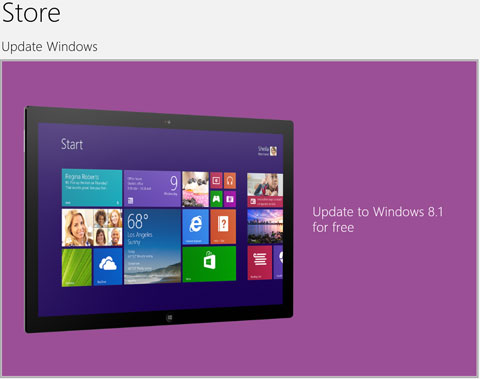
Perhaps one of the most anticipated feature of all from this update with the return of the Start button.

Written by
Abe Olandres

Abe Olandres

Editor-in-chief

Abe is the founder and Editor-in-Chief of YugaTech with over 20 years of experience in the technology industry. He is one of the pioneers of blogging in the country and is considered by many as the Father of Tech Blogging in the Philippines.

View all posts by Abe Olandres →

116 Comments

ED
edwaine · 13 years ago

UPDATE:
After a couple of days they fixed the Windows RT bricked problem so its up and running now on Windows Store.

Reply
MA
marlon · 13 years ago

Anyone experienced heavy battery drains after the update? In a single day, my battery went to 0% twice after leaving it on standby mode.

Reply
NA
nagger · 13 years ago

Guess it’s a problem that has something to do with ACPI. Have you tried updating your drivers?

And please, to anyone who’s seeking help, please post your particular laptop model here so that we can help you better!

RA
Raymond · 13 years ago

Update how, need extra income just go to this link http://www.getpaid4visits.com/index.php?refcode=6069need

Reply
DA
Damn you spammer! · 13 years ago
CH
Chad · 13 years ago

tried updating to Windows 8.1 but got this error

This PC doesn’t meet the system requirements
Contact your PC manufacturer to see if you can upgrade the system BIOS.

Anyone help?

Reply
ED
edwaine · 13 years ago

@Chad

You need to update your PC (BIOS, Drivers, etc) Please go to your laptop brand page regarding your problem.

ED
edwaine · 13 years ago

Windows RT has issues regarding upgrading it to 8.1 so Microsoft has remove the link (Upgrade to 8.1) for a undisclosed reasons.

For updates regarding this issue check neowin.net. Walang trash talkers and reasonable ang pakikipag argue ng mga users.

Reply
BE
becki · 13 years ago

hay dami bugs – di gumagana blutooth sharing and pairing!!! asus vivobook here kung merong alam ng sagot.. thanks

Reply
EN
Enya · 13 years ago

^Same is true with my Acer Aspire P3. Dinala ko sa Service Center. Di pwede saken walang bluetooth!

NA
nagger · 13 years ago

@becki
Please read the article from Asus regarding on what software should be uninstalled/updated after upgrading to Windows 8.1. That page helped me in solving issues that I encountered after upgrading all of our 5 Asus laptops in my household to Windows 8.1.

Here’s the link:
http://event.asus.com/2013/osupdate/update/index.htm

Once you’re on the page, go to the “Notices to Update to Windows 8.1” page to see the software that needs to be uninstalled or updated after upgrading to Windows 8.1.

After determining which software should be updated, head on to the “Product List” page and find your model. Clicking on the model name of your product will take you to its Software Download page.

Hope that helps.

RI
Rica · 13 years ago

http://Fjeer.ME/ – Try nyo libreng SMS Worldwide, gawa din ng isang Filipino @ Bookmark nyo na.

Reply
ME
mel canilao · 13 years ago

@erwin bantilan

tried it, but when I entered the current product key to your step #3, it says that “This product key cannot be used to install a retail version of Windows 8”. I’m using my 6mos old ASUS Vivobook. The Store process gives me error as well. Please help..Thanks

Reply
ER
Erwin Bantilan · 13 years ago

You can use generic windows 8.1 key for the installation, search it on Google. then use your own retail windows 8 key for activation.

ER
Erwin Bantilan · 13 years ago

You can download the Windows 8.1 ISO from microsoft using my tricks (http://gensanblog.com/2013/10/18/how-to-download-windows-8-1-iso/)

Reply
NA
nagger · 13 years ago

Sorry to say this, but downloading a copy of Windows from other sources is a clear violation of Microsoft’s EULA terms. Be careful on posting those links if you don’t want your site to be seized by Microsoft’s authorities and be on legal trouble.

Check the link here for more information:
http://www.microsoft.com/en-us/legal/default.aspx

ER
Erwin Bantilan · 13 years ago

It’s not from other source bro, its from the Microsoft website.

check the link..

NA
nagger · 13 years ago

Glad to hear it’s indeed the legal and correct way to download Windows 8.1. Thumbs up!

Guess my previous comment will just serve as a warning for bloggers out there who plan to post unofficial download links for Windows 8.1.

ED
edwaine · 13 years ago

Confirmed work around for those who will upgrade multiple computers running windows 8. This also serves as a workaround if you have problems an need to use a refresh/reset option.

IC
IC DeaDPiPoL · 13 years ago

my SDGO client’s gameguard triggers a BSOD during launching after this update. Already sent a report to the game provider but I believe this will affect other games that rely on anti-cheat engines.

Performance is identical although the update size is a bummer to those frequently reinstalling. Also can’t download Win8.1 ISO as of now (setup requires a win8.1 key and existing win8 key will not work).

Reply
PE
Pensonic · 13 years ago

Done upgrading my laptop (vaio) to Windows 8.1, didn’t encounter any problems. Ang tagal nga lang bago natapos.

Reply
CO
CopyCat-droid · 13 years ago

When Apple updates their OS X. Like from 10.8.2 to 10.8.3, so amazingly smooth. I can’t help to compare with my Windows 8.1 update with the MS-Store. My previously installed apps can’t work in this crappy-HP PC. Hoping my SCREEN won’t turn BLUE again.

:(

Reply
CL
cloud nine · 13 years ago

Windows 8.1 user here. I really admit that the upgrade process isn’t smooth as I expected too. Maybe Microsoft will make the process smoother in the next upgrade. You know, Microsoft is still used to the way how their Service Packs worked in previous versions of Windows and I think they should make the update much smoother and less intrusive next time. It’s really Microsoft’s first time not to push updates via Windows Update, so yeah, nothing surprising here.

CH
ChekenLehttel · 13 years ago

buti pa kayo nakapag-update na. Dahil nag preview ako, wala pa akong nakikitang 8.1 update sa Windows store </3

Reply
NA
nagger · 13 years ago

I suggest that you should read this article by winaero.com explaining the possible reasons why one can’t update their copy of Windows 8 to 8.1:
http://winaero.com/blog/fix-upgrade-from-windows-8-to-windows-8-1-fails/

P.S. This isn’t my site. I just posted the link just in case someone can’t figure out what’s wrong on their end.

K
K · 13 years ago

Pag windows 8.1 preview installed through windows store, punta ka lang sa microsoft website (see below) makikita mo yung instructions sa pang upgrade to 8.1 using windows store. Di ko lang sure kung gagana to sa mga nag iso install. ok naman ang install parang nag fresh install na talaga laptop ko.

http://windows.microsoft.com/en-us/windows-8/update-from-preview

EM
emem · 13 years ago

Try installing all updates first.. reboot then check store ;) worked on my RT :D

my RT runs faster :D

AB
abuzalzal · 13 years ago

Kahit anong pagpapaganda at paglilinis sa Windows 8, basura pa rin. IMO, Microsoft should kill their Windows products because it’s so crap and they should go back in making those fucking DOS machines for fucking Bob Freking’s sake!

P.S. Sa lahat ng Windows users, eto ang isang kantang aantig sa inyong mga puso:
http://www.youtube.com/watch?v=8UrzV3g5cZs

MGA PUTANG INA NYO!

Reply
ED
edwaine · 13 years ago

kabag bumalik ang cybercrime act, isa ikaw sa irereport ko gago

AB
abuzalzal · 13 years ago

lmao you don’t have to spew threats like a mother telling her son not to do bad things

chill XD

ED
edwaine · 13 years ago

And on what reason should I didnt complain about you? Even if those fucking videos has been deleted, those are posts are saved on their database. Anyway that fuckface (video) sucks, ang baduy mo.

AB
abuzalzal · 13 years ago

And who are you to give a fucking damn to me, huh, kiddo? Fucking kids nowadays must know their position, good grief!

P.S. What the hell happened to @Bob Freking!? It’s been days since I’ve spewed some sense to him but he didn’t have the guts to face us after his damn Nexus 5 render plagiarism fiasco he’ve made!?

ED
edwaine · 13 years ago

You are telling me to know my place??

Hey you’ve crossed the line when you post that stupid video.

Tell that to yourself before doing anything stupid.

Oh yes you are really stupid if your still continue this.

ED
edwaine · 13 years ago

atleast hindi ako nagkalat sa page na ito. Very very immature. Matanda ka pa naman.

Yeah you should really know your place before telling me.

WE
wew · 13 years ago

heres abuzalzal again trolling hahaha panay salita ng kung anoano pero pag hiningan ng ebidensya wala namang maibigay ni link o picture lol

LA
lazlaz uba · 13 years ago

i salute mr edwaine for being helpful to others and showing his face. si abu kaya ano kaya face nya. hindi nya siguro ipapakita ang totoong mukha nya, baka biglang manakawan ng upper-cut… ang dapat kay abu, purihin… kahit wala pa sya nagcomment, sabihin kaagad ang galing-galing ng mga idea mo, kapakipakinabang!… i do believe it i unnecessary for me to show my face, because im nobody… anyway, this december im getting my windows 8 tablet, kasi basura ang windows 8 tablet. ganun talaga ang mga professional, kaya gawing ginto ang mga basura… =)

GI
Giann · 13 years ago

I just updated my laptop last night, and everything seems to be fine except for my nvidia graphics card. Where should I download the driver? From nvidia or the computer manufacturer? Anyone?

Reply
JU
Justin · 13 years ago
JU
Justin · 13 years ago

I downloaded it last night…I started at about 8:15 pm of Oct. 17(15 minutes after the release). I finished installing it at about 3:30 am Oct. 18.
So far it is good! Tons of bug fixes, performance improvements and of course, more customization options. At 3.62 GB, it is a bit of a hurdle to download, though.

Reply
TI
tiger biscuit · 13 years ago

Just curious, is the download resumable? I’m planning to update my little sister’s Windows 8 laptop into 8.1 but after doing some research, it turns out that the Update on Windows Store is much, much bigger than the standalone ISO installer and I’m concerned just in case our connection craps out while downloading the update.

MA
marlon · 13 years ago

@tiger biscuit It can be resumed. Noticed this when I was changing connections between different wireless APs. The download continued where it left off.

SI
sinned · 13 years ago

0x80240031 error code when downloading.. please try again.. and again…
3.6GB.. wow.. thanks to my globe unlisurf!

Reply
RI
Rick · 13 years ago

just updated mine… AVG antivirus doesnt work, media players seems to have problems. It seems to be a whole new OS to cover up their issues with Windows 8.

Reply
KA
kaskade · 13 years ago

Just to let you know, you’ve encountered those issues because Windows 8.1 uses a new kernel that’s different from Windows 8 hence, the incompatibility errors like the one you’ve encountered. I suggest that you update those apps that don’t work properly with Windows 8.1.

NA
nagger · 13 years ago

Windows 8.1 ISO = 2.4 GB
Windows 8.1 Update from Windows Store = 3.6 GB

Why, Oh why is the update bigger than the whole ISO installer?!

ED
edwaine · 13 years ago

@Rick

try to use the refresh option.

@magger

yeah mas magandang magfresh install pa kayo wlang hassele.

AS
asahi · 13 years ago

@nagger

saan mo nadownload 2.4 GB mo na 8.1 iso?

yung nadownload ko kasi nung nagleak yung RTM dati, nasa 3.8GB. at ito mismo ginamit ko sa pag fresh install ng 8.1 kahapon. nagtry kasi ako mag-update via the store kaso nag-error!

NA
nagger · 13 years ago

@asahi
I downloaded my copy of Windows 8.1 ISO via the Microsoft DreamSpark Premium subscription that my university gave me. I think the reason why your leaked ISO is bigger is because it’s really not the final RTM ISO.

AS
asahi · 13 years ago

@nagger

its not because the iso i got was not the final one.

its simply because mine was 64bit, & yours must be 32 bit.

KA
Kami · 13 years ago

Cant freaking download it. Laging error. >.<

Reply
ED
edwaine · 13 years ago

Also Microsoft has just launched Facebook and Movie Moments for Windows 8.1

Reply
ED
edwaine · 13 years ago

HOY ABUSALSAL BUSALSAL

KUNG WALA KANG MAGANDANG MAGAWA SABUHAY MO UMALIS KA SA BLOG NA TO!

PLEASE NAMAN KUNG SINO MAN ANG MODERATOR NITONG BLOG NA TO PAKIBLOCK NA TONG GAGONG TO!!

AB
abuzalzal · 13 years ago

@Edwaine
Well, there is Another Abuzalzal here who bears the same Avatar as mine (but uses a different iP adress obviously)

, clearly I’m not into those videos that was posted by this impostor, because I listen to metal music.

Sorry dude. Alam kong Gago ako pero hindi ako ganyang ka-Gago

@ YUGA….MY GOODNESS, paki-ayos naman ito! bakit ba nangyayare mga ganito dito sa site?????

AB
abuzalzal · 13 years ago

Whoops…sorry about that! I was so drunk last night I didn’t realize that I wrote that comment. My bad.

SA
santissimo · 13 years ago

@abuzalzal
Buti alam mong gago ka. Good for you. Oh and that’s coming from a fucking religious person.

ER
Erwin Bantilan · 13 years ago

You can download the Windows 8.1 ISO from microsoft using my tricks (http://gensanblog.com/2013/10/18/how-to-download-windows-8-1-iso/)

ED
edwaine · 13 years ago

good thing you admit that youre a fuckface (ikaw ung sinasabihan ng pinost mong baduy na kanta). Still check your post if you really admit it or not (obviously you admit).

WE
wew · 13 years ago

parang tanga lng dito c abu hahahaha

Leave a Reply

Loading next article...