infinix x yugatech

Microsoft Surface Pro Review

Listen to article

Microsoft introduced the Surface Pro to make a compelling case for Windows 8 and for the longest time, Windows was left behind the growing market of Android and iOS tablets. Microsoft’s counter is the Surface Pro. Check out the full review below if they hit the target right in the head.

The Redmond-based giant introduced their own tablet sometime in June of 2012 although the final product was only released after October, when Windows 8 was also shipped. Two variants were released — Surface RT (which we reviewed here earlier) and the Surface Pro, which we have here now.
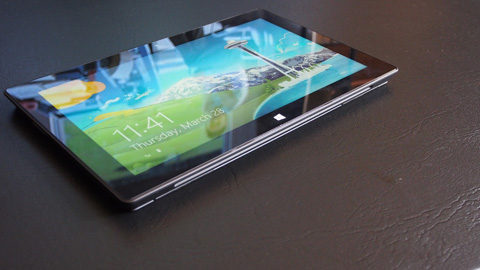
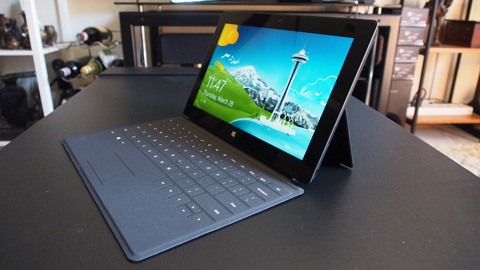
The Surface Pro is a 10.6-inch tablet that is powered by Windows 8. In all intents and purposes, it is a full-fledged laptop or ultrabook when you attach the soft cover that acts as the physical keyboard. Since it is powered by a 64-bit Windows 8 operating system, you can do basically anything that you want with it in the same way you would use a regular laptop or PC.

Design and Construction.

The device is has that industrial design and monolithic look to it, having constructed using a solid yet light metal alloy. The dark, chrome shade is cold but not dull. The matte finish feels smooth and nice.

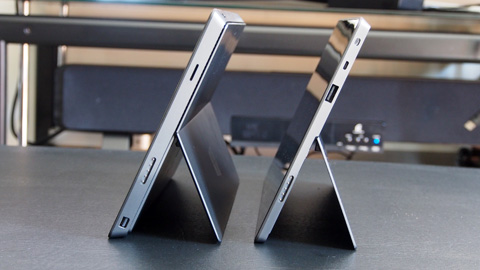
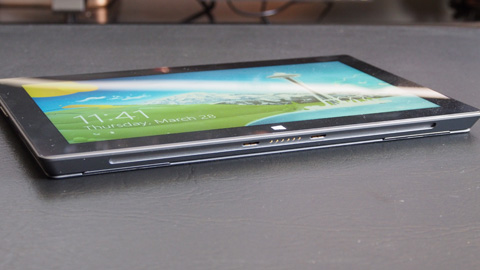
The corners are sharp and the edges are cut unevenly in a wedge or trapezoidal shape. The physical buttons are placed at the sides — power button at the top; volume control at the left along with headphone jack; a full-sized USB port and microSD card reader on the right and the magnetic latch at the bottom.

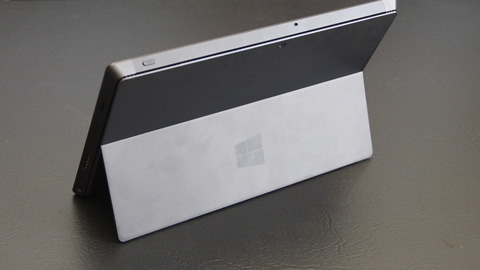
At the back is the kickstand which allows the tablet to gain free-standing position at about 45-degrees. This works best when you’re doing some productive work with the device, along with the keyboard.
There are two types of keyboard cover but the one that came with this review unit is the soft cover, the same one we had with the Surface RT. It’s very thin but manages to be usable after some time. There’s no tactile feedback to speak of but you’re get used to it and be a quick typist in no time. It does help that there’s a subtle clicking sound when you press a button so you get that simulation of a keyboard feedback.

The tablet feels a bit chunky though, even a few millimeters thicker than the Surface RT. This is probably due to the Intel chipset and the fact that it needs some sort of air ventilation at the back side.

Display.

The Surface Pro is probably one of the very few tablets to get a full HD display. When compared to ultrabooks, it shares the same full HD feature as the Zenbook Prime and Aspire S7 but since the Surface Pro is just 10.6 inches, the latter gets the benefit of a slightly higher pixel density.
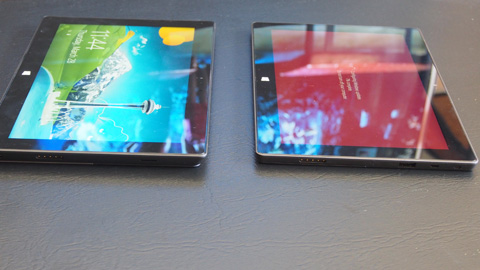
The glass display looks clear and crisp but one of the drawbacks of a full HD resolution is that the Windows Desktop looks really small. In contrast, the Metro UI looks better at this resolution. Viewing angles is pretty wide and amount of brightness is just enough.

What frustrates us often is the marks left by the keyboard on the display every time you close it. We suggest bringing a micro-fiber clothe all the time to wipe the smudge marks away.
Performance

This variant of the Surface Pro is powered by an Intel Core i5 dual-core processor running at 1.9GHz. Intel’s Turbo Boost 2.0 technology allows the cores to power up to 2.6GHz when needed. The system also comes with 4GB of DDR3 RAM which is just enough for a Windows 8 operating system.
The 128GB built-in SSD is good enough for storage — it’s the bare minimum we can tolerate when compared to ultrabooks but it’s more than enough when we’re talking from the tablet side.

The tablet is relatively powerful compared to Android or iOS tablets and comparable to most high-end ultrabooks in the market.
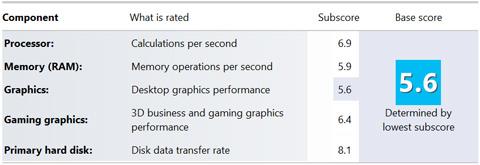
The CPU has a very nice score of 6.9 on Windows Experience Index and an 8.1 on the SSD storage (this is probably the highest WEI sub-score we’ve ever tested on any laptop or Windows tablet). The lowest sub-score of 5.6 is taken from the Graphics which is still very decent.

The Wacom Pen.

It is interesting to note that the Surface Pro comes with a Wacom pen (absent in the Surface RT). Wacom’s technology is already proven and tested so there’s no question about sensitivity, accuracy and responsiveness on that end.

Not a lot of people might use it though since it has limited use, mostly for drawing and sketching. However, if you are the type of person who prefers a stylus like Wacom, then this is going to impress you. Was trying out the Wacom with MS Paint and it was very smooth — so smooth, I was able to scribble effortlessly and write my signature better than I would have in a pen and paper.

Battery Life.

When you consider the Surface Pro as a tablet the same way as you would an Android or iOS tablet, you will be sorely disappointed with the battery life. We could barely last 4.5 hours playing a full HD 1080p video in a loop at 50% brightness and 50% audio volume.
As an ultrabook, this battery life is very typical and matches almost the same as with the Zenbook Prim and the Aspire S7. The 1080p display took most of the power consumption in video playback. For other less extraneous productivity like MS Word or PowerPoint, we saw a bit better battery life but not by much either.

The Core i5 processor and 1920×1080 resolution wore out the Surface Pro really quickly. Microsoft did state that the Surface Pro will only have half the battery life of the Surface RT so that’s 5 hours compared to the Surface RT’s stated clock time.

Conclusion.

The Surface Pro is an interesting hybrid of a tablet and laptop. Unlike its little sibling (Surface RT), which is considered more of a tablet, the Surface Pro has more affinity to the ultrabook.

From that perspective, you would understand the unique value proposition — a fully functional, high-power ultrabook in a tablet form factor. This isn’t actually new since Microsot has been working with the likes of HP more than a decade ago to create Windows-based laptop-tablet hybrids. It was very bulky then, under-powered, has low resolution and mediocre stylus performance. This time, we think, they’ve finally realized that long-forgotten ambition.

Where else can you find a portable yet powerful tablet that can do Premiere and Photoshop easily ans still play Starcraft 2 at very decent frame rates?

The Microsoft Surface Pro is available over at Galleon.ph for Php51,349 {see listing here}. It’s priced in the same range as most other ultrabooks out there.

Microsoft Surface Pro specs:
10.6-inch full touch HD display @ 1920×1080 pixels
Intel Ivy Bridge Core i5-3317U 1.7GHz, 2 Cores, 4 Threads
Turbo Boost up to 2.6GHz
Intel HD Graphics 4000
4GB DDR3 RAM
128GB Samsung SSD
WiFi 802.11 b/g/n
Bluetooth 4.0
USB 3.0 port
microSDXC card slot
Mini DisplayPort
Windows 8 Pro 64-bit
42 W-h battery
10.81 x 6.81 x 0.53 in (dimensions)
2lbs (weight)

What we liked about it:
* Great, solid build and design
* Powerful hardware
* Large storage
* Full-sized USB 3.0 port
* Full HD resolution

What we did not like:
* A bit chinky and heavy for a tablet
* Lackluster battery life

P.S. Check out our giveaway here.

Frequently Asked Questions

What operating system does the Surface Pro run?
The Surface Pro runs a 64-bit Windows 8 operating system.
What is the screen size of the Surface Pro?
The Surface Pro has a 10.6-inch screen.
When was the Surface Pro released?
The Surface Pro was released after October 2012, alongside Windows 8.
React to this article:
Written by
Abe Olandres

Abe Olandres

Editor-in-chief

Abe is the founder and Editor-in-Chief of YugaTech with over 20 years of experience in the technology industry. He is one of the pioneers of blogging in the country and is considered by many as the Father of Tech Blogging in the Philippines.

View all posts by Abe Olandres →

290 Comments

JA
Jasper king · 13 years ago

Haayyy…….. suntok sa buwan…

Reply
AL
Alvin Nashif D. Maga · 13 years ago

wow! MS Surface Pro is great for digital artist since it supports Wacom Pen like a digital canvas on the go a cheaper solution and alternative hardware for wacom cintiq only the diffence is the screen-size though cintiq is an addon hardware it means you can’t just carry anywhere unlike Surface Pro is like a laptop or tablet. Since it is in Windows 8 then you can install Photoshop and not the Android/iOS versions.

But if you go for mobility and ergonomics this is a good one!

Reply
HE
Henry Solivio · 13 years ago

MS Surface Pro! I Love You! Hahaha. The best talaga ang windows. =) Akin na yan!!! :D

Reply
JA
Jay Jay · 13 years ago

Would be great to try games with this! ahaha

Reply
AP
apb777 · 13 years ago

Wow ang ganda sana nito para sa student. E-book reader, web browser, photoshop / illustrator companion and light programming device :))

Reply
BE
Berto Putik · 13 years ago

Since ni-launch ng MS ang Surface RT and Pro sobrang pinangarap ko na talaga, kaso hindi ko talaga afford bumili ng kahit ano sa ngayon.

OK lang kahit wala na tablet at mamahaling phone, pero kung meron naman ako nito ayus na ayus na.

Puro basa na lang ako ng tech sites, ika ko nga..”updated lang ok na”. ang drama ,haha

Sana palarin na ako this time:D

Thanks Sir Yuga!

Reply
BE
ben · 13 years ago

I dream of holding you in my arms, Surface…

Reply
MI
Mica · 13 years ago

Everyone is looking to win this after Sir Abe’s tweet. Haha!

Reply
ER
Erickson · 13 years ago

Gorgeous device. Perfect for me. LOL

Reply
IV
ivy · 13 years ago

Large storage and Full HD resolution! This is great but wow Php51,349!!! ^_^

Reply
TO
ton2x · 13 years ago

its my greatest dream of having this one but cant afford. portable pc in tablet form! great device! love you yugatech! :-)

Reply
XD
xDoria · 13 years ago

the specs impressed me, the price shocked me, the design hmmmm . . . ayun too thick and heavy for a tablet (like you said, hehehe)

Reply
JA
jay ar irisary · 13 years ago

Wow I really like this coz the fact is microsoft moving forward to their products this the best tablet/pc on the market today i hope someone open their eyes… I think the apps issue i think microsoft is working right now …. I love to have this seriosly kso sobrang mhal … :(

Reply
MI
Migs Abad · 13 years ago

The big question for me is once it plays high end games or apps, will its limited battery supply go even lower?

Reply
FE
Ferdinand A. · 13 years ago

Php51,349?!!!!!!

Reply
NI
nicoley · 13 years ago

I like it! I want to own one :)

Reply
AN
ann-d · 13 years ago

looking (and hoping!) for a gadget to help making teaching aids for my preschool students easy and convenient. laptop’s too bulky, tablet’s too limited.

Reply
EC
Echusera · 13 years ago

Echusera tong mga to! HAHAHAHAHA! Kakatawa mga comments :))) bakit before di kayo nagcocomment? Hahahaha. Tapos ngayon kung makapuri wahahahaha!

Yeah ang ganda ng tablet na to, i will use this in school, cool design. Hahahahaha chos! :)))

Reply
AL
allan · 13 years ago

there’s no instruction.. just read!

Reply
HE
Helzinen · 13 years ago

This device shows the next frontier of mobile computing. Cloud based storage and services + portable unlocked PCs. When I first had an iPad 1 a few years back, I immediately thought that the hardware could definitely run windows (and people were succesful actually) and could revolutionize PCs as we know it. Now it’s actually looking like it might work.

Reply
ER
Erickson Castillo · 13 years ago

Can I get this one? I like it!

Reply
DI
Din · 13 years ago

Thanks for the review. Now if there is a phablet, how would you call this one, a Laplet or a Tabtop? =)

Reply
JA
Jaime · 13 years ago

With tons of news about cheaper and cheaper Android tabs and the rumours of Nokia coming out with a phablet for WP8 and some Win8 7-or-so-inch form factor devices I wonder how Surface Pro and RT will change in 8.1 or Blue. I love Microsoft but I gotta be honest – they need to step up their game. I really want them to make it but I feel like their more recent products (Win8 WP8) haven’t really captured the imagination of the masses.

On another note, I’d love to win this Surface Pro. Never felt one before but I’m imagining the thickness/ not-so-refined-feel of the first gen iPad.

Just my 2 cents.

Reply
WE
wewet · 13 years ago

if only sir abe will give it to me ^_^ be mine MS Surface Pro

Reply
WO
Wowie015 · 13 years ago

Sweet! But It would be sweeter if you could let me play with it. ^ ^

Reply
ER
Erickson · 13 years ago

I want it so bad. But I don’t have money to buy even the cheapest netbook out there. :c

Reply
HA
Haykal Lorena · 13 years ago

Wow! Perfect! Just what I need. Perfect for on-the-go designing, editing and computing…. BTW May 8 bday ko na perfect gift din hahaha!

Reply
TH
Theo Musni · 13 years ago

Aww… the price…. Errr. Pero okay na rin sa specs. Sana maayos soon ‘yung issue sa battery life though.

Reply
PA
pathetic · 13 years ago

Walang nagcocomment before kaya pinaraffle na lang HAHAHAHAHA.

Reply
AM
Amor Rodriguez · 13 years ago

Cool tablet with high – end features. A bit disappointed with the battery though. It’s one of the things I first look at because amazing specs are useless when the battery’s weak. :(

Reply
XT
xtn · 13 years ago

May the luckiest person wi

Reply
VL
Vlad Dimson · 13 years ago

Great review folks! I was wondering if you can write a review about the Asus Vivotab Smart or the Asus Vivobook? :)

Reply
NH
Nhoel · 13 years ago

the price is indeed pricy, the performance should compensate it! looking forward to have one too!

Reply
KA
Kaiser · 13 years ago

a decent spec for an ultrabook, though i still prefer a separate laptop and tablet. :)

Reply
PA
Patrick balicao · 13 years ago

Great tablet sna magbigyan ako puro medicine tablet lang kasi meron ako hehe

Reply
FE
Feliciano · 13 years ago

Wow! Wanna experience this new hybrid tablets. This is such a new experience, a breath of fresh air from a sea of conventional laptops. [+]

Reply
VI
vin · 13 years ago

this is a great alternative to my work laptop, specs are good enough for my office tasks. My current laptop is way way too heavy and my back hurts due to carrying it from home to work and vice versa. I wish the price was lower though.

Reply
FP
fpdianzen · 13 years ago

nice tablet. a great replacement for my aging laptop. and i’ll be grateful to receive this if you would give it to me as a birthday present :)))

Reply
JO
John Eduard · 13 years ago

nice tab, better than most android tabs sa market

Reply
KA
kannuchi · 13 years ago

nice review.. this is my dream Microsoft device!

Reply
DL
dlanyer27 · 13 years ago

this is more convinient for an ultrabook. the specs are pretty awesome. even though the battery is a little bit confused but still we can carry on.

Reply
ER
Erickson · 13 years ago

You’re giving this gorgeous device to one lucky reader? Great! Hope I can win, I need it for school works. :)

Reply
LA
Lau Beruin · 13 years ago

so the next tablet from Microsoft will be called Surface Pro 2?

Reply
VA
vanch mercado · 13 years ago

I love the design, kinda modern but the price is wow!! you could buy an Apple laptop with its price.

Reply
CR
Cris · 13 years ago

prang laptop lng siya kaso tablet.. i want this, kaso mahal :(

Reply
PA
paul · 13 years ago

nice tablet. a great replacement for my aging laptop. and i’ll be grateful to receive this if you would give it to me as a birthday present :)))

Reply
CE
Cee · 13 years ago

I want this.
This will help me for my studies.

Reply
JE
Jerry Culala · 13 years ago

Talaga lang ha……. Overuse statement who join here, Tsk Tsk… Bigyan ng JAcket!

JO
jolet dela cruz · 13 years ago

ganda. kaso ung battery nga. para narin syang laptop

Reply
DO
Dovi Amor Sabong · 13 years ago

wow! i would love to have that gadget, if only i have money…. :(((

are you planning for a giveaway? :D

Reply
RA
raymark · 13 years ago

a nice tablet,running windows 8
high end specs for tablet..

Reply
MJ
mj · 13 years ago

its not a tablet, but its a ultrabook/laptop in a tablet form, and its not comparable to the iPad the RT version is.

Leave a Reply

Loading next article...