

HUAWEI MatePad 12 X (2026) Review



One of the first things I did when I arrived in San Diego earlier this week was to go to the nearest Apple Store. I was surprised that there was also a Microsoft Store nearby so I checked it out and finally bought an MS Surface RT.
The Microsoft Store features a lot of OEM partners that have Windows 8 tablets and ultrabooks released since October (Asus, Acer, Sony, Samsung). Samsung’s Ativ Pro PC is there (over $1,200 a pop), the Asus ViboTab ($599) and a Core i3 VivoBook for only $499 (~Ph21k).
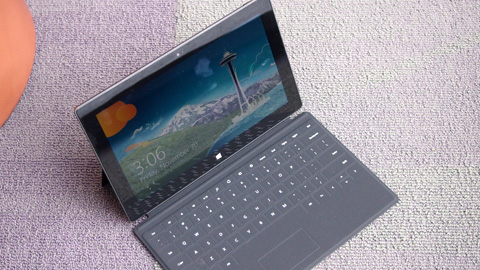
The Surface RT is the star of the store with dozens of sales people teaching customers how to use it. The tablet alone sells for $499 (32GB) and an additional $99 if you want the keyboard/cover to go with it. The 64GB model sells for $599. The other optional docking keyboard goes for $169.
I got the 32GB and the basic cover for a total of $651 (taxes and environmental fees included).

The Surface tablet itself feels a bit thick (especially if you’re already familiar with the iPad and other Android tables). I guess that impression of thickness is due to the full-sized USB 2.0 port that comes with it. The combination of aluminum magnesium and polycarbonate materials used for the body gives the Surface some considerable heft but also puts a solid feel to it.
The thick bezel also gives that impression that the Surface is like an 11.6-inch tablet but in fact its just 10.6 inches (diagonally). The pop-out stand at the back is really useful especially when you are using the keyboard cover and doing some typing.
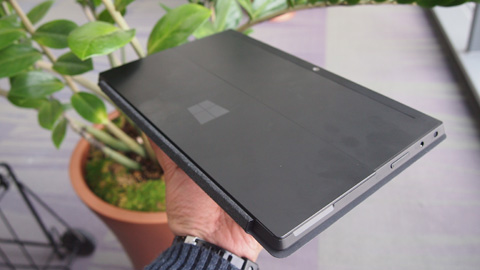
The basic cover-keyboard needs some time to get used to since there’s no feedback when you type on them. On the other hand, the trackpad is surprisingly very usable.
The USB port becomes pretty useful nad is the one thing that would really separate the Surface from the iPad. I was able to use a Bluetooth mouse with it, read off of a card reader from my camera and even use the tablet to charge my iPhone 5 (among other things you normally use the USB port on a laptop).
As for battery life, I can’t make any final conclusions yet since I’ve only used the tablet for just over day but based on that short time, I think it’s pretty good and can do somewhere between 5 to 8 hours with heavy use. I am now looking at the Surface RT as a device between an iPad/Nexus 7 and the ultrabook. It can pass for a comfortable and very capable content-creation device (some of my articles in the last 24 hours were done on the Surface).










Apple, Asus, Cherry Mobile, Huawei, LG, Nokia, Oppo, Samsung, Sony, Vivo, Xiaomi, Lenovo, Infinix Mobile, Pocophone, Honor, iPhone, OnePlus, Tecno, Realme, HTC, Gionee, Kata, IQ00, Redmi, Razer, CloudFone, Motorola, Panasonic, TCL, Wiko
Best Android smartphones between PHP 20,000 - 25,000
Smartphones under PHP 10,000 in the Philippines
Smartphones under PHP 12K Philippines
Best smartphones for kids under PHP 7,000
Smartphones under PHP 15,000 in the Philippines
Best Android smartphones between PHP 15,000 - 20,000
Smartphones under PHP 20,000 in the Philippines
Most affordable 5G phones in the Philippines under PHP 20K
5G smartphones in the Philippines under PHP 16K


reikoku says:
🌱 Noobs🏆1
Material used for the body is magnesium not aluminum
nyoron says:
🌱 Noobs🏆1
To be more accurate, it’s Vapor Magnesium.
Heck, this material is one hell of a tough matter!
Tim says:
🌱 Noobs🏆1
I want a piece of that flesh!
hk says:
🌱 Noobs🏆1
surface pro.. next month.. ^^
wreek888 says:
🥉 Bronze🏆1
Saw this at COMMDAP last week and all i can say is, it is smooth as a silk no lag. I guess villman is selling this at P38k.
dj0502 says:
🌱 Noobs🏆1
Villman is selling at 29,999 without keyboard.
zi says:
🌱 Noobs🏆1
mali po kayo mr. Yuga, yung Surface RT is at .37 inches, and exactly the same as iPad 3 and iPad 4. As for the weight they are almost the same differeng lang ng .04lbs – 0.46lbs, which is kasing bigat ng 2 x 10-peso coin natin.
ipad 3/ ipad 4
9.5×7.31×0.37 in
weight:
Wi-Fi model: 1.44 lb (650 g)
LTE model: 1.46 lb (660 g)
Surface RT
10.81 inches (27.5 cm) (w)
6.77 inches (17.2 cm) (h)
0.37 inches (9.4 mm) (d)
Weight
1.5 pounds (680 g)
Abe Olandres says:
🥉 Rookie🏆3
Hi Zi! It was just a personal impression since I did not look at the actual numbers. Maybe it was due to the fact that the tablet wasn’t tapered at the edges and I had the keyboard-cover on. But thanks for pointing that out.
dj0502 says:
🌱 Noobs🏆1
I will skip Surface RT this round. I want a 1080p windows RT with next gen graphics/processor.
zi says:
🌱 Noobs🏆1
I agree sir yuga, the tapered edges does make look things thinner than they actually are. And also the pictures you posted does make the surface look like its fat, even if it isnt.
But hey, its still a sexy machine :). Congratulations on the purchase :)
emansky says:
🌱 Noobs🏆1
pwede ba magpabili sayo sir yuga hahahaha kahit tanggalin na sa box hehehe