infinix x yugatech

Microsoft to Shut Down Popular Windows 11 Account Bypass, Forcing Online Setup for Everyone

Listen to article

Microsoft is closing a loophole that allowed users to bypass its Microsoft Account (MSA) and internet requirement when setting up a Windows 11 device. In its latest Windows 11 Insider Preview build, the company has removed the long-used “bypassnro” command — a backdoor that let users complete the out-of-box setup offline and without linking a Microsoft account.
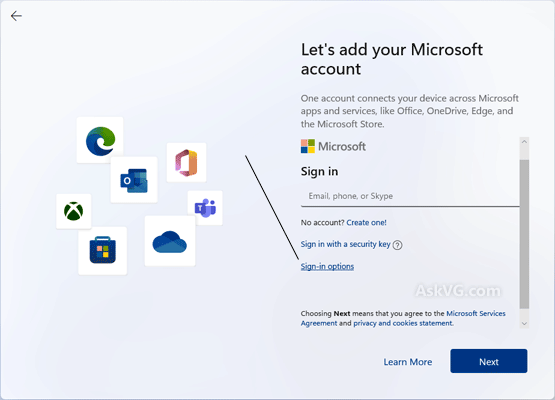
This change, first reported by Windows Central, signals that Microsoft is no longer tolerating workarounds. The company claims the removal of the bypass script is intended to “enhance security and user experience,” forcing all new installations of Windows 11 to exit setup with both internet connectivity and a Microsoft Account in place.

For those unfamiliar, the “bypassnro” command was a simple, effective trick for IT professionals, power users, and privacy-conscious individuals to avoid Microsoft’s increasingly locked-down setup process. All it took was a Shift + F10 keystroke during setup and entering a single line to proceed offline. That’s no longer possible in the latest beta build — and it’s likely to disappear from production versions of Windows 11 in the coming weeks.

For now, there are still more complex workarounds available, such as tweaking the registry manually during setup with the following command:

reg add HKLM\SOFTWARE\Microsoft\Windows\CurrentVersion\OOBE /v BypassNRO /t REG_DWORD /d 1 /f 
shutdown /r /t 0

But these methods aren’t guaranteed to last, and Microsoft may patch them out soon. Another path is using unattended.xml files to preconfigure devices — a method commonly used by IT admins setting up multiple systems. However, it’s not practical for most regular users looking to avoid account requirements on a single PC.

The move comes as Microsoft increases pressure on users to fully adopt its Windows 11 ecosystem, phasing out Windows 10 support by October 2025 and limiting installation options for users who don’t meet its strict hardware and setup requirements. The company has already:

  • Blocked installations on older PCs without TPM 2.0 support
  • Disabled the use of older Windows product keys for fresh installs
  • Pushed full-screen upgrade prompts and purchase nudges to Windows 10 users
  • Enforced Microsoft Account login for both Home and Pro editions

For many users, especially privacy-focused individuals or those in rural or limited-connectivity areas, these requirements feel overly restrictive. While Microsoft continues to claim these changes improve the user experience and security, critics argue they strip away user control and create unnecessary hurdles — especially when setting up secondary or offline-use devices.

If Microsoft moves forward with removing even the registry-level workarounds, users may be left with no official way to install Windows 11 without logging in or creating a Microsoft account. Unless a policy shift happens, it’s clear the company is fully committing to its cloud-connected, account-integrated vision for Windows — whether users like it or not.

Frequently Asked Questions

What change did Microsoft make in the latest Windows 11 Insider Preview build?
Microsoft removed the 'bypassnro' command that allowed users to bypass the Microsoft Account and internet requirement during setup.
Why did Microsoft remove the bypass script?
The company claims the removal is intended to 'enhance security and user experience'.
Are there still ways to bypass the Microsoft Account requirement after this change?
More complex workarounds like manual registry tweaks exist, but they aren't guaranteed to last and may be patched soon.
React to this article:
Written by
Anton Gabriel

Anton Gabriel

Senior Writer

Anton is into technology and gaming, with a growing interest in creative, tech-driven projects. He enjoys writing, editing, and experimenting with new tools, always learning and improving as he goes. Curious by nature, he likes building ideas, testing things out, and seeing where they lead.

View all posts by Anton Gabriel →

2 Comments

DR
dri012 · 1 year ago

time to switch to linux

Reply
ER
Eric Lanzo · 1 year ago

No need to worry, now a days, there are VERY GOOD LINUX based OS
that can rival Windows 11 features, functionality, User friendly interface
and more, from ease of right clicking, copy and pasting, drag and
dropping, from and to multiple applications from Office applications
with same functionality as found in MS Excel, to image editing, to internet
browsing etc,.. im dont want to advertise or promote anything but if
you do some youtubing, and search best Linux OS alternative to
Windows 11 or Best Lunux Distro for 2025, all the result you’ll see from
the top 5 result will somehow give you a solid idea how it is easy to
use linux now and most of all its, free with no hassle secure updates
and all the best freeware that rivals paid applications in windows can
be downloaded from the repositories depending on the distro.
So incase you’re alarmed or realying heavily on office apps for your
work and dont want Microsoft invade your privacy by getting your
daily computer use behavior and online activity and use it to train their
CO-PILOT AI, well now is the time to move to Linux and the learning curve
is very easy since those top rank linux distros are very similar to Windows
11 interface so learning or adjusting will not be a problem. And to those
PC gamers, not a problem, You can now install games in Linux like
windows, simple by clicking the offline installer you have and let the
installation finish or download thru STEAM platform or any similar
PC game distribution sites, with regards to installing graphics driver
and other drivers needed to run your video cards and sound cards and
other printer or wireless peripherals, linux got all covered now and it
can detect the type of hardware or printers you have and automatically
download the necessary drivers in their repositories without breaking
a sweat. Give it a try guy and for sure, you’ll never regret going back to
Windows like i do.

Reply

Leave a Reply

Loading next article...