
If you’ve ever felt bogged down by an overflowing inbox on your Android phone, Gmail’s upcoming tweak might be your new best friend. Instead of opening the app to clear out low-priority messages, you could soon find a handy “mark as read” button right in your notification shade, no extra taps required.
Until now, Android users had to dive into Gmail just to stop alerts from piling up. Even if you could tell at a glance that a message was just a newsletter or promo, you still had to open Gmail, mark it, then go back. That extra back-and-forth could eat up precious minutes, especially for anyone handling dozens of emails a day.
A few lucky testers are already seeing this shortcut on the latest Gmail build (version 2025.06.15). One user shared a screenshot of the new button on one of their accounts, while another person confirmed its appearance, though details are still scarce. Google seems to be running a small A/B test to see how people like it before rolling it out to everyone.
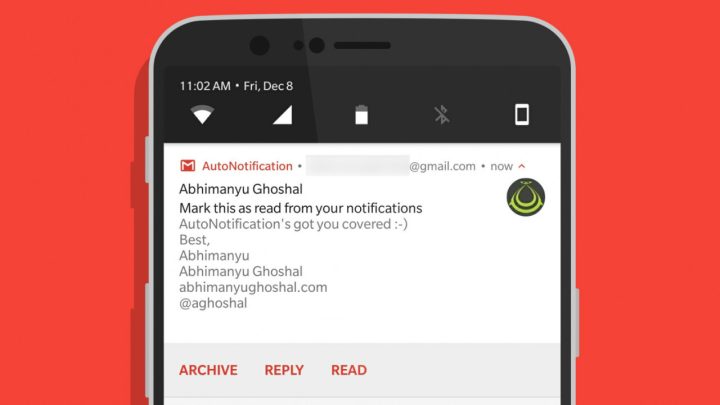
This feature isn’t brand-new to the email world; other Android mail apps have long offered quick-mark options, and Gmail’s iOS version already supports it. Bringing it to Android makes perfect sense, especially for those who juggle work emails, news alerts, and social invites all day. Once it’s live for your account, simply pull down the notification and tap “mark as read.” The email stays in your inbox but stops bugging you.
Keep an eye on your Gmail alerts over the next few weeks. If you spot the new button, congratulations, you’re part of Google’s early group. If not, hang tight, Google usually flips these switches one batch at a time.





0 Comments
Leave a Reply