

The birth of ultrabooks marked the start of a new era in mobile computing. Under the watchful eyes of Intel and their set parameters for such machine, companies slug it out to meet or even exceed those standards while trying to differentiate their brainchild from the rest of the pack by adding their own personal touch.
If you’re planning to get one this coming holiday season, it may be tough to decide which one to get. So we’ve come up with a list of current Ultrabooks from 7 distinguished manufacturers and its respective pros and cons to give you a better perspective about each of the candidate.
Note: This list is arranged alphabetically and not based on hierarchy. We picked two Ultrabooks from each company based on pricing with one being the cheapest and the other their high-end model.
1.a) Acer Aspire S3 – Unveiled last November, the S3 is one of the cheapest Ultrabook available in the local market with its latest configuration priced at Php39,990. With that price, it is also the first Ultrabook to break the Php40k price barrier.

Pros:
• Very competitive price
• Slim and Lightweight profile
• Solid construction
Cons:
• No backlit keyboard
• Measly 36Wh battery
Read our review of the Acer Aspire S3 here.
1.b) Acer Aspire S5 – This Ultrabook has brought a handful of design and performance enhancements from the previous model. The Acer Aspire S5 holds the title as the second thinnest 13†ultrabook in town (14.9mm) next to the Samsung Series 9 13†(12.7mm). This ultrabook was able to achieve this feat thanks to its hidden compartment which houses the majority of its ports.

Pros:
• Thin and lightweight profile
• Spacious and very responsive touchpad
• Thunderbolt port
Cons:
• Pricey (Php65,000 for i7-3517U 1.9GHz, 4G DDR3, 128Gb SSD config.)
• Sub-par display (1366 x 768) esp. for its price
• Unimpressive 2310 mAh battery which only promise upto 6.5hours of use.
You can read our first impression of the Acer Aspire S5 here.
2.a) ASUS Zenbook UX31E – From its solid aluminum alloy — sand-blasted lid with concentric-pattern finish to its 17mm thin frame, the Zenbook UX31E has SEXY written all over it. But this machine proves that it isn’t just about looks, as it boasts 1600 x 900 display which is the densest we’ve seen on a ultrabook when it was launched. This record was only bested by its successors Zenbook UX31A and Zenbook Prime UX32VD.

Pros:
• Sleek and Solid design
• Crisp 13.3†1600 x 900 display
• 50Wh battery that can stretch up to 9.5hours
Cons:
• Erratic Touchpad
• No backlit keyboard
• Lacking ports
You can read our full review of the Asus Zenbook UX31E here.
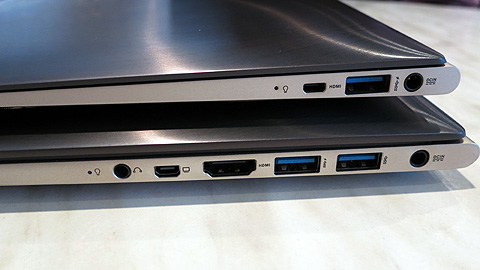
2.b) Asus Zenbook Prime UX32VD – Simply put, take a UX31E, put an Intel Ivy Bridge processor and an NVidia GT620M GPU, put in other extra features on the side and you got yourself sexy beast. But these added features, especially the dedicated graphics card, also have its drawbacks especially in pricing and design. In terms of design, it seems that the GPU made the UX32VD a bit thicker and bulkier. Though there’s not much of a difference in pricing between the UX32VD and UX31E, which both a change shy of PhP60K, ASUS has to cut some corners with the former to achieve this pricing. This is evident on 1366 x 768 display of the UX32VD compared to the 1600 x 900 of the UX31E and a slightly lower battery capacity (48Wh vs 50Wh).
Pros:
• Sleek and Solid design
• Dedicated Graphics card
• Large storage capacity
Cons:
• Pricey
• Slow HDD drie (500GB 5400rpm)
• Lacking ports
You can read our first impression of the ASUS Zenbook Prime UX32VD here.
3.a) Dell XPS 13 – Protection is the name of the game for this ultrabook; actually it’s a bit of an overkill in our opinion. This armored machine’s display is coated from edge-to-edge with a scratch-resistant Corning Gorilla Glass, a feature only previously used on mobile devices. The base is made of durable Carbon fiber material which also dissipates heat. These added protections come at a premium price, but if you’re willing to shell out a few extra grand for a durable Ultrabook, you won’t be disappointed with the Dell XPS 13.

Pros:
• Sleek and Heavily armored design
• Evenly lit keyboard
Cons:
• Pricey
• Limited ports (No HDMI and Card Slot)
You can read our first impression of the Dell XPS 13 here.
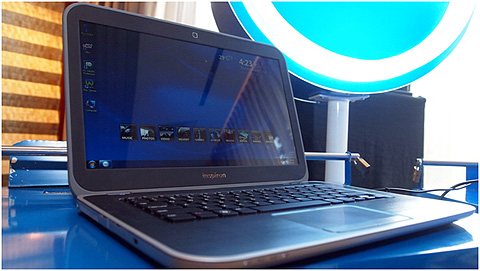
3.b) Dell Inspiron 14z – If you’re really not into the flashy appeal and the fancy armor of the XPS 13 and you’re looking for a more feature-packed ultrabook, then you should definitely consider this one. But in terms of its design, the Inspiron 14z barely made Intel’s standards for a 14†ultrabook (maximum of 21mm) with its 20.7mm thickness. Weighing more than 4lbs, this ultrabook is also among the heftiest in that category. These minor design drawbacks shouldn’t overshadow its 4GB 1600MHz RAM, AMD Radeon HD 7750M 1GB GDDR5 and its 2 fancy 2-Watts Skullcandy Speakers with Waves MaxxAudio 4 sound technology.
Pros:
• Speedy RAM at 1600MHz
• Dedicated GPU
• Loud sound output
• Good price-to-feature ratio
• Long battery life
Cons:
• Slow HDD (500GB 5400rpm)
• Insufficient battery capacity (44Wh) esp. with a dedicated GPU
• Not so appealing design
You can read our first impression of the Dell Inspiron 14z here.
4.a) HP Folio 13 – Much like the Dell Inspiron 14z, this ultrabook is forced to play the sidekick role for its highend counterpart even though in reality there’s not much of a difference in terms of specs. The HP Folio 13 is in essence your bare minimum, meaning no over-the-top protection and no cutting-edge thinness. But what it lacks in glamor, it makes up for ergonomics and battery life which makes for a good price-to-feature ratio albeit not as good as the Dell Inspiron 14z.

Pros:
• Ergonomic design
• Long Battery life
• With backlit keyboard feature
Cons:
• Not so appealing design
• Poor touchpad performance
4.b) HP ENVY 14 Spectre – HP’s ENVY product line is reserved for their top-of-the-line offerings, one that would make any on-looker envious. Just like the XPS13, this ultrabook sports an edge-to-edge Gorilla Glass not only on the crisp 1600 x 900 display but also on the palm rest and on the top of the lid. It also features an equally fancy Beats Audio technology. But for its premium price one would expect an dedicated GPU, large SSD and at least 1920 x 1080 display. Unfortunately these features are nowhere to be seen on this ultrabook.

Pros:
• Sleek and sturdy design
• Beats Audio technology (a Pro for some)
• Good battery life up to 9.5Hrs
• Fancy HP Brilliance Backlit Keyboard
Cons:
• Way too pricey (most expensive ultrabook in the local market)
• Sub-par screen resolution and processor (Sandy Bridge) for its price
You can read our first impression of the HP ENVY 14 Spectre here.
5.a) Lenovo U310 – this machine joins the ranks of the few Ultrabooks that were able to break the PhP40K price barrier and without sacrificing too much feature at that. Nothing too fancy about this one, but it is a well-rounded ultrabook. So much that we find it hard to think of cons for this computer. This is certainly a note-worthy option for those who’re looking for an affordable ultrabook.

Pros:
• Very affordable (Good price-to-feature ratio)
• Glass touchpad and well-lit keyboard
• Solid construction
Con:
• Not so impressive battery life
• Display is a bit dim
You can read our full review of the Lenovo U310 here.
5.b Lenovo ThinkPad X1 Carbon – taking cues from its earlier version, Lenovo has revamped the ThinkPad X1 making it more sleek and purposeful. Holding the title as the lightest 14†Ultrabook thanks to its lightweight and durable Carbon fiber body. It also boast Matte display with 1600 x 900 resolution which is makes for a very crisp display. But you’d have to prepare your wallet ‘cause this premium ultrabook isn’t as affordable as the U310.

Pros:
• Very thin and lightweight profile for a 14†Ultrabook
• One of the best touchpad on an ultrabook
• Durable Carbon fiber body
Con:
• Hefty Price tag
You can read our first impression of the Lenovo ThinkPad X1 here.
6.a Samsung Series 5 13†– this is the Samsung’s first shot on the ultrabook market and they did pretty well on their first attempt. The Samsung Series 5 13†as well as its 14†sibling have all tools to be an ultrabook, but other than barely meeting Intel’s standards there’s really nothing in the Series 5 that one can write home about.
Pros:
• Complete ports (inc. VGA via dongle)
• Decent sound quality
• Bright display (300nit)
Cons:
• Plastic build
• Poor keyboard and touchpad performance
• Unimpressive battery life (3.5-4.5hrs)
6.b) Samsung Series 9 15†– this version is the boasts the biggest screen by far in the ultrabook category. The Samsung Series 9’s 15†1600 x 900 400nit Matte display is certainly its key seling point. But since Samsung banks heavily on this ultrabook’s screen, we just wished that they went all in on it by putting a denser resolution like the 1920 x 1080 of the UX31A.

Pros:
• Bright and large screen
• Minimalist design and solid construction
• Long battery life
Cons:
• Pricey
• No discrete graphics for asking price
• Screen Reso could’ve been better
You can read our first impression of the Samsung Series 9 15†(2012) here.
7.a) Toshiba Portegé Z830 – this ultrabook may not hold the title as the thinnest 13†ultrabook but at 16mm it’s without a doubt one of the thinnest, but what it can be proud of is that it was once the lightest 13†ultrabook. It only weighs 2.45lbs and is only bested by a hair 6 months later by the Samsung Series 9 13†which only weighs 2.43lbs.
Pros:
• Slim and lightweight profile
• Solid construction
• Complete full-sized ports
• Neat Matte A4 tile keyboard, large multi-touch touchpad
Cons:
• A bit pricey
• Sub-par screen reso for asking price
• No dedicated GPU for its price
• Processor should have been better
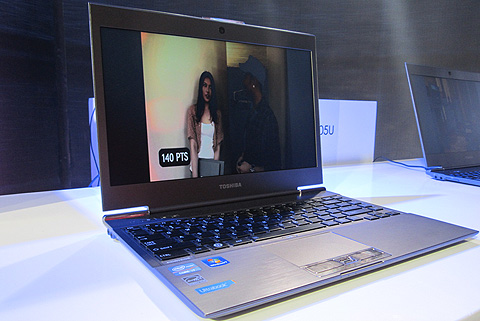
7.b Toshiba Portegé Z930 – sitting perfectly in the third spot in both the thinnest and lightest 13†ultrabook, the Portegé Z930 is among the sexiest machine in town. This ultrabook joins the crew of the elite few to have a 1600MHz RAM right from the get go. It inherits most of the feature of its older sibling Z830, unfortunately it also got its steep pricing.
Pros:
• Slim and lightweight profile
• Neat Matte A4 tile keyboard, large multi-touch touchpad
• Speedy RAM at 1600MHz
• Solid construction
Cons:
• Steep pricing
• Lackluster 1366 x 768 screen reso
• No discrete graphics card for its price
You can read our first impression of the Toshiba Portegé Z930 here.
Here’s a tabular view of the ultrabooks mentioned above. The specs listed above is based on the manufacturers base configuration or the configuration of the unit we saw on the product launch and may vary depending on customizations due to pricing.

Click on image to enlarge.
So that’s our ultrabok round-up. We hope that this post may come in handy in case you’re in the hunt for an ultrabook. We’ll be publishing another round-up after 6 months or so with an updated list. Expect more exciting ultrabook lineup by then.






it isnt that difficult. Ipads are next level to moltiiby and is for light users who use laptops for merely surfing and mail checking. Don’t use Ipad if you hate touch screen keyboard as if you want to use it for office purpose then you wont feel like typng more than 2-3 lines that too is an overkill. again you cannot install any app you want in Ipad so its only apps from Apple market whereas in laptop you can install anything you want from internet and even have the choice of most apps being free. so the kind of apps you use will also define if you would move to ipad or stick to laptop. hope this helps.