

Acer Philippines brought several dozen members of the media to a 3-day, exhaustive tournament at Pearl Farm. It was all fun and no work (not a single product presentation in the program) but this upcoming Acer ultrabook did not escape our prying eyes. Check out or hands-on first impression of the Acer Aspire S5 after the jump.
The Aspire S5 is the 2nd generation ultrabook from Acer after introducing the Aspire S3 (arguably the most affordable) last year. Compared to the Aspire S3, the Acer Aspire S5 was completely rebuilt from the ground, up. There were very little features inherited from the first one.

The all aluminum unibody design has a clam-shell figure with more rounded and smoother edges that tapers towards the end making it look more thin that it actually is.
The black coating covers the entire body of brushed-metal finish while the palm rests is made of finely polished polycarbonate material. The keyboard area is actually a bit recessed from the level of the palm rest which gives the chiclet-type keys a few more millimeters of additional height to it.
Speaking of the keyboard, the individual keys are well-spaced from each other and has enough height to give that tactile feedback when typing. A few minutes of practice and I found myself typing with ease and decent speed without making a typing error.
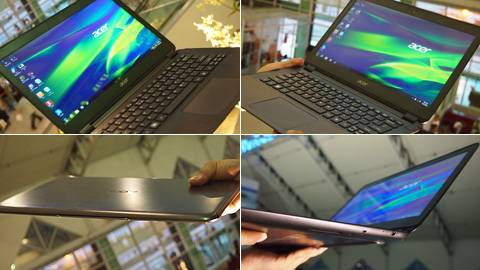
The generously large trackpad is very easy to use and I have to say that it’s probably the best trackpad on any ultrabook I have ever tried — it is smooth, evenly responsive, not too sensitive. The usual multi-touch gestures are easy to execute — commands like pinch-to-zoom, two-finger scroll, twist-to-rotate are done almost flawlessly. It’s very comparable to the trackpad on the Macbook Air.
There are not a lot of ports found on the sides of the Aspire S5 and you might think this shortcoming is a bit of a letdown until you find that odd little button on the upper right corner of the keyboard. Press it and a hidden section of the bottom end will roll out.
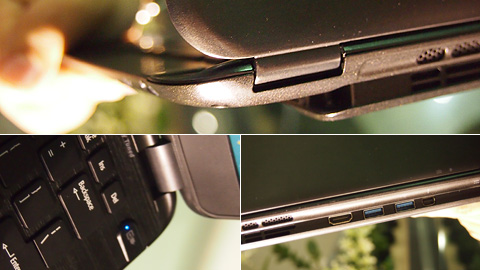
That hidden compartment houses two USB ports, a full-sized HDMI port and a Thunderbolt port ( the first we’ve seen on a Windows-based laptop). The bottom section also raises the underside of the ultrabook which might offer more open space for air ventilation. This section can only be opened when the laptop is powered-up.
On the right side of the laptop, there’s a 5-pin port which serves as the contact point for the charger. It’s practically the same mechanism as the magnetically-attached power connector on the Macbook (called the MagSafe).

This engineering unit is powered by an Intel Ivy Bridge processor (Intel Core i5 3317U 1.7GHz dual core) with Turbo Boost up to 2.6GHz. It also uses the new and more powerful Intel HD 4000 Graphics, has 128GB of SSD storage and 4GB of DDR3 RAM.
What’s a bit of disappointing is that the 13.3-inch LED screen only has a resolution of 1366×768 pixels. Acer could have done a bit better with 1400×900. The lid of the laptop also stands on two relatively small wedges which makes the entire lid wobble when you shake or move the laptop.
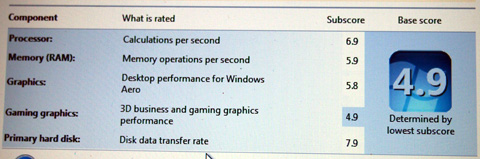
Was abe to get a screenshot of the Windows Experience Index. The Ivy Bridge processor got a nice sub-score of 6.9 (my Zenbook’s Core i5 1.6GHz has 6.4) while the RAM and the SSD got the same usual scores from the old ultrabooks. On the other hand, the Intel HD 4000 Graphics got a slight bump on Windows Aero subscore of 5.8 (the Intel HD 3000 has 5.6) while the sub-score on the Gaming Graphics only has a score of 4.9 (this probably needs to get an updated device driver).
Acer Aspire S5 specs:
13.3″ LED display @ 1366×768 pixels
Intel Core i5 Ivy Bridge 3317U 1.7GHz dual-core
Turbo Boost 2.6GHz
128GB Lite-On SSD
4GB DDR3 RAM
Intel HD 4000 Graphics
WiFi 802.11 b/g/n
Bluetooth 3.0
2 x USB 3.0 ports
1 x HDMI port
1 x Thunderbolt port
Card Reader
Windows Home Premium 64bit

While we’ve been thoroughly impressed with the design and engineering on the Aspire S5, we still found a couple of items that need a bit of improvement. But so far, the Aspire S5 is a good upgrade from the S3.
We were not given any details on the Philippine release date and pricing of the Aspire S5 but we will definitely update this one we get closer to the launch date.






Hi my loved one! I wwant to say that this article is awesome, nice written and come with approximately all vital infos.
I’d like to peer extra posts like this .